



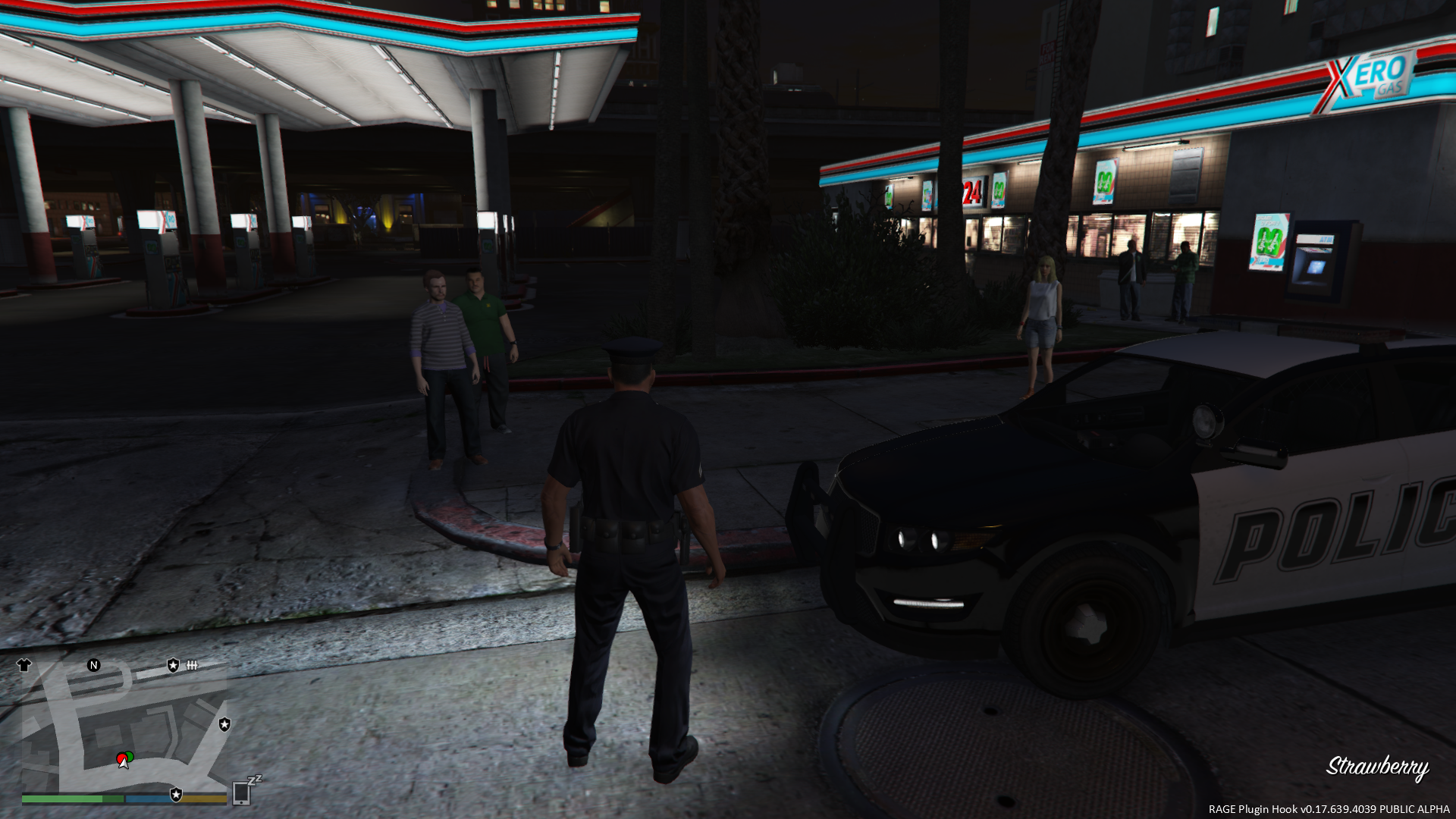


Code 3 Callouts
"Attention all units, officer needs assistance. Shots fired. All available units, respond Code 3."
This is a plugin that I have been planning for ever since I started writing scripts for LSPDFR. Now that the LSPDFR API has come out, this idea has now become a reality!
The focus of this plugin is to create a realistic experience where the player needs to do some actual police work. Police work is not always about flicking on the lights and sirens and flying down the road at 100 MPH. Nor is it always about pulling out an AR-15 and emptying a clip on a suspect.
In fact, most of the time, police work is all about dealing with people. Hearing both sides of the story. Figure out who is lying, and who isn't. Sometimes you have a helping hand when you have an eyewitness, and sometimes not. Or sometimes you will get eyewitnesses who contradict one another. Bob says the bank robber's car was blue. Jane says the car was red. Turns out, Jane was on her cell phone, and wasn't paying attention. Oh, and Bob was in the bathroom, so he didn't actually see anything. You later find out that the car was actually green.
The first version has four different callout scenarios. Each will have their own degree of variation, so you will not have exactly the same situation every single time!
Code 3 Callouts is designed to work alongside other callout plugins, to create the most exciting and realistic experience possible.
It is YOUR job to determine what actually happened based on the evidence. Its time for your shift, Officer. Gear up, and move out.
Requirements
- You MUST have the latest version of Rage Plugin Hook installed, as well as a legal copy of GTA V.
- YOU MUST HAVE VERSION 0.39 (OR NEWER) OF THE RAGE PLUGIN HOOK!
- This plugin has been tested on v757.4 of Grand Theft Auto V, but will work with newer versions.
- You must have at least v0.3.1 of LSPDFR
Features
- TEN different callout situations, each with their own varying scenarios.
- Fully integrated dispatch audio, to create a realistic experience.
- Requires the player to investigate each call, and do some actual police work to determine what ACTUALLY happened. Remember, just because someone called 911 to report something, does not mean that's precisely what happened.
- Altered suspect behaviour based on the response of the officer
- NEW - AMBIENT EVENTS!
- NEW - INTEGRATION WITH LSPDFR COMPUTER+!
Credits
A very special thank you to...
- @LukeD - Lots of helpful advice, and helping me get comfortable with the API! Plus working together to ensure our callouts can work alongside each other!
- @FinKone - Same as above, plus testing and showcasing the plugin for me!
- Erwi - For helping me out with some code issues!
- @DCP1293, @LtFlash, and @Straysify - Testing earlier versions of Code 3 Callouts for me! Thanks a lot!
- @Albo1125 - For graciously sharing some of his code with me, helping me out with the CAD popup windows, giving me the idea for the new suspect vehicle search logic, and for helping me testing this version!
-
@JFavignano and @Bayareabuggs - For being my guinea pigs... I MEAN testers, and giving me lots of useful feedback! Both of you have contributed a lot towards the success of this plugin, whether it be testing things for me, or just showcasing the callouts! Your guys' videos gave me lots of ideas for things to fix and improve!!

- @Zachary Houseknecht and @Polecat324 - Thanks a lot for showcasing the callouts, and for testing beta versions for me!! I really enjoy watching your videos!
- @goigle - For giving me the idea of the Assault observation window...which in turn led me to think of the CAD popup idea! Thanks a lot!
-
@MulleDK19, along with all the other dev's on the RPH IRC channel - For being patient, and helping me out with code issues that I had difficulty with, plus testing things out for me!!
- My sincerest apologies if I missed anyone!
Callouts
Most of these callouts are "Code 2" calls, meaning, they do NOT require a "Code 3", or "lights and sirens" response. Part of police work is to actually drive at normal speeds, and obeying traffic laws and red lights while driving to a call!
If you're stuck in a traffic jam, you can use your lights to get yourself through an intersection, and then resume driving normally. But be careful about using the siren...you don't want the suspect to know that you're coming, do you?
See the PDF documentation for more information on all of the callouts included.
Future Development
Follow this thread on the forum for future development plans!
What's New in Version 1.2.1
Released
VERSION 1.2.1
-
Fixed a bug that would cause a crash when exiting a house during the Burglary callout
- Callout can now only respawn one of the default/stock police vehicles; GTA V seems to block spawning of standalone vehicles for some reason
- Thanks to @Ranger61 for reporting this bug
-
Fixed crash bugs in ambient events...wrapped all ambient events with error checking to ensure it does not happen again
- Thanks to @Vampyre, @baconmuffin and @jacklop21 for reporting this bug
-
Fixed a bug with the configuration logic that would cause the EnableDispatchStatusCheck value to be ignored
- Thanks to @Thehurk and @Polecat324 for reporting this bug
- Made the status check interval customizable, in case anyone wants to keep it enabled, but make it happen less often
- Added an extra prompt when Dispatch calls for the player's status, reminding the player how to open the menu
VERSION 1.2.0
-
Updated Computer+ API reference for Computer+ v1.3.2
- Computer+ v1.3.2 is now required for police computer integration
- Fixed a bug where responses to Dispatch (via the shortcut keys) were not being recognized
- Added more error checking to the 'Carjacking' and 'Stolen Vehicle' ambient events, to prevent crashes
- If the player's vehicle gets deleted by GTA V during the Burglary call, a replacement vehicle will be spawned in the same spot
VERSION 1.1.0.1
-
Optional update
- Small bug fix for potential crashing at the start of callouts.
- Thanks to @ConstableSly for finding it!
VERSION 1.1.0
-
Plugin now requires RPH 0.39 in order to run
-
New, simplified automatic install process
-
Completely re-done INI configuration file (NOTE: Older INI files are not compatible!!)
- Allows individual callouts to be disabled
- Allows nearly all keybinds to be modified
-
Allows certain features to be disabled
-
Integration with Traffic Policer (Optional; requires v6.9.5.0+ of Traffic Policer)
-
Integration with LSPDFR Computer+ (Optional; requires v1.3.0+ of LSPDFR Computer+)
- This is a very exciting addition to the LSPDFR world!
-
Callouts dispatched to the player will now be visible in the Computer+ interface!!
- Even calls the player does not accept!
- The player can view/read all of the details of the callout before responding, and all information is updated in real time, just like a real police computer!
-
The previous "CAD popup" (opened by CTRL+D) has been removed in favour of Computer+
-
Interaction menu
- You can now observe/question subjects in more callouts (previously was only the Burglary call)
- The menu now allows you to trigger any of my callouts on demand
-
The menu can now be opened at any time, with limited options available
-
[NEW!] Dispatch Status Check!
- Periodically, Dispatch will call you to ask what your current status is. You can respond via the menu, or the INI file allows you to set up shortcut keys to answer dispatch with. (Two possible answers: "I'm OK", or "Help me!")
- If you don't answer, Dispatch will assume that you are in trouble, and need immediate assistance!
- This feature can be disabled via the INI if desired, but it is enabled by default
-
It is recommended that this feature be left on for realism
-
[NEW!] New Ambient Events!
-
I have added two new ambient events:
- Person stealing a vehicle
- Carjacking
-
NEW FEATURE - Dispatch will now receive a 911 call when an ambient event occurs, and you will hear the call being dispatched over the radio
- There will not be any notification popups, like a normal callout. You will simply see a red transparent blip appear on your map for a few seconds, telling you the general area where the incident occurred. Its up to you to find the perpetrator, or maybe you got lucky and caught him in the act!
- This feature is enabled by default, but can be turned off in the INI file (again, its recommended that it be left on)
-
I have added two new ambient events:
- Fixed a bug with the Observe Subject window that would crash LSPDFR
-
Added an 'objective' notification at the start of each callout
-
Person With a Firearm callout
- This callout has been ripped apart, and much of the code has been re-written
- You will now receive a description of the suspect, and its up to you to find them in a certain area
- The search area will be updated periodically, just like the "Hit and Run" and "Police Impersonator" callouts
-
The "suspect" may also not be a suspect! (Play this call to find out what this means!)
- Basically, don't open fire on them right away! You don't know who they might be!
- This callout was re-done especially for you, @Polecat324! Thanks for the feedback in your video a few weeks ago! I'm sure you'll like this callout much more now!
- Lastly, I want to apologize...I wanted to make some changes to the Burglary callout, and add some more variation to it. But I didn't get time to do it for this release. Next update, I promise!
FinKone - Same as above, plus testing and showcasing the plugin for me!
Jeff Favignano - Being an encouraging voice, plus testing the plugin and showcasing it for me!
Bay Area Buggs - Thanks for promoting this plugin in your videos!
DCP1293 - Testing and helping me break it
LtFlash - Testing and helping me break it
Straysify - Testing, plus working together to ensure our callouts can work alongside each other!
Erwi - For helping me out with some code issues!





![NPCAI - Spolszczenie Krakowski Styl [v1.0.1]](http://s3-screenshots.int-cdn.lcpdfrusercontent.com/resize/500/-/monthly_2026_07/ChatGPTImage25lip202622_46_50.thumb.png.9a426d91c7d1e200080df490b28cf171.png)








Recommended Comments
Create an account or sign in to comment