Skip to content
View in the app

A better way to browse. Learn more.

LCPDFR.com

A full-screen app on your home screen with push notifications, badges and more.

To install this app on iOS and iPadOS
  1. Tap the Share icon in Safari
  2. Scroll the menu and tap Add to Home Screen.
  3. Tap Add in the top-right corner.
To install this app on Android
  1. Tap the 3-dot menu (⋮) in the top-right corner of the browser.
  2. Tap Add to Home screen or Install app.
  3. Confirm by tapping Install.

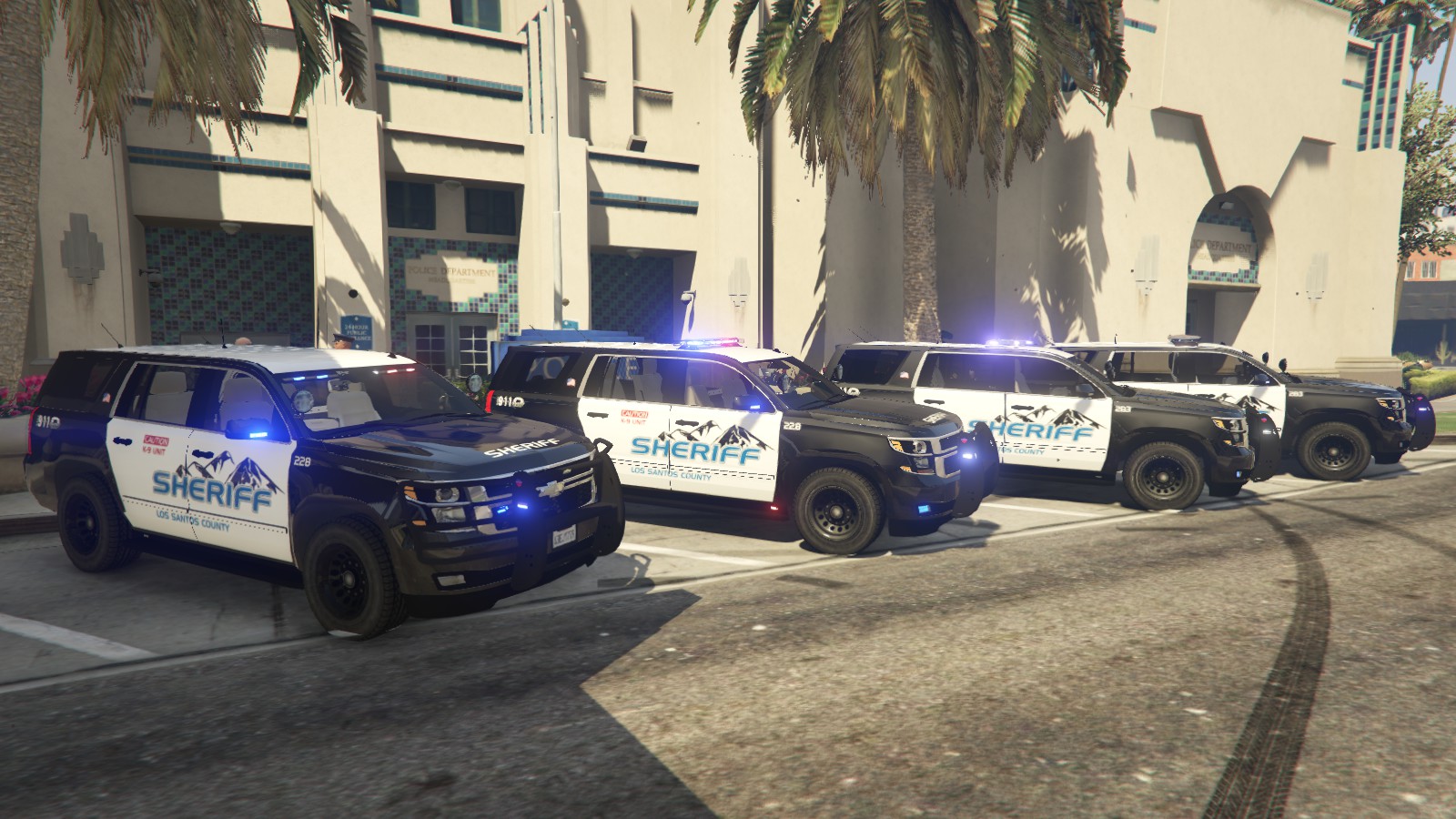
2015 Chevy Tahoe LSSD 2.0

(34 reviews)

7 Screenshots

ATTENTION: If you have previously downloaded this file, please redownload this new version!


I am proud to finally present version 2.0 of my 2015 Tahoe, outfitted for the Los Santos County Sheriff's Department, featuring high-quality skins by @Krame86 and now templated for multiple liveries by @Thero This vehicle has been in the making for nearly two months and has been EXTENSIVELY updated and now also includes the Federal Signal Arjent as an optional lightbar. Please try out this new version if you had the previous one!

Features:

  • Multiple lightbar/extra options: Federal Signal Valor, Whelen Liberty, Federal Signal Arjent (new) and Whelen-inspired interior lightbar all in one model!
    • Extra 1: Federal Signal Valor
    • Extra 2: Whelen Liberty
    • Extra 3: Federal Signal Arjent (NEW)
    • Extra 7: Interior Lightbar
    • Extra 11: Passenger-side spotlight
    • Extra 12: Pushbar wraparound (NEW)
  • Rear partition
  • Integrated console with laptop (NEW)
  • Panasonic Arbitrator dashcam
  • Medkit, duty bag, and weapon/storage compartment in the trunk
  • Trunk and hood issues from original model have been fixed
  • Breaking glass
  • Much more!

Install:

  • To install, simply place all sheriff2 files in \GTA V\mods\update\x64\dlcpacks\patchday9ng\dlc.rpf\x64\levels\gta5\vehicles.rpf.

Credits:

  • Shadydk311: Original Suburban Model
  • Peng00820: Converting model to GTA IV
  • BritishGamer88: Convering to GTA V
  • AuthorSaulAlan: Modifying Suburban into Tahoe
  • RidgeRunner Designs: Panasonic Toughbook CF-31
  • johnclark1102 and diablozer0d617: Panasonic Arbitrator
  • BFRS-EMT: Progard partition
  • PSource and Sergitj: Duffle bag, medkit
  • RoegonTV/BogdanM: Federal Signal Valor
  • F5544: Converting and providing Valor
  • EVI: Whelen Liberty
  • OfficerFive0: Liberty Emmissive Texture
  • Krame86: HQ Sheriff Textures
  • Thero: Mapping and Templating the vehicle for multiple liveries
  • Virzza: Help/guidance along the way!
  • Lundy: Federal Signal Arjent and teaching me how to fix window tint bug!
  • BxBugs123 (?): Go Rhino Pushbar


Known bugs:

  • Pushbumper does not deform during collisions, this will be fixed soon
  • Gauges are now functional, but are not properly calibrated


Please report any bugs, issues, or other problems in my WIP thread: 


Enjoy!

Screenshot 2016-05-09 17.47.44.png

Capture.PNG

upclose.PNG

20160624042107_1.jpg

20160624042112_1.jpg

What's New in Version 2.0

Released

The tahoe has been almost completely rebuilt from the ground up for this update. So many things have changed that I will probably miss several, but here are the big things:

  • Vehicle has been completely remapped for multiple liveries by @Thero (template included)
  • Brand-new liveries by @Krame86
  • Added Arjent lightbar by @Lundy
  • New pushbumper (Go Rhino by I believe BxBugs123, taken from the Police Car Parts resource. Wraparound is an extra component)
  • Redone lighting setup including rear traffic advisor, all red/blue setup for lightbars, new grille and pushbumper lights, fog lights. All coronas are hidden to allow for all-blue light setup (textures included in download)
  • Center console has been redone and is now integrated and doesn't look like crap
  • Various bug fixes

Hopefully more to come!

User Feedback

Recommended Comments

Invictus

Members

On 4/18/2016 at 2:51 PM, retrocidalTV said:

C:\Program Files (x86)\Steam\steamapps\common\Grand Theft Auto V\mods\update\x64\dlcpacks\patchday3ng\dlc.rpf\x64\levels\gta5\vehicles.rpf\

correct install path 

I was also thinking this, but then I tried it in Patchday9 and it worked even though there isnt a Sheriff slot in there.. so yeah I don't get it lol. 

Captain14

Members Author

On May 27, 2016 at 2:38 AM, Invictus said:

I was also thinking this, but then I tried it in Patchday9 and it worked even though there isnt a Sheriff slot in there.. so yeah I don't get it lol. 

It will load the sheriff2 in the most recent update, in this case, patchday9ng

Invictus

Members

1 hour ago, Captain14 said:

It will load the sheriff2 in the most recent update, in this case, patchday9ng

Sure, but what about the areas I put the normal Police1 and Police2 vehicles? I don't get why it's different.

Captain14

Members Author

@Invictus The game attempts to load any vehicles from the most recent patchday, then works it's way down the list. It loads all vehicles from patchday9, then it goes back to patchday8 and loads any vehicles that were not found in patchday9. It does this all the way back until it loads the original vehicles.rpf.

sircam19

Members

Does anyone have any links to skins that will work with this awesome car?

Lfitzcon42

Members

found a weird bug with this.

high speed front end corner damage (near left or right headlights) spawn more copies of the vehicle. using LeSpeedo & TrainerV for speedometer, 70+ MPH has a chance to spawn the raw, no door/glass/light copies and just fuck things up altogether. only happens when player is driving, have yet to see it with AI driving the vehicle. spawned 3 on me the last time

Captain14

Members Author

21 hours ago, Lfitzcon42 said:

found a weird bug with this.

high speed front end corner damage (near left or right headlights) spawn more copies of the vehicle. using LeSpeedo & TrainerV for speedometer, 70+ MPH has a chance to spawn the raw, no door/glass/light copies and just fuck things up altogether. only happens when player is driving, have yet to see it with AI driving the vehicle. spawned 3 on me the last time

Are you using the most recent version of the vehicle?

Officer27

Members

LASD Liveries:


zxDrugsxBunnyxz

Members

great skin love the car though blocks my spotlight mod as you can see in the front of the vehicle  

20160624042107_1.jpg

20160624042112_1.jpg

HerrSkorpion

Members

(edited)

12 hours ago, zxDrugsxBunnyxz said:

great skin love the car though blocks my spotlight mod as you can see in the front of the vehicle  

Go to your Spotlight config files and scroll down to where it has the X Y Z positioning for the light source. Find Sheriff2 and change Y (which should be defaulted to 1.2) to 1.3

Edited by xSKORP1ONx

zxDrugsxBunnyxz

Members

1 hour ago, xSKORP1ONx said:

Go to your Spotlight config files and scroll down to where it has the X Y Z positioning for the light source. Find Sheriff2 and change Y (which should be defaulted to 1.2) to 1.3

Thanks :)

shonole

Members

Anyone made a blank livery for this yet?  I'd love to run it slicktop/unmarked!

EthanO

Members

Does anyone know if there is an unmarked texture for this vehicle? Also, a ghost skin by chance?

Delco24

Members

Loving this model so far. The only complaint/suggestion I have is that the yellow on the rear traffic advisor is very bright compared to the red/blue lights. I also find it a bit too neon yellow (prefer more of an amber color myself), but that's more personal preference. I don't mind modifying the texture myself for my own use if you could point me to the correct file? There's so many lightbars included that there's a lot of emerg light textures. :smile:

Captain14

Members Author

5 minutes ago, Delco24 said:

Loving this model so far. The only complaint/suggestion I have is that the yellow on the rear traffic advisor is very bright compared to the red/blue lights. I also find it a bit too neon yellow (prefer more of an amber color myself), but that's more personal preference. I don't mind modifying the texture myself for my own use if you could point me to the correct file? There's so many lightbars included that there's a lot of emerg light textures. :smile:

traffic_lights is the texture.

Delco24

Members

14 hours ago, Captain14 said:

traffic_lights is the texture.

Awesome, thanks!

seve

Members

(edited)

On 12/5/2016 at 4:25 AM, Captain14 said:

Yes. Just rename the files to fbi2. You will probably have to edit your carvariations.meta to enable multiple liveries.

Can someone Please tell me where the carvariations file is? and what should i set it too?(im trying to make it work as FBI2.)

Also what light texture is for the Valor lights?

Edited by seve

Could you please re-release the old blue skin that came with the original model?

-E

dcrcbc722

Members

Could you add radar as option

elispd

Members

There's a weird dark spot on the roof, back side... it's still there

Techengage

Members

(edited)

@Captain14,


I would like to start by saying I absolutely love this truck. Thank you so much for the contribution.

I also love using the all blue light set-up, but that is where I seem to have a small issue. The right blue light on the tail light is still red, though the left is blue. Every other light is blue and transitioned perfectly, except that pesky tail light led. I'm terrible with Photoshop, so is there any chance I can request a fix for this? Or from anyone else who might be able to help. I would greatly appreciate it.

Regards,

Jon

Edited by Techengage

Captain14

Members Author

On 7/25/2016 at 4:39 AM, Techengage said:

@Captain14,


I would like to start by saying I absolutely love this truck. Thank you so much for the contribution.

I also love using the all blue light set-up, but that is where I seem to have a small issue. The right blue light on the tail light is still red, though the left is blue. Every other light is blue and transitioned perfectly, except that pesky tail light led. I'm terrible with Photoshop, so is there any chance I can request a fix for this? Or from anyone else who might be able to help. I would greatly appreciate it.

Regards,

Jon

The red taillight strobe is actually a corona. It is part of the game engine and it's color cannot be set by a texture. Unfortunately unless I update the vehicle it will not be fixable, I will look into changing it.

Techengage

Members

(edited)

6 minutes ago, Captain14 said:

The red taillight strobe is actually a corona. It is part of the game engine and it's color cannot be set by a texture. Unfortunately unless I update the vehicle it will not be fixable, I will look into changing it.

Thank you for the reply, @Captain14. I figured the issue was those pesky coronas. Can you possibly change the left taillight strobe back to red? I figured that would be an easy texture updates for the blue light files, so you won't have to edit the truck itself (though these newer models without coronas+Rad V are real spiffy :P). But if the strobes match and everything else is blue, it would be perfect. Thank you again!

Edited by Techengage

Captain14

Members Author

33 minutes ago, Techengage said:

Thank you for the reply, @Captain14. I figured the issue was those pesky coronas. Can you possibly change the left taillight strobe back to red? I figured that would be an easy texture updates for the blue light files, so you won't have to edit the truck itself (though these newer models without coronas+Rad V are real spiffy :P). But if the strobes match and everything else is blue, it would be perfect. Thank you again!

Well that's the thing, both the taillight strobes are coronas. I forget which sirens I used but one is red and one is blue (I think it was siren12 and siren14). Other than that none of the lights on the vehicle have coronas.

Techengage

Members

(edited)

EDIT: Fixed this issue with sirensetting=14 in my Mod.


I don't want to question/insult your skill, but do you know how to remove coronas completely? Most people using these bigger car files are using Rad V anyway. Or is it possible to replicate the blue light (siren 12 or 14, whichever), delete the red siren, and move the replicated blue light over? I'm just throwing crap out, honestly. I'm very new to creating skins/textures. I've always stuck to text coding and editing. I really appreciate it your help/input on this, because I love this truck so much, haha!

Edited by Techengage

Create an account or sign in to comment

Latest Mods

Account

Navigation

Search

Search

Configure browser push notifications

Chrome (Android)
  1. Tap the lock icon next to the address bar.
  2. Tap Permissions → Notifications.
  3. Adjust your preference.
Chrome (Desktop)
  1. Click the padlock icon in the address bar.
  2. Select Site settings.
  3. Find Notifications and adjust your preference.










