Skip to content
View in the app

A better way to browse. Learn more.

LCPDFR.com

A full-screen app on your home screen with push notifications, badges and more.

To install this app on iOS and iPadOS
  1. Tap the Share icon in Safari
  2. Scroll the menu and tap Add to Home Screen.
  3. Tap Add in the top-right corner.
To install this app on Android
  1. Tap the 3-dot menu (⋮) in the top-right corner of the browser.
  2. Tap Add to Home screen or Install app.
  3. Confirm by tapping Install.

XScanner v3.23.44.3460

(51 reviews)

1 Screenshot

XScanner is an LSPDFR Scanner replacement/addon.


Features:


  • Full XAudio2 support.
  • Multiple output device support, play background scanner on one device and police scanner on another.
  • Multiple audio emitters to choose from; player, player vehicle, police vehicles.
  • Customizable distortion effects for the police scanner.
  • LSPDFR relay.
  • Broadcast quick selection.
  • Broadcast presets; Top50, Newest Streams, Official Streams, Manual stream input, search for streams.
  • Supports all known audio formats, and then some.
  • Police Scanner playback (frontend and 3d).
  • Background Scanner playback (frontend and 3d) (local files or stream).
  • Preferred audio folder; for dispatch replacements.
  • Audio redirects; for dispatch replacements.
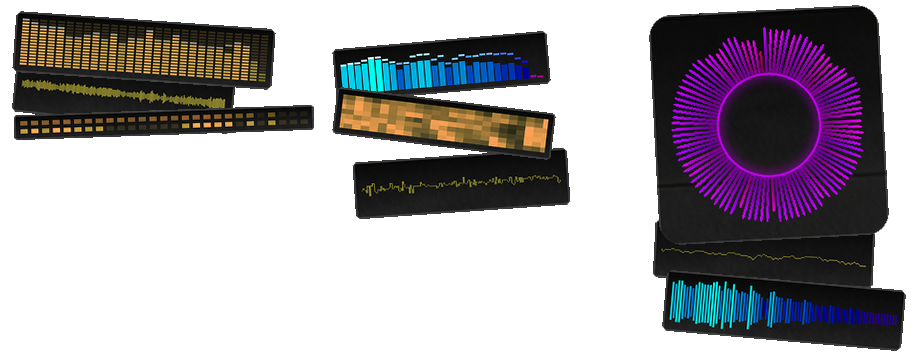
  • The prettiest animated menu around with theming support.


There is the possibility of editing the ini manually, but I do not recommend it due to the complexity of this plugin.
Everything can be changed through the menu (default: F8)
If you already have something bound to F8 you can either:


  • change the menu key through the consolecommand
    SetXScannerMenuKey
  • manually open the menu through the consolecommand and change the menu key from within the menu.
    OpenXScannerMenu


Installation: Place files from the "Grand Theft Auto V" folder into your game installation folder.


⚠️  Known Issues ⚠️ 
None


⚠️ DISCLAIMER ⚠️

Not providing support in the comments anymore.

Support can be found on my Discord or on the ULSS Discord.


Could contain: text, screenshot, graphic design, poster, graphics, art, font


Edited by khorio
change description

What's New in Version v3.23.44.3460

Released

Fix:

  • updated hook scanner
  • fixed streams 403-ing due to changes on broadcastify's end and showing up as down.
  • fixed landmarks not properly being used


Changes:

  • Folders under GTAV\LSPDFR\SCANNER are no longer selectable as the Preferred Audio Folder from the menu,
    as this folder is generally a bigger mess than your grandmothers random trash drawer.
    Use folders in GTAV\PLUGINS\LSPDFR\XSCANNER\Audio instead, which will still show up in the menu.
    You can still set the folder to GTAV\LSPDFR\SCANNER itself however.
    This will NOT break any dispatch replacements.
  • changed normalization divider to 32768 instead of 32767


Add:

  • Added "Vinegar Enjoyer" flag to Settings->Global Flags to disable holiday effects
  • Added aborts and criticals to ScannerAPIFlags
  • Added critical scannerblocks


Spoiler

v3.2.359.3421

Additions

  • Added HUD (off by default, Menu->Extras->HUD, HUD can be moved/scaled while the menu is open, hover your mouse over it for instructions.)

Fixes


  • Updated hooks for LSPDFR v0.49.9110.3411
  • Updated RNUI
  • Removed support for older versions.
  • Fixed a bug which would lock up the local background playback after playing a few files due to the stream not being fully consumed by the voice
  • Fixed a bug which would cause manual stream id input to bug out after an invalid input/cancellation
  • Removed strictness of XCHATTR file loading
  • Fixed missing scannerblock status updates
  • Added fading
  • Reduced playback latency
  • Added global watch to stop audio pause from triggering stalled playback
  • Various fixes I forgot to write down
  • Changed AudioRedirects to allow multiple files, now in the config/Redirects folder


v3.2.316.3079

Additions

  • Added controller support for keybinds
  • Added internal squelch sounds to intro\outro options
  • Updated Common to v2.5.316.517
  • Added missing hint for PoliceScannerMenu::Preferred Audio Path
  • Probably more stuff I forgot
     

Fixes

  • Menu fixes for PreferredAudioFolder and Intro\Outro not working properly
  • Changing keybinds would destroy the eventhandlers until reload
  • Several API fixes
  • Fixed background buffering overflow
  • Removed silentbuffer spamming log
  • Sound not pausing\muting on window focus\game pause
  • stream updates firing too regularly
  • *K1895 Near\Over\On not working properly due to a distancesqr check always returning 0
     

Boring Stuff

  • Added new listeners to each engine increasing the channels to 2*64
  • More additions to the debug menu
  • Voices not being properly released from the xaudio2 graph


v3.1.312.2973

  • Bugfix *K1892: VoiceManager throwing an error on Voice::Destroy
  • Bugfix *K1893: IniManager::Purge throwing a possible error
  • Common update v2.5.312.450

v3.0.311.2962

Additions

  • Added missing keybind implementation (background +/-/mute) (policescanner +/-/mute)
  • Added keybinds menu (no messing with ini, just do it in here) (for all that's holy don't touch the ini)
  • Added GlobalFlags to the settings menu
    - Disable Normalization (normalization got rewritten so it might not cause you issues anymore, see fixes below)
    - Disable volume keybinds
  • Lowered volume step for better finetuning of the volume
  • Added BackgroundScanner:UseDucking Flag
    when During Pursuit/Callout is enabled you can set a volume ducking percentage instead of it going full mute whenever the PoliceScanner is active.
  • Added bottom slider for the PoliceScanner:EnableEffects flag
  • Added volume control for the PoliceScanner:WhiteNoise flag 
  • Increased stream buffer throughput (should be quite a bit faster now)


Fixes

  • Fixed playback trying to start before load finished
  • Fixed stream merge acting up resulting in the policescanner shitting itself on rare occasions
  • Fixed menu visualization to only act on the stream output, instead of the device output
  • Fixed menu visualization to use RMS values instead of peak
  • Rewrote custom normalization implement using DMO
  • Fixed a few values not saving from the menu (spamthreshold, emitterfallback)
  • Fixed a bunch of debuglogging
  • Fixed voices not properly destroying after usage
  • Fixed menu status changes not triggering properly
  • Generic API fixes


Boring stuff

  • Added audio header detection
  • Added Settings.DebugInfo menu (for nerds)
  • Updated Common to v2.5.308.447
     

v3.0.308.2625

Additions

  • Added missing spam threshold implementation
  • Added SkipAds flag for the backgroundscanner streaming option
  • Added ChannelMapping (Beta) to the Settings menu to remap sound playback to surround. (Optional, off by default, results may vary)


Boring stuff

  • Fixed hotswapping of modes
  • Fixed engine restarts getting stuck due to bad token cancellation
  • More aggressive cleanup of voices
  • Fixed assert for XAudio2 listener overflow
  • Removed consecutive duplicates from LSPDFR internal relays (double intro\outro)
  • Removed duplicate calls from LSPDFR internal relays
  • Rewrote the SoundEffects API to be more robust and less shit.


v3.0.305.2414

  • Added wrapper to log more coherent exceptions
  • Added PoliceScanner Flag to toggle the whitenoise
  • Added missing import of external chatter
  • Added BackgroundScanner Flag to disable the builtin chatter
    will require external chatter for the local chatter to still function (files starting with "xchattr_"))
  • Small fix to not query the cachemanager before it finished loading
  • Fixed an event not being raised
     

v3.0.305.2401

  • Fixed potential crash in the menu
  • Fixed COM exception
  • Fixed spatial audio for the background emitter
  • Fixed LPF filter
  • Fixed invalid MP3 bytes error (please stop using mp3 files, they're garbage)
  • Fixed failed searches still getting queued in the police scanner
  • Fixed AudioRedirects example file


  • Added CurveDistanceScalerMulti (available in the settings menu) to increase the spatial distance for 3d playback
  • Added Only In Vehicle flag for the backgroundscanner (available as a flag in the backgroundscanner menu) to fully mute the sound when not in vehicle (when the emitter is set to a vehicle)


v3.0.303.2266

  • Fixed an issue with invalid audiodevices throwing a com error and crashing the game (thx deejaymaxx, nemesisx101, blackagent, for testing)
  • Fixed a possible crash due to missing folders
  • Fixed handling of broken audio files


Short Description

Now with Broadcastify support

User Feedback

Recommended Comments

Nemesisx101

Members

(edited)

@khorio Awesome stuff! I’d like to bring up an idea/request I had back in the day that made the rounds (no one really figured it out): could you look into tricking the game/ forcing the dispatch chatter herd in police cars to play in the background while on-foot? It would really add to the experience as its dynamic. I mean, you could always try replicating it by creating your own system by grouping voice lines and stringing them together in the same format  while checking Player location to create the illusion of background simulation of crime/other unit activity. Many thanks.

Edited by Wolfx101

JM Modifications

Insiders

1 minute ago, Wolfx101 said:

@khorio Awesome stuff! I’d like to bring up an idea/request I had back in the day that made the rounds (no one really figured it out): could you look into forcing the dispatch chatter herd in police cars to play in the background (frontend) while on-foot? It would really add to the experience as its dynamic. Many thanks.

xscanner has that feature. you just have to enable it through the menu.

Nemesisx101

Members

1 minute ago, OfficerMorrison said:

xscanner has that feature. you just have to enable it through the menu.

I’m talking about police car scanner chatter outside of LSPDFR— it’s a game script.

Tukkan

Members

although having scanner to intercept all audio going to "vanilla" scanner, when I request ped or vehicle check via stop the ped, it still goes thru vanilla scanner and allows xscanner play background chatter or a new call

(dunno how stop the ped is scripted, though, if the check request goes thru scanner or if it just an audio playing ...)


and even if I have selected option to not always use landmarks, dispatcher still uses them ... and sometimes it's super weird to hear, eg when call comes up in mirror park, the dispatcher announces it as east of ls drainage river or, more weirdly, east of fib tower ...

khorio

Members Author

6 hours ago, Tukkan said:

although having scanner to intercept all audio going to "vanilla" scanner, when I request ped or vehicle check via stop the ped, it still goes thru vanilla scanner and allows xscanner play background chatter or a new call

(dunno how stop the ped is scripted, though, if the check request goes thru scanner or if it just an audio playing ...)


and even if I have selected option to not always use landmarks, dispatcher still uses them ... and sometimes it's super weird to hear, eg when call comes up in mirror park, the dispatcher announces it as east of ls drainage river or, more weirdly, east of fib tower ...

Dispatch will still use them if its not turned off, it just lowers the amount of times it uses it. and Mirror park is east of the ls river and the fib tower

Tukkan

Members

4 hours ago, khorio said:

Dispatch will still use them if its not turned off, it just lowers the amount of times it uses it. and Mirror park is east of the ls river and the fib tower

I understand, but the dispatcher always uses them. Even if I turned it completely off ...

My remark towards park and tower was in that sense, that it is kinda distant.

khorio

Members Author

2 minutes ago, Tukkan said:

I understand, but the dispatcher always uses them. Even if I turned it completely off ...

My remark towards park and tower was in that sense, that it is kinda distant.

can you upload your log or ini if its still using them even after turning it off?

And yes, the landmark range is based on its size/height/visibility (rough estimate), for example:

  • FIB Tower: 1000m
  • LS River: 500m
  • Subway stations: 100m
  • Morgue: 250m
  • Up 'n Atom: 100m
  • Vangelico: 80m

Officer Bryce

Members

Can I add my own broadcastify feed? If so, how?? 


(edited)

  • Community Team
On 11/21/2023 at 6:20 PM, Officer Bryce said:

Can I add my own broadcastify feed? If so, how?? 


Enter the broadcast ID in "Stream ID" and press Enter. Broadcast ID is the last five/four numbers of the broadcast URL.

Edited by unitedOrange66

Heisenberg456

Members

very wonderful mod thx btw ı have a more radio chatter mod too but sometimes ı have hear at the same time any idea to this or do ı need to delete more radio chatter mod?

khorio

Members Author

12 minutes ago, Heisenberg456 said:

very wonderful mod thx btw ı have a more radio chatter mod too but sometimes ı have hear at the same time any idea to this or do ı need to delete more radio chatter mod?

More radio chatter doesn't check for anything so it plays randomly no matter if the lspdfr/xscanner playback engine is busy, probably easiest to remove it as it's not being updated either.

jacalapar

Members

This update is great the only questions I have is when the relay is turned on, you get all the landmarks added and when you turn it off she doesn't say any of the landmarks. But when I have relay on, why is it that when you call anything in the radio using native backup and not Ultimate Backup, dispatch starts talking and then the officers instantly reply over dispatch making it two people talking on the radio at once which is extremely unrealistic. If there's a way for dispatch to be able to speak and then the officers stop talking over her radio and instead Waits until she's finished and then they reply let me know. That's the only issue I've been having. I really like the landmarks update though

Tukkan

Members

On 11/21/2023 at 9:44 PM, khorio said:

can you upload your log or ini if its still using them even after turning it off?

And yes, the landmark range is based on its size/height/visibility (rough estimate), for example:

  • FIB Tower: 1000m
  • LS River: 500m
  • Subway stations: 100m
  • Morgue: 250m
  • Up 'n Atom: 100m
  • Vangelico: 80m


[General]
IntroSound=lspdfr\audio\scanner\RESIDENT\INTRO
OutroSound=lspdfr\audio\scanner\RESIDENT\OUTRO
DisableIntro=False
DisableOutro=False
DefaultScannerVolume=0.4
DisableUnneededAreaReports=True
DisableLandmarks=True
DontAlwaysTryToFindNearbyLandmarks=True
DisableScannerResetOnPause=False
SpamControl=90

[Keybinds]
PoliceScannerKey=LControlKey
BackgroundScannerKey=LShiftKey
VolumeModifierKey=LMenu
VolumeUpKey=Add
VolumeDownKey=Subtract
MenuKey=F6

[Relay]
EnableRelay=True
ForcedRelayTimeOut=10

[BackgroundScanner]
EnableBackgroundScanner=True
BackgroundScannerVolume=0.2
EnableBackgroundScannerWebstream=False
BackgroundScannerBroadcastifyId=32602
BackgroundScannerRegionSpecificBroadcast=False
BackgroundScannerRegionTimeBeforeSwap=10
BackgroundScannerWebstreamBufferSize=65536
BackgroundScannerOnlyForPlayerVehicle=False
EnableBackgroundScannerOnPlayer=True
EnableBackgroundScannerDuringCallouts=True
EnableBackgroundScannerDuringPursuits=False
ResetBackgroundScannerLineAfterGamePause=False
BackgroundMinTime=15
BackgroundMaxTime=60
Disable3DBackgroundScanner=True
BackgroundScannerVolumeBoost=0
CurrentlyActiveBroadcastifyID=20296
BackgroundScannerManagedBuffer=True
DisableBufferSpinner=False


just after I set  disablelandmarks to true, I hear them just time to time ...

khorio

Members Author

(edited)

40 minutes ago, Tukkan said:


[General]
IntroSound=lspdfr\audio\scanner\RESIDENT\INTRO
OutroSound=lspdfr\audio\scanner\RESIDENT\OUTRO
DisableIntro=False
DisableOutro=False
DefaultScannerVolume=0.4
DisableUnneededAreaReports=True
DisableLandmarks=True
DontAlwaysTryToFindNearbyLandmarks=True
DisableScannerResetOnPause=False
SpamControl=90

[Keybinds]
PoliceScannerKey=LControlKey
BackgroundScannerKey=LShiftKey
VolumeModifierKey=LMenu
VolumeUpKey=Add
VolumeDownKey=Subtract
MenuKey=F6

[Relay]
EnableRelay=True
ForcedRelayTimeOut=10

[BackgroundScanner]
EnableBackgroundScanner=True
BackgroundScannerVolume=0.2
EnableBackgroundScannerWebstream=False
BackgroundScannerBroadcastifyId=32602
BackgroundScannerRegionSpecificBroadcast=False
BackgroundScannerRegionTimeBeforeSwap=10
BackgroundScannerWebstreamBufferSize=65536
BackgroundScannerOnlyForPlayerVehicle=False
EnableBackgroundScannerOnPlayer=True
EnableBackgroundScannerDuringCallouts=True
EnableBackgroundScannerDuringPursuits=False
ResetBackgroundScannerLineAfterGamePause=False
BackgroundMinTime=15
BackgroundMaxTime=60
Disable3DBackgroundScanner=True
BackgroundScannerVolumeBoost=0
CurrentlyActiveBroadcastifyID=20296
BackgroundScannerManagedBuffer=True
DisableBufferSpinner=False


just after I set  disablelandmarks to true, I hear them just time to time ...

I'll check, thanks for the report!


Edit: from looking at the code it still played landmarks if you had them disabled but had DontAlwaysTryToFindLandmarks enabled, will be fixed in the next update.
For now you can probably get around it by making sure DontAlwaysTryToFindLandmarks is disabled and DisableLandmarks is enabled (either through the menu or the ini)

1 hour ago, jacalapar said:

This update is great the only questions I have is when the relay is turned on, you get all the landmarks added and when you turn it off she doesn't say any of the landmarks. But when I have relay on, why is it that when you call anything in the radio using native backup and not Ultimate Backup, dispatch starts talking and then the officers instantly reply over dispatch making it two people talking on the radio at once which is extremely unrealistic. If there's a way for dispatch to be able to speak and then the officers stop talking over her radio and instead Waits until she's finished and then they reply let me know. That's the only issue I've been having. I really like the landmarks update though

That shouldn't happen and I've never seen that happen either, can you upload your ragepluginhook.log if this happens again, it sounds like the hook is failing somewhere on load.

Edited by khorio

0xShelby

Members

Love this mod, have been using it since it came out, however, every single time I change settings, specifically volume, it crashes. I cannot change that and many other settings in the menu at all when trying to use XScanner. Is there a fix for this or is this a bug that needs worked out?

brandonhieu

Members

I love this. I wonder how do I look up the broadcast code/stream ID for my county? 

khorio

Members Author

6 hours ago, 0xKlepto said:

Love this mod, have been using it since it came out, however, every single time I change settings, specifically volume, it crashes. I cannot change that and many other settings in the menu at all when trying to use XScanner. Is there a fix for this or is this a bug that needs worked out?

You will need to upload your ragepluginhook.log

There is no currently known bug that would cause this.

58 minutes ago, brandonhieu said:

I love this. I wonder how do I look up the broadcast code/stream ID for my county? 

If you go on broadcastify.com you can look up your desired stream(s) and just note down the broadcast id at the end of the url. That's id you enter in xscanner

BGaming101

Members

Hello, 

My Game crashed, i read through it and it said stuff about X-Scanner. Here is my .log file, 
 

RagePluginHook.log

khorio

Members Author

6 hours ago, BGaming101 said:

Hello, 

My Game crashed, i read through it and it said stuff about X-Scanner. Here is my .log file, 
 

RagePluginHook.log 110.92 kB · 0 downloads

You have an extremely old version of ragenativeui. Xscanner refused to load while another plugin crashed which is why it's shown in the log (XScanner will just refuse to load if the requirements aren't met so it should never crash).


Update your ragenativeui and then try again, link is on the main page above here ^^

khorio

Members Author

On 11/25/2023 at 9:52 AM, jacalapar said:

This update is great the only questions I have is when the relay is turned on, you get all the landmarks added and when you turn it off she doesn't say any of the landmarks. But when I have relay on, why is it that when you call anything in the radio using native backup and not Ultimate Backup, dispatch starts talking and then the officers instantly reply over dispatch making it two people talking on the radio at once which is extremely unrealistic. If there's a way for dispatch to be able to speak and then the officers stop talking over her radio and instead Waits until she's finished and then they reply let me know. That's the only issue I've been having. I really like the landmarks update though

After further investigation it seems like I've missed an LSPDFR hook on the backup unit request/respond audio which still continues playing on the LSPDFR scanner as a result.
Additional hook has been added for the next update.

jacalapar

Members

35 minutes ago, khorio said:

After further investigation it seems like I've missed an LSPDFR hook on the backup unit request/respond audio which still continues playing on the LSPDFR scanner as a result.
Additional hook has been added for the next update.

happy you found the issue and fixing it in the next update! Thank you! Great work as well so far!

jacalapar

Members

tried the new update and its awesome! The only things I've seen is that when using the default lspdfr backup menu and I call for backup, dispatch and the cop wont talk over each other on the radio but dispatch wont read the landmarks. the landmarks seems to work very well with ultimate backup though. Also when calling in air support over the radio through grammar police while in a pursuit, it calls in the default lspdfr heli which the heli pilot instantly answers on the radio while dispatch is calling it in simultaneously. so the only 2 bugs are default lspdfr backup menu when calling units, dispatch wont read landmarks but ultimate backup it works fine and when calling in a air unit with grammar police while in a pursuit, dispatch calls it in and the pilot instantly talks over dispatch calling the heli in.

OfficerAlexis

Members

Just a suggestion,it would be great if we could here the radio from the other officers too.

One of the best mods I've added to LSPDFR. Some funny lines too. Great mod.

bondi9mm

Members

ios this safe as says anomaly detected ? 

Create an account or sign in to comment

Latest Mods

Account

Navigation

Search

Search

Configure browser push notifications

Chrome (Android)
  1. Tap the lock icon next to the address bar.
  2. Tap Permissions → Notifications.
  3. Adjust your preference.
Chrome (Desktop)
  1. Click the padlock icon in the address bar.
  2. Select Site settings.
  3. Find Notifications and adjust your preference.