Skip to content
View in the app

A better way to browse. Learn more.

LCPDFR.com

A full-screen app on your home screen with push notifications, badges and more.

To install this app on iOS and iPadOS
  1. Tap the Share icon in Safari
  2. Scroll the menu and tap Add to Home Screen.
  3. Tap Add in the top-right corner.
To install this app on Android
  1. Tap the 3-dot menu (⋮) in the top-right corner of the browser.
  2. Tap Add to Home screen or Install app.
  3. Confirm by tapping Install.

XScanner 4.0.2461.3

(51 reviews)

1 Screenshot

What XScanner4 Actually Does

XScanner4 rebuilds two things LSPDFR players deal with constantly: the dispatch voice that talks to you on duty, and the ambient radio chatter running in the background.

It also throws in an on-screen audio visualizer, mostly because once you've got real audio data flowing through the system, it'd be a waste not to draw something with it.
None of this is a "drop a few sound files in and hook up a trigger" mod, it's built like an actual audio engine, and it shows.
 

 Dispatch (Police Scanner)

The dispatch side quietly takes over every call LSPDFR would normally send to its own built-in scanner. You don't have to configure anything per callout pack, if a mod talks to LSPDFR's dispatch, it's now talking through this instead, automatically.

A few things make the actual calls feel less canned. Dispatch knows roughly where things are happening and can call out the street, the area, or a nearby landmark instead of reading a generic line every time.

There's also a set of radio effects that add some grit to the transmission itself; a bit of static, some low-end thinning so it sounds like it's coming out of a speaker instead of your headphones, the occasional short warble or muffle, and every once in a while a whole line gets scrambled like it's on an encrypted channel. It's randomized so it doesn't repeat the same "glitch" every time, and you can turn the intensity up, down, or off entirely if you'd rather have it clean.

You can point the whole thing at your own voice pack, set custom intro and outro stingers, and there's a real 3D mode: instead of dispatch just narrating flatly over everything, it can actually come from you, your vehicle, or a nearby cruiser, with the usual volume/gain/effects controls layered on top. It'll also duck itself automatically if you're talking over voice chat, and if you're already running a different dispatch-voice mod, there's a mode that steps XScanner4 back to just handling the audio side without fighting for control. Other plugin authors can also register with it and push their own lines through the same system instead of building their own audio pipeline from scratch.


Background Scanner & Live Radio

This is the ambient stuff; the low chatter running under everything else while you're on patrol. You get two ways to run it: local clips from your own audio folder playing on a random timer, or actual internet radio.

The internet radio side is the part I'd point to first if someone doubted this was a "real" feature. You can browse popular feeds, newest feeds, officially verified ones, search by station name or county, or just paste in a direct stream link and it'll figure out what it is. Streams get checked in the background and reconnect on their own if they drop, buffering is tunable so switching stations doesn't stutter, and it'll keep quietly filling the buffer even while you're muted so there's no stutter the second you unmute. There's a small live readout too, so if something's choppy you can actually tell whether that's your connection or the station's.

On top of that: a radial "wheel" you can pop up with a keybind to flip between your saved stations without digging through a menu, rules for whether ambient chatter keeps playing through callouts or pursuits, an option to only play while you're actually in a vehicle, a squelch chirp on local clips if you want that classic key-up/key-down sound, and ducking against either the dispatch scanner or your own mic. Each scanner can also be routed to a different output device entirely, if for some reason you want dispatch in your headset and ambient chatter out of your speakers.

Vehicles Actually Sound Like Vehicles

This is the one I think is easy to miss but genuinely changes how it feels in practice: when the scanner's coming from a vehicle in 3D mode, how clearly you hear it depends on the state of the vehicle itself. Windows up, doors shut; it's muffled, like it actually would be. Roll a window down, and it opens up. Leave a door hanging open, and it bleeds out more from that side. It even accounts for damage; a busted window lets sound leak out that wouldn't otherwise, and a dented door that doesn't shut quite right does the same. It's not a huge, showy effect, but it's the kind of detail that makes a nearby cruiser's radio feel like it's actually there instead of just a sound effect glued to a car.
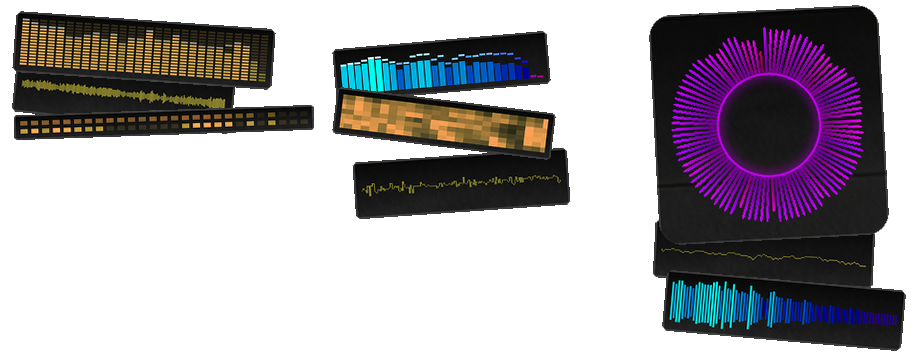
visualizer_collage.png

The Visualizer

 An optional on-screen display that reacts live to whatever's playing; dispatch, ambient chatter, or your own mic. There are thirteen styles to pick from (plus off): a classic bar-graph equalizer, a mirrored "Winamp-style" version of the same, a circular ring of pulsing spikes, a VU-style needle bar, a straight-up waveform and a scrolling version of it, a connect-the-dots oscilloscope and its scrolling counterpart, a blocky segmented "hardware EQ" ladder, a scrolling spectrogram, an LED-grid readout, a set of rings that punch outward on hits, and a sweeping Knight Rider–style eye.

Whatever style you pick, you can color it as a flat color, a version that shifts subtly with the sound, or a full RGB cycle with its own range and speed. The card it sits in is fully customizable too; padding, an optional caption, background gradient, a scanline overlay if you want that retro CRT look, rotation, and you can just drag it around the screen with the mouse or set its position with sliders. It'll also fade itself out automatically if things go quiet, if the source is too far away to actually hear, or if you step out of your vehicle, so it's not just sitting there doing nothing on screen.

The Small Stuff That Adds Up

 Every keybind is fully rebindable, keyboard or controller, with an on-screen volume bar when you nudge volume up or down. There are menu color themes if you want to reskin it. And there's a diagnostics screen tucked away for troubleshooting, in case something's ever misbehaving and you need to see what's actually going on under the hood.

Where This Sits Compared to the Usual NAudio Mod

Most sound-playing plugins in this space lean on general-purpose .NET audio libraries; NAudio is the common one; just to push a file out to your speakers. That's a fine way to build a "play this sound when that happens" mod, but it's a thin layer, and the limitations tend to show up in the same handful of places: audio that's basically flat with maybe some stereo panning standing in for "position," no real awareness of whether the game is paused or running in slow motion, a narrow set of supported file types, and if there's internet radio at all, it's usually fragile; one dropped connection and the stream just dies.

XScanner4 is built on a proper low-level audio engine instead, closer to what an actual game uses for its own sound than what a typical mod bolts on. That's what makes a lot of the above possible in the first place; sound that's actually positioned in 3D space rather than approximated, a scanner that slows down properly with the game instead of ignoring it, a visualizer reading real audio data instead of guessing at it after the fact, and a wide range of file formats plus real streaming protocols instead of just local file playback. It's less "a mod that plays sound files" and more a small audio system in its own right, which is really the only reason the 3D audio, the live radio, and the reactive visualizer can all run at once without stepping on each other.

⚠️ DISCLAIMER ⚠️

Not providing support in the comments anymore.

Support can be found on my Discord or on the ULSS Discord.


KNOWN ISSUES

29/09/2026 - currently investigating an issue where broadcastify streams return nothing but static


Keep quality plugins free by supporting
your favorite developers that actually still write code.

(favorite developer does not necessarily need to be me)

Paypal-Donate-Button-Image.png


Could contain: text, screenshot, graphic design, poster, graphics, art, font


Edited by khorio
change description

What's New in Version 4.0.2461.3

Released

Complete rewrite


Short Description

Police Scanner, Live streams

AI disclosure

The author has disclosed that AI tools were used in creating the following aspects of this file:

  • Description

User Feedback

Recommended Comments

249Xeno

Members

13 minutes ago, khorio said:

It means the sound files didn't get installed properly

I only did the drag-and-drop.

khorio

Members Author

1 minute ago, Parzival.Zio said:

I only did the drag-and-drop.

Did you also download the required audio

249Xeno

Members

(edited)

was there one? I assumed that everything was in one winrar... or did I miss something out of that?

also, I do not see the audio link

Edited by Parzival.Zio

khorio

Members Author

20 minutes ago, Parzival.Zio said:

was there one? I assumed that everything was in one winrar... or did I miss something out of that?

also, I do not see the audio link

image.png.2241a7e9e3b37ba718b6dff123ccfeb8.png
Yes 😄

249Xeno

Members

19 minutes ago, khorio said:

image.png.2241a7e9e3b37ba718b6dff123ccfeb8.png
Yes 😄

Man.. all files should be together, not separate.

khorio

Members Author

5 minutes ago, Parzival.Zio said:

Man.. all files should be together, not separate.

That would mean each time I push an update people have to re-download 150mb of data they already have

249Xeno

Members

that would be the case, but remember... a lot of vehicle packs download a big file too. It will prevent any issues later down the road, that unless you want someone that comes to you and asks the same thing I asked you.

I would add all in one and let them download everything at one time rather than twice. It makes things much less complicated.

MythicalMonkey

Members

Loving the new version of the plugin. One suggestion would be the ability to select channels, i.e have a selection of Broadcastify feeds to choose from. For instance, previously I used to use feeds for LAPD, LASD, CHP, etc depending on which part of the map I was playing in.

0xShelby

Members

(edited)

Is anybody familiar with how to set this up with Broadcastify? I would absolutely love to set that up with such.


Edit: Never mind, I didn't see the Broadcastify settings in the configuration file when I looked, I see it now!

Edited by 0xKlepto

Paladin Ranger

Members

When I set Broadcastify to my local agency, I'm getting this loud feedback before and after each transmission. It wasn't doing this with the default Broadcastify, and my local agency doesn't sound like this directly from Broadcastify.

khorio

Members Author

30 minutes ago, Paladin Ranger said:

When I set Broadcastify to my local agency, I'm getting this loud feedback before and after each transmission. It wasn't doing this with the default Broadcastify, and my local agency doesn't sound like this directly from Broadcastify.

A few broadcastify streams use some shifty mp3 instead of a pcm stream that causes clipping when streaming through the soundengine, I'm aware of the issue but have not figured a way around it yet.

Welsh Hazard

Members

Hello - Great mod btw!!


Question- How do i change the intro to a different noise? 


Are there a selection? 

khorio

Members Author

4 hours ago, Welsh Hazard said:

Hello - Great mod btw!!


Question- How do i change the intro to a different noise? 


Are there a selection? 

You can change it to whatever you like
 

Section: [General]

IntroSound					This is the squelch before each call on the scanner, change this to whichever sound you want it to play
OutroSound					Same but at the end of each call

There are more in 
 

Grand Theft Auto V\lspdfr\audio\scanner\RESIDENT


khorio

Members Author

17 hours ago, MythicalMonkey said:

Loving the new version of the plugin. One suggestion would be the ability to select channels, i.e have a selection of Broadcastify feeds to choose from. For instance, previously I used to use feeds for LAPD, LASD, CHP, etc depending on which part of the map I was playing in.

You can already change the stream ingame by using the console command, I could add some menu in the future.

Welsh Hazard

Members

4 hours ago, khorio said:

You can change it to whatever you like
 

Section: [General]

IntroSound					This is the squelch before each call on the scanner, change this to whichever sound you want it to play
OutroSound					Same but at the end of each call

There are more in 
 

Grand Theft Auto V\lspdfr\audio\scanner\RESIDENT


A menu would be a perfect idea. A bit like grammar police- where you can adjust the settings simply. 


When i am looking through the file to select a new tone its hard to get an idea of what it would sound like because the preview is mega fast if you get me.  


If we had a menu where we can just scroll through and it gives the example when you select that would be brilliant, especially for those that arnt amazing at file modifications etc 🙂


Thanks for the reply man, good luck with the future updates 🙂

Sagx

Members

what a good mod one of the best immersive mods for this plugin!!! 

michael 628

Members

So I'm having a little trouble getting this mod to work I've downloaded the updated file as well as the full file with the required audio. I've dragged and dropped everything from the updated file and dragged and dropped just the audio from the other file and I don't hear anything in game no crashes and everything loads up fine did I miss anything? or did I installed it incorrectly?  

khorio

Members Author

4 hours ago, michael 628 said:

So I'm having a little trouble getting this mod to work I've downloaded the updated file as well as the full file with the required audio. I've dragged and dropped everything from the updated file and dragged and dropped just the audio from the other file and I don't hear anything in game no crashes and everything loads up fine did I miss anything? or did I installed it incorrectly?  

Can you upload your ragepluginhook.log ? Alternatively you can come ask for help in #gta_support on the rph discord

michael 628

Members

5 hours ago, khorio said:

Can you upload your ragepluginhook.log ? Alternatively you can come ask for help in #gta_support on the rph discord


RagePluginHook.log

khorio

Members Author

(edited)

1 hour ago, michael 628 said:

You probably want to change your broadcastifyid in the ini to a more active broadcast like 32602 or disable broadcastify if you want to use the local files.

Edited by khorio

michael 628

Members

1 hour ago, khorio said:

You probably want to change your broadcastifyid in the ini to a more active broadcast like 32602 or disable broadcastify if you want to use the local files.

hmm that's the thing I don't have broadcastify on its set to false. the only change I made was set EnableBackgroundScannerOnPlayer=True and EnableBackgroundScannerDuringPursuits=True both set to true. 

khorio

Members Author

34 minutes ago, michael 628 said:

hmm that's the thing I don't have broadcastify on its set to false. the only change I made was set EnableBackgroundScannerOnPlayer=True and EnableBackgroundScannerDuringPursuits=True both set to true. 

Think you have to double check the ini, this is from your log
image.png.3bb0eab34e3f90271ba7345cf810e35e.png

michael 628

Members

31 minutes ago, khorio said:

Think you have to double check the ini, this is from your log
image.png.3bb0eab34e3f90271ba7345cf810e35e.png

Thank you! I thought "BackgroundScannerRegionSpecificBroadcast=False" was the broadcastify it works now sorry for the trouble! love your plugin always have!

khorio

Members Author

1 hour ago, michael 628 said:

Thank you! I thought "BackgroundScannerRegionSpecificBroadcast=False" was the broadcastify it works now sorry for the trouble! love your plugin always have!

No worries.

MythicalMonkey

Members

On 11/3/2023 at 6:53 AM, khorio said:

You can already change the stream ingame by using the console command, I could add some menu in the future.


I see the latest update has incorporated this, great work. I did see the console command in the config but the region function is much better. A menu is a nice idea too, that would save some key bind assignments for volume as well.

Create an account or sign in to comment

Latest Mods

Account

Navigation

Search

Search

Configure browser push notifications

Chrome (Android)
  1. Tap the lock icon next to the address bar.
  2. Tap Permissions → Notifications.
  3. Adjust your preference.
Chrome (Desktop)
  1. Click the padlock icon in the address bar.
  2. Select Site settings.
  3. Find Notifications and adjust your preference.