




ineseri
Friends of LSPDFR
-
Joined
Everything posted by ineseri
-
Have you used LCPDFR 0.95RC2 prior to installing LCPDFR 1.0?
-
Hello, please attach the logs instead of screenshotting them. Also, what are your computer specs?
-
What are your computer specs? Is the game being launched as administrator?
-
I know it was just a question, and I replied to it too. There hasn't been any further updates than that :)
-
Yes, you do (http://support.rockstargames.com/hc/en-us/articles/200145406-Grand-Theft-Auto-IV-Patch-7-Title-Update-v-1-0-7-0-English-1-0-6-1-Russian-1-0-5-2-Japanese-)
-
And when installing the mod manually, do you overwrite all files? Do you have the latest GTA IV patch? All redists?
-
Hm. Which steps are you taking in-game to launch the mod?
-
Sure, that'll help :)
-
 You come back from the dead for that comment? :D
 -
Dsound is more stable IMO, and with it you can play online. XLIVE will disable GFWL (and the live save files).
-
The hotfix is included in the manual installation package, no need to apply the hotfix :)
-
It's a sign to use the manual installer ;) Honestly though, I have no idea.
-
Hello, use the manual installer instead :)
-
Or.. Vanilla :D
-
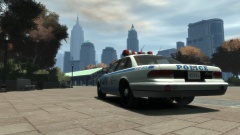
From the album: ineseris LCPDFR images
Do anyone notice something special with this cruiser? (Yes, it's just the first draft) -
Hello, make sure that the trainer keys are disabled by going to your GTA IV folder, open trainer.ini, hit CTRL+F, type in KeyBindingsDisabled=0, click on Find Next and replace 0 with 1. This should solve your issue.
-
Hello, try to install the taser manually (>)
-
Please post a screenshot of your GTA IV directory and I'll try and get back at you as soon as I can :)
-
I'm so confused right now.
-
Sure, best of luck :)
-
There is a installation guide, I suggest you to read it :)
-
Whichever one you want to use :)
-
No, you can continue here. It means that LCPDFR is designed to work on a clean copy, and only a clean copy. However, it might work on a modded copy of your game but with far more crashes than a vanilla version.
-
Try to reinstall LCPDFR 1.0 with the manual installer. I think you might be missing some files. Make sure to overwrite any file.
-
I'd recommend you to use LCPDFR 1.0 instead of LCPDFR 0.95RC2. (http://www.lcpdfr.com/files/download/4607-lcpd-first-response/). Use the manual installer and make sure to remove LCPDFR 0.95RC2 (http://www.lcpdfr.com/page/tutorials/index.action/_/script-data-file-modification-tutorials/how-to-uninstall-lcpdfr-r19). Please note that LCPDFR is only officially supported on a unmodded, i.e clean copy of GTA IV.

