


NickieB
Members
-
Joined
-
Last visited
Everything posted by NickieB
-
you have zero cars released.... but Hilth0 he's sort of right, Sometimes there is a few polys behind the grill you need to remove so the modules can be seen but thats not always the case. On the Impala I believe you need to remove the few black textured polys behind so the modules are visible. Vertex mode on the from bumper and then either quadr or single to select what you want to delete by right clicking (single) or right click and drag (quadr), selected mode on, delete
-
Tahoe Preview Video - Got it in game tonight. Feedback is welcome. Scanner/Radio traffic is radioreference.com and is my local county traffic. Vehicle WFT - 1.9MB!
-
![[WIP] Tahoe - Code 3 Defender](//s3-gallery.int-cdn.lcpdfrusercontent.com/gallery/album_1177/sml_gallery_9139_1177_5958.jpg) Appreciate it!
Appreciate it! -
![[WIP] Tahoe - Code 3 Defender](//s3-gallery.int-cdn.lcpdfrusercontent.com/gallery/album_1177/sml_gallery_9139_1177_63021.jpg) Thanks
Thanks -
From the album: NickieB Upcoming Releases
Code 3 Defender, Setina Pushbar, Whelen TIR pushbar lighting, Whelen PAR36 Fog light inserts, Spotlights, Head/Tail Strobes, Various Interior equipment, Code 3 commandstik, Whelen IONs, Whelen Slim-misers in the rear windows, Soundoff Intersectors -
From the album: NickieB Upcoming Releases
Code 3 Defender, Setina Pushbar, Whelen TIR pushbar lighting, Whelen PAR36 Fog light inserts, Spotlights, Head/Tail Strobes, Various Interior equipment, Code 3 commandstik, Whelen IONs, Whelen Slim-misers in the rear windows, Soundoff Intersectors -
![[WIP] Tahoe - Code 3 Defender](//s3-gallery.int-cdn.lcpdfrusercontent.com/gallery/album_1177/sml_gallery_9139_1177_90091.jpg)
From the album: NickieB Upcoming Releases
Code 3 Defender, Setina Pushbar, Whelen TIR pushbar lighting, Whelen PAR36 Fog light inserts, Spotlights, Head/Tail Strobes, Various Interior equipment, Code 3 commandstik, Whelen IONs, Whelen Slim-misers in the rear windows, Soundoff Intersectors -
-
Shouldn't be his ENB because the rear door windows look fine. Yeah something is messed up with the windows. I haven't used that car in a long long time so I don't remember if its on a template or not but you painted something white which should be almost black. Just look at the windows - the rear doors and then the front and front/back windshields, you can clearly see the difference and how they are white
- 14 comments
- 8 reviews
-
![[WIP] Tahoe - Code 3 Defender](//s3-gallery.int-cdn.lcpdfrusercontent.com/gallery/album_432/sml_gallery_9139_432_69208.jpg) I'll be swapping everything onto Bugs model, I have it now
I'll be swapping everything onto Bugs model, I have it now -
Yeah I thought the same thing, I got the car that way and I was just sort of leaving that till the end when i could look into it and figure out the correct size. Its on my list
-
-
Well something got screwed up along the way because you should be able to see in the windows, plus all of the other texture issues I can see in the photo. Did you get any errors while importing? Make sure the import texture extension is the same as the textures you imported. Without looking at the model myself in zmod, I don't know what else to say. It looks like you just put a Whelen liberty on there so it wouldn't be that hard to redo just to see if it still crashes
-
Yeah it says its not implemented yet. Everytime I've ever tried to accept it, its code 4 or another officer is handling. Recently it worked for me one time and said it was at a burger shot and gave me call details but never showed me which burger shot. So I never got to go. If you watch nicolaib's recent patrol videos, his works for him so you can see the call out if you want
-
Thanks guys! @Tim - alright I'll look at it. I had to make them small to fit the mirror, otherwise if you increase the scale much more they are to big for the mirror and stick out. Unless I would make some sort of mounting bracket to hide it. @Perez - The 5 spoke chrome rims? Police Tahoes never came with those rims as far as I know. The rims you see in the photo are the proper police package ones. @Jetski343 - The rims pictured have their own independent texture that is easy to change to silver or whatever color you wish. I'll include the silver option with the download. But if you guys are talking about these rims, http://gtapolicemods.com/downloads/upload_es4.jpg I don't think I'll be adding those to this version. If I do a slicktop or unmarked unit then I may use those to remove the police car look
-
From what I can see of the hierarchy it looks fine. I can see from the 3D window in zmod that your textures are screwed up. You should be able to see in the windows and you can't on yours. Same thing with the wheels, they should be black, not grey. your missing textures when you imported. Is that causing your problem of crashing though, it shouldn't. Did you add the vehshare textures when you imported?
-
![[WIP] Tahoe - Code 3 Defender](//s3-gallery.int-cdn.lcpdfrusercontent.com/gallery/album_432/sml_gallery_9139_432_46369.jpg) I re-mapped it to Bugs template
I re-mapped it to Bugs template -
From the album: WIP
Code 3 Defender, Setina Pushbar, Code 3 Narrowstik, Whelen ION's, Whelen PAR36's, Whene TIR3's, Soundoff Intersectors, Whelen Slim-Miser, LED Spotlight. The Tahoe is still WIP so things may change between now and the final product but its almost ready for ELS mapping so its pretty close to what the release will look like -
From the album: WIP
Code 3 Defender, Setina Pushbar, Code 3 Narrowstik, Whelen ION's, Whelen PAR36's, Whene TIR3's, Soundoff Intersectors, Whelen Slim-Miser, LED Spotlight. The Tahoe is still WIP so things may change between now and the final product but its almost ready for ELS mapping so its pretty close to what the release will look like -
I export as .PNG. Your other options are correct, coll and sliced model. I don't know if it matters what your texture settings are when you export, or if it has to be in the same format as what your imported the textures as. ie import as DDS - export as DDS, import as PNG - export as PNG, etc. Try exporting as PNG? Although I don't think thats the issue. What I meant was something is probably messed up in the hierarchy, I remember having issues like this when I starting modeling but I can't remember what caused it or what the fix was. Snap a pic of your hierarchy?
-
You probably have something setup wrong thats causing it to crash
-
-
I'm so confused, your trying to import a model into zmod? You need to add the textures in the mat editor and then file>import and find the wft of the pushbar. Wait a second, do you have a full version of zmodeler? Because I think with the "free" version you can't import anything.
-
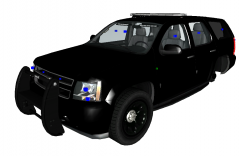 Of course, right now I have it mapped to BxBugs tahoe template, just have to get permission to use it
 -
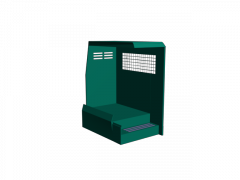 he didn't say it was being released publicly, just to respective modders/modelers. So who knows who will get it....

![[WIP] Tahoe - Code 3 Defender](http://s3-gallery.int-cdn.lcpdfrusercontent.com/gallery/album_1177/sml_gallery_9139_1177_5958.jpg)
![[WIP] Tahoe - Code 3 Defender](http://s3-gallery.int-cdn.lcpdfrusercontent.com/gallery/album_1177/sml_gallery_9139_1177_63021.jpg)
![[WIP] Tahoe - Code 3 Defender](http://s3-gallery.int-cdn.lcpdfrusercontent.com/gallery/album_1177/sml_gallery_9139_1177_90091.jpg)

![[WIP] Tahoe - Code 3 Defender](http://s3-gallery.int-cdn.lcpdfrusercontent.com/gallery/album_432/sml_gallery_9139_432_69208.jpg)
![[WIP] Tahoe - Code 3 Defender](http://s3-gallery.int-cdn.lcpdfrusercontent.com/gallery/album_432/sml_gallery_9139_432_46369.jpg)
