


NickieB
Members
-
Joined
-
Last visited
Everything posted by NickieB
-
-
Yeah if you would have searched you would have found the right thing, you really can't go wrong at the Official ZModeler Website. Like Beckugan1 said, if your looking for pirated versions we strongly frown upon that here and it probably wouldn't be a good idea to ask. I would recommend you get Zmodeler v 2.X.X because I don't know how well ZM3 works with what we do. I've seen a few posts with people having problems with it and GTA IV. I'm not saying ZM3 doesn't work with IV, I don't know since I haven't tried it but I can say whatever the latest version of ZM2 is, it works great.
-
The vehicle in the video is not my Tomar Blade Charger. A vehicle wouldn't cause that glitch/problem. Like GTAIVCODE3 said, its probably a issue with the visualsettings. @efjk - what your talking about isn't even relevant to his issue. Your talking about a car crashing the game and his game does not crash, its a issue with the lights and the environment. Plus a vehicle wouldn't cause a issue like that, or at least it shouldn't.
-
There is no way to make a car less poly's without having the unlocked version like everyone has said. Even if you did have the model, its not easy to eliminate poly's. Here are my suggestions, turn all the graphics down to the lowest settings and then play the game. Slowly increase the settings until gameplay starts to suffer. Then you know what settings run the game best for you. Or try using low-poly cars, there are starting to be more and more of them so you shouldn't have a hard time finding one. I'm going to do a few this summer.
-
No I don't believe so, xliveless would have nothing to do with ENB's or making older versions work on the newer game patch... but it isn't that hard to try, just make a backup of your current ENB and its respective folders and install the one made for the older patch and xliveless and see if it works. If not just copy/paste your files back.
-
Interesting, I'll try that when I get home on Friday. I hope that works. @XBR - I did always edit both files in the common and the TBOGT folders.. I don't know why they would do something like that either but hey, this is Rockstar were talking about
-
They all look good, nice pack! BUT May I offer a little advice? The Charger wheels are wayyyy to far to the inside. They need to be moved out more. I thought you had a real Javelin and I was about to PM you to offer a trade but then I saw its just the Justice :/
- 16 comments
- 11 reviews
-
-

- 3
-
-
So I've had EFLC for a few months now, got it from steam during the 75% off sale. Didn't really use it except for a few missions. Well since my IV has been crashing a lot lately due to ELSv7 I started transferring everything to EFLC to try and overcome this crashing. Now to my problem - The ELS lights are all white/cream color and dont have any glow or bloom to them. I've tried using the visualsettings from ELS7 and the radiance/luminescence mod, upp'd brightness/contrast/saturation and that didn't help, also tried the timecyc that comes with the radiance mod. Neither worked and I also upped the setting for the lights in the visualsett. to 150.00 and that didn't make a difference. I've replaced the files in the main common>data and TBOGT's common>data. I've been reading conflicting advice from past posts so I'm hoping to get a clear answers/advice. I don't use any ENB and I don't want to, so thats not a option. I know I read about fixes for this a long time ago but I can't remember where I saw them. Any suggestions? I wanted to snap a picture but forgot and won't be home again until Friday so I'll post one if I can't seem to fix it with whatever suggestions you have. The game is 99% unaltered/vanilla install since I just started modding it. Except for the cars, ELS and my attempts to fix this issue by replacing the files mentioned. THANKS!
-
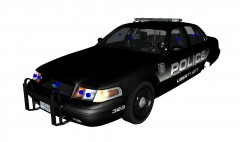 Thanks guys and why wouldn't I care? lol. I really appreciate the comments/feedback. I do take it into consideration if people have suggestions
 -
From the album: WIP
WIP -
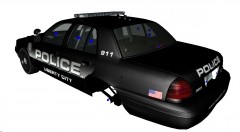
From the album: WIP
WIP -
I'm assuming the download pic is the new icon. I agree he should have posted a in-game photo. I didn't see anything wrong with the default icon that came with the baton but nice job making a HD one
- 6 comments
- 2 reviews
-
Yes it is. I downloaded some modifications when I played it too. I reinstalled it on my new PC recently and downloaded a few mods but never got around to installing them. I have TSS expansion pack to, adds a few cool features and more missions
-
Yeah I understand, and no problem
-
If you would have read the user guide you would have seen that ELS doesn't use the same commands for multiplayer as far as the siren goes. For MP, you use the default GTA siren button, default is G i think but you may have remapped it to something else. So to make the siren work in MP just use the default GTA siren key
-
I'm 102% sure that no keybindings conflict. I'm OCD about my keybindings and remapped them before I even ran v7 for the first time. I'm using zero default ELS keybindings, everything is different. Believe me I thought of that too, I've gone over it multiple times to try and find some conflict of mods that would even remotely cause a crash and didn't see anything but I can try again. Its possible I missed something
-
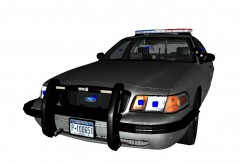 Don't worry, I've already made edits to it ;) I don't know if they were applied yet in this photo but they have been made
 -
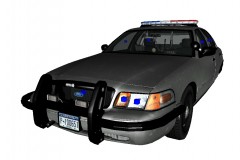 Departments use a mixture of equipment all the time. Not every single police car out there has all one brand of lighting or equipment on it...Some maybe do but everything around my area has various companies on each car
 -
Wow that brings back some memories, loved playing that game. Use to play online all the time but haven't now for a long long time. Good times
-
Never thought of starting a new game and re-saving it... I guess thats worth a try. More detail on that: its the first safehouse when you start the game in Dukes/Broker and it crashes about 4 seconds in. I can make it out the door of the apt. and just as I'm about to jump down the stairs...crash. As for removing mods, yes I've tried it. I've removed everything, all my script mods, ASI mods (except ELS of course), and LCPD:FR, still crashed.
-
There isn't anything that we do different in zmod to the cars to apply ELS. They are still mapped the same way as before, granted we have more options with the new flash patterns and features but all of the cars that existed prior to the release of v7 would work 100% fine. And you would still be able to utilize all of the features of v7. A car doesn't have to be setup for v7 for you to get the full effect of v7.... since nothing is really being done differently
-
I still haven't found a fix for my game crashing 95% of the time on startup into the safehouse. I've tried everything I could think of, even reverting to a backup of the game and it still crashes most of the time with "GTA IV has stopped working" but sometimes it works and when it works it works great. Latest and updated scripthook files, only using dsound, installed correctly. Took out all my mods that could conflict with it and it still crashes. If I remove ELS7, it works every single time without failure
-
Even if you know the best modeler in the world I'm pretty sure the game only supports 4 liveries at a time on any given vehicle. Its not possible to have more. Don't you think that if it was possible to add 10 liveries some modeler would already have done it from the beginning? Its not really something you could edit or change in a modeling program or any program. Its just not possible due to game limitations
-
-
do you have things placed correctly in the hierarchy?

