


NickieB
Members
-
Joined
-
Last visited
Everything posted by NickieB
-
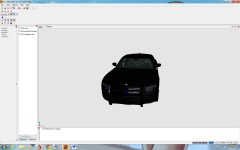 You didn't do anything to it, lol, why post a photo yet? Plus FYI the textures for the headlights are messed up, take a look at your materials/textures
 -
I'm looking forward to trying this this weekend. Thanks for posting it. I don't have the greatest PC in the world so anything to help it run IV smoother or with better quality is awesome in my book. Will post back with my results/thoughts on Thursday/Friday
-
-
-
-
When I installed ELS7, 95% of the time GTA would crash about 3 seconds after loading into the game in Niko's apartment. "GTA IV Has Stopped Working". I tried everything I could think of that was easy and nothing worked. So I reverted back to a old backup (I make backups every few months so I don't have to do a full uninstall/reinstall, just copy/paste). I re-installed FR, all my script mods, car models, player mods, etc and ELS. Now everything works like a charm, I've launched the game at least 4-5 times now and its worked great. So if your having any issues try re-installing. I know its a pain in the a** but it worked for me and others.
-
The one in the video? You can't, its a private model and will not be given out.
- 18 comments
- 14 reviews
-
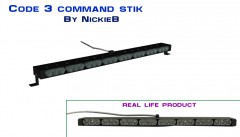 lol I beat you? You were going to make one too?
 -
From the album: WIP
Something I made tonight. Would like to get the modules a little closer to real life -
I also disabled FR callouts since the braveheart script. I still get plenty of chases though, whether its from traffic stops or actual braveheart calls
-
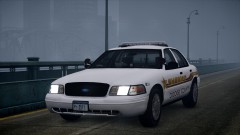 You aren't the first people to comment on it that way, haha. Thats really the name of the county
 -
-
Thats why I said "experienced modelers"
-
Well if there is only a "bunch of files" for it maybe you installed it in a different location. You sure you have the game installed?
-
![[WIP] Arjent S2 Charger](//s3-gallery.int-cdn.lcpdfrusercontent.com/gallery/album_1177/sml_gallery_9139_1177_84775.jpg) lol, I'm assuming thats a good thing. Either your bored by it or your drooling... I'll pick the later. I'll keep you in mind when I have a working build
lol, I'm assuming thats a good thing. Either your bored by it or your drooling... I'll pick the later. I'll keep you in mind when I have a working build -
Seriously? That made no sense considering that most if not all of the patterns from v6 are in v7. Plus plenty of different ways to setup the ini for different pattern styles. A lot of cars will start to be optimized for ELS7, I know mine will be.
- 40 comments
- 58 reviews
-
![[WIP] Arjent S2 Charger](//s3-gallery.int-cdn.lcpdfrusercontent.com/gallery/album_1177/sml_gallery_9139_1177_7202.jpg) Thanks
Thanks -
Experienced modelers aren't usually looking for requests to take. Especially when you say, "Some specs included may no longer be needed, but they will be included, to see how they look" That means that you want someone to put the entire list of parts/lights on but you may not want everything? Thats a lot of time someone will spend only to have you say, I don't want any of that on the car anymore. Plus you said models, plural, multiple models. This stuff takes a ton of time. Don't hold your breath waiting for someone to come along. I'm assuming you tried PMing a lot of people since you said this was your "last resort"?
-
From the album: NickieB Upcoming Releases
-
From the album: NickieB Upcoming Releases
Wraparound version -
The key code is 4. I had it set in ELSv6 to turn on the "ELS" siren but it only worked about 20% of the time I would push it. Haven't tried it for v7.
-
Its not any different than mapping ELS on a car. If you don't know how to map ELS at all, its impossible to explain it in a post, to much information to just type up. You would have to refer to YouTube or the Tutorials section
-
Thats great but my tutorial did more damage than good so I took it down. Unfortunately the people who truly wanted to learn and develop great mods suffered from that
-
Oce again youre exactly right. I don't even need to add anything to this. From what I said to this, our case has been presented
-
wow, your asking for a awful lot of stuff


![[WIP] Arjent S2 Charger](http://s3-gallery.int-cdn.lcpdfrusercontent.com/gallery/album_1177/sml_gallery_9139_1177_84775.jpg)
![[WIP] Arjent S2 Charger](http://s3-gallery.int-cdn.lcpdfrusercontent.com/gallery/album_1177/sml_gallery_9139_1177_7202.jpg)