


NickieB
Members
-
Joined
-
Last visited
Everything posted by NickieB
-
yes, very true. I re-read the OP after I posted. You say you need a firetruck version which is longer than the police version. Your going to have a hard time finding a real freedom police version and a even harder time finding a firetruck version. You will either have to modify the ones GTAIVCode3 posted into the size/configuration you want or try and contact some of the few firetruck modelers and see if they will give you one if they have one. I found a genuine freedom in my files but I don't remember where I got it from so I don't know the correct credits or if I could even give it out to people. So I can't help you
-
What GTAIVCode3 posted is as close as your going to get to a Freedom. There are no actual Freedoms available publicly right now that I now of, just those in the download section that were pieced togther into freedoms
-
Alright, I agree that there are a lot of CVPI's out there and yes there are a lot being uploaded to the site. The reason they all look the same is because all these new "modelers" are just importing parts that import directly into place or ones that can be placed with little effort. Then you end up with another CVPI with a go-rhino and a Liberty. I've been taking a lot of time lately to scratch make new parts just so that my cars have some variety and new lighting modules on them. That way I'm not adding to the list of 100 CVPIs with Libertys. OP, you say you want a variety of cars, new cars, well you don't understand how hard it is to get those cars. The very few people who have them are not giving them out to just anyone. Plus some have mentioned converting, I don't think you realize how long and how much work it takes to convert something. This is another big reason why you don't see every modeler converting cars. In the end, modelers, experienced or not, are going to make what they want to make. You can post about it and complain all day long but the only true way to get the models you want is to make them yourself. I'm not going to join in on the little war thats started here but I do agree with LucaDiablo on some of his points
-
![[W.I.P] CIV TO PI](//s3-gallery.int-cdn.lcpdfrusercontent.com/gallery/album_1567/sml_gallery_49005_1567_361597.png) they dropped a 2nd time? XD
they dropped a 2nd time? XD -
lol I thought the same thing
-
HOld whatever button you have setup for the function key (ALT by default) and press the primary lighting key.
- 10 comments
- 10 reviews
-
OSP_CVPI_v1.3 by NickieB v1.3 - Added front/rear facing exterior radar units. Updated the trunk antennas and the interior/grill lighting to TIR3s. ELSv7 config file included, feel free to edit it to your liking. This CVPI was created to represent the Ohio State Patrol CVPI as closely as possible. Since they use all blue lighting, only blue lighting will be available for this vehicle. The secondaries are mapped to the rear lighting to better represent the real car. The lightbar glass has its own texture now instead of it being mapped to the emerglights file. I did this so the color was easier to change. Info on the lightbar glass below. A new vehicle template is also being released with this car. The "bumper trim" is now editable from the template as well as the door pillars and door jams. ** CREDITS - Model is original Ford Crown Victoria by Schaefft, modified for and converted to GTAIV by Chasez. - This version of the CVPI model has been modified by Bxbugs123 & Lt.Caine with permission by Schaefft and Chasez. Edited by NickieB - Rims by Chasez - Laptop, Police Console by PFCBarefoot - Laptop Stand, Radar, Prisoner Divider, Dash Cam, Spotlights, Shotgun by BxBugs123 - Original CVPI template by BxBugs123, edited with permission by NickieB - TIR3 by EVI. Modified to various LED modules by NickieB - Ohio State Patrol skins by JSDGraphics - Bearcat Scanner, Radar Remote Controller, Motorolla Radio Speaker by NickieB - Trunk Antennas by Priman - Code 3 x2100 Lightbar made by Bxbugs123 and penguin2254, modified and converted by gfxle. - Code 3 x2100 Modified to Code 3 RX2700 by NickieB - Trooper Hall for requesting the addition of the exterior units - Big thanks to EFox for all his information and help with making this car as realistic as possible. *Credits update: The readme is incorrect, Priman created the trunk antennas ** To change the light bar glass color. Using OpenIV or SparkIV, open the WTD of whatever spot you installed this car into and look for "lightbar_template". Choose replace or import and navigate to the "lightbar glass" folder supplied within this file and choose the color you wish to import. A template will be provided if you wish to make or edit the colors. ** SPOTLIGHT Coordinates [NOOSE] spot-x=-0.9 spot-y=+0.8 spot-z=+0.6 http://www.youtube.com/watch?v=VwqbDFD2fLw&feature=youtu.be Link to Ohio State Patrol v1.2 -
- 10 comments
- 10 reviews
-
You had to make a thread to announce this?
-
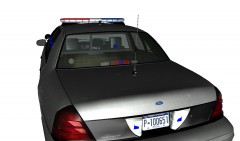
From the album: NickieB Upcoming Releases
Rear view - Soundoff Predator brake light modules -
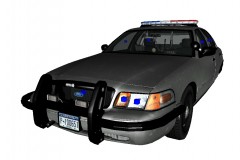
From the album: NickieB Upcoming Releases
Unsure what pushbar setup to use - #2 Soundoff Predator and NForce modules on the sides (see other photo for setup option #1) -
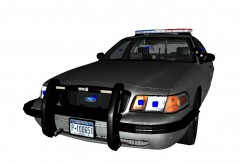
From the album: NickieB Upcoming Releases
Unsure what pushbar setup to use - #1 Soundoff NForce modules on the crossbar and sides (see other photo for setup option #2) -
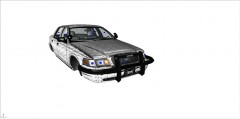 You could make a Setina wrap like that in about 15 minutes. I don't know about a Santana though... Looks good Hilth
 -
well that was hilarious
-
-
Its just a normal Whelen Liberty. There are different types with different takedowns and module options but the one you posted is probably the most common setup. Hard to tell more without seeing the front. Here are some photos of models that resemble your photo. http://www.whelen.com/_AUTOMOTIVE/images/Lightbars/Liberty/Trio-Bars/hiresweb/trio-pkg-1.jpg And these are some combinations for the front http://www.whelen.com/_AUTOMOTIVE/images/Lightbars/Liberty/hiresweb/sx8rrbb-sxtdled.jpg - my personal favorite - I like the LED takedowns http://www.whelen.com/_AUTOMOTIVE/images/Lightbars/Liberty/hiresweb/sl8bbrr.jpg http://www.whelen.com/_AUTOMOTIVE/images/Lightbars/Liberty/hiresweb/sb-wecan-duo.jpg
-
Maybe try moving it to the location you want it and then re-apply/re-install it. I installed it just now and didn't check the box, it crashed right away after launching and gave me a WS10 error I was about to come on here and rant about how it messed up my game, lol, but I tried again and checked the 2GB box and it worked, no crashing. I only played for 5 minutes just to see if it improved it any. I can say it didn't make the game worse but I couldn't notice any major improvements in the few minutes I played. I'm going to be sitting down to play online later so I'll check it out more then. I didn't have many issues to start with except for the game slowing down sometimes at certain spots on the map with higher poly cars and of course if there is a lot going on at once it would slow down. Plus the occasional texture loss but it didn't make the game unplayable. So I'm fingers crossed it helps with that stuff
-
Oh okay sorry, I must have missed that when I was reading through the posts
-
This also just started happening to me yesterday. I started the game and thought things didn't look right and then I saw this thread. My lights aren't as dull as yours but they aren't what they use to be either. What ended up fixing it for you? what .dat file?
-
-
-
I made one also: http://gtapolicemods.com/downloads.php?do=file&id=2204
-
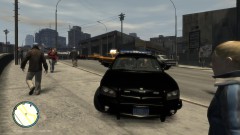
From the album: NickieB Upcoming Releases
COMING SOON -
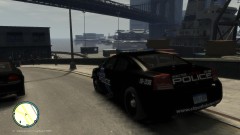
From the album: NickieB Upcoming Releases
COMING SOON -
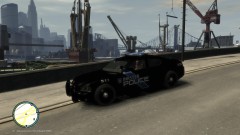
From the album: NickieB Upcoming Releases
COMING SOON -
I use either but brush guard is something that would go on a non-police vehicle


![[W.I.P] CIV TO PI](http://s3-gallery.int-cdn.lcpdfrusercontent.com/gallery/album_1567/sml_gallery_49005_1567_361597.png)
