




Cyan
Management Team
-
Joined
Everything posted by Cyan
-
Your topic has been moved to GTA V Support, this is not LSPDFR related. Please post in the correct location in the future.
-
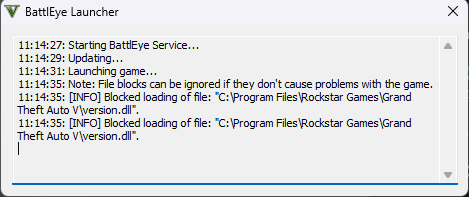
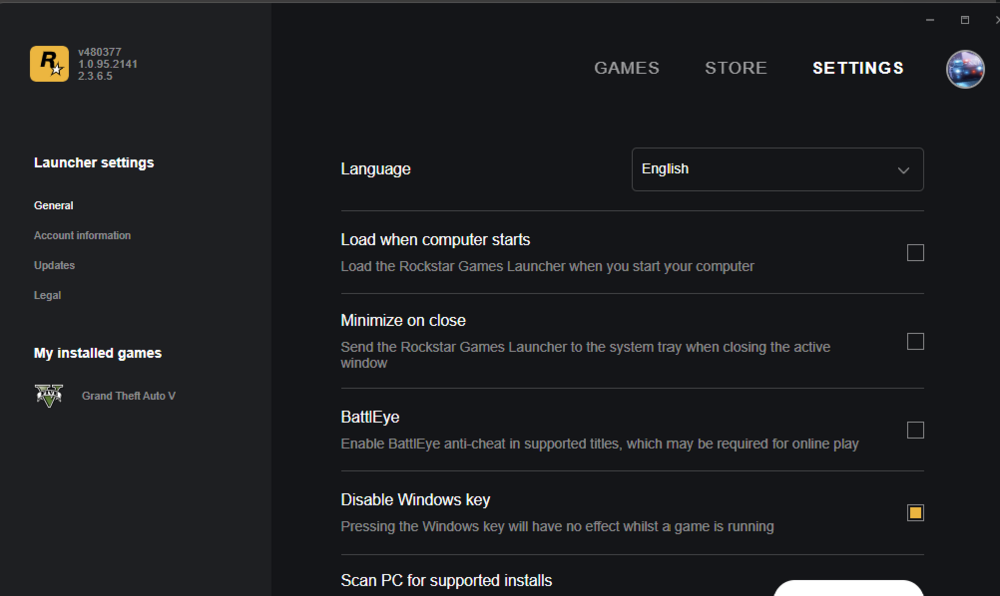
Yes it is being blocked, you have to turn BattlEye off.
-
Sorry but, how are you connecting Unknown game version to BattlEye? 😕
-
Are you trying to run with BattlEye? Follow the instructions to disable it.
-
This is explained on the More Information link on the big red banner that's on the homepage.
-
You'd have to wait for an update, like the message on the homepage indicates.
-
There's a GTA V update, you'll need to now wait for a LSPDFR update. (P.S; There is no 'lcpdfr' for GTA 5).
-
You can guestimate a general ETA by looking through the past update dates:
-
Guessing you didn't read the homepage? LSPDFR, RPH and SHV need an update. If you've reverted your game, there's a lot of ways of not getting that right, and isn't really supported. Best to wait for an update unless you can get it working right.
-
Hello, Copyrighted material isn't permitted to be shared on LCPDFR.com without permission from the copyright holder, sorry. You'll have to wait for an update, or restore your own backup.
-
-
It's unlikely to work anyway, as it will need updated for the game patch. If you don't have that option, try restarting Rockstar Launcher a few times, perhaps it didn't update.
-
It looks they've introduced BattlEye, which may prevent the usage of script modifications (e.g. Scripthook V, LML and RPH including LSPDFR) in this version going forward. We will need to analyze this more, and we'll have more information later in the day. Edit: Looks like BattlEye can be DISABLED in the launcher settings. So false alarm here, potentially. Edit2: Can confirm after disabling BattlEye I can use LML normally (which usually doesn't need a game update). There could still be changes to how the game is obfuscated that could delay an update, but the BattlEye part considering it can be disabled, shouldn't interfere with singleplayer modding. Edit3: If this post isn't clear enough - LSPDFR will still need an update for this version.
-
There's no infected file there, just a bad AV detection.
-
Well according to your post it sounds like the answer is no, right? If you're referring to NVE, it's not a mod we're able to test with as it's paid. I know they have some sort of RPH/LSPDFR compatibility mod so maybe it's worth looking at.
-
If you feel this topic has been closed in error, please report this post.
-
Your topic has been moved to GTA V Support, this is not LSPDFR related. Please post in the correct location in the future.
-
Your topic has been moved to GTA V Support, this is not LSPDFR related. Please post in the correct location in the future.
-
Your topic has been moved to GTA V Support, this is not LSPDFR related. Please post in the correct location in the future.
-
Your topic has been moved to GTA V Support, this is not LSPDFR related. Please post in the correct location in the future.
-
Your topic has been moved to GTA V Support, this is not LSPDFR related. Please post in the correct location in the future.
-
Your topic has been moved to GTA V Support, this is not LSPDFR related. Please post in the correct location in the future.
-
Your topic has been moved to LSPDFR 0.4 Support. Please post in the correct location in the future.
-
You haven't included any information that could be useful in diagnosing the issue with your installation. Describe your issue, be verbose. Include the RAGEPluginHook.log file from your game folder.
-
W-what?





