




Cyan
Management Team
-
Joined
Everything posted by Cyan
-
[12/17/2024 5:21:30 PM.756] LSPD First Response: [TRACE] *** This version of LSPDFR is outdated. If the user is requesting support, request they update to the latest LSPDFR version. *** [12/17/2024 5:21:30 PM.756] LSPD First Response: [TRACE] This version: 0.4.8943.27879, Version available on server: 0.4.9110.41894 Update LSPDFR. The issues you are having are directly linked to your old LSPDFR version.
-
Can you describe exactly what you're doing and what isn't working? Screenshots of what you're trying to do would be great.
-
-
They pushed out an update today.
-
There's an issue with LML where the game crashes due to a DRM check. The workaround is launching the game with RPH, which gets rid of this DRM check. This hasn't yet been ported to LML. Have you tried this?
-
Your topic has been moved to LSPDFR 0.4 Support. Please post in the correct location in the future.
-
Take a selfie of your LSPDFR character with the in-built GTA camera.
-
None of us would be able to share these with you, as they're copyrighted by Rockstar Games sadly. Wait for an RPH/LSPDFR update.
-
Did you run RPH? The message from your game is unrelated to LSPDFR/RPH as we don't use SHV/ScripthookVDotNet.
-
This topic has been moved to the appropriate forum. Please post in the correct location in the future.
-
Go to the category manually and press 'Upload here'.
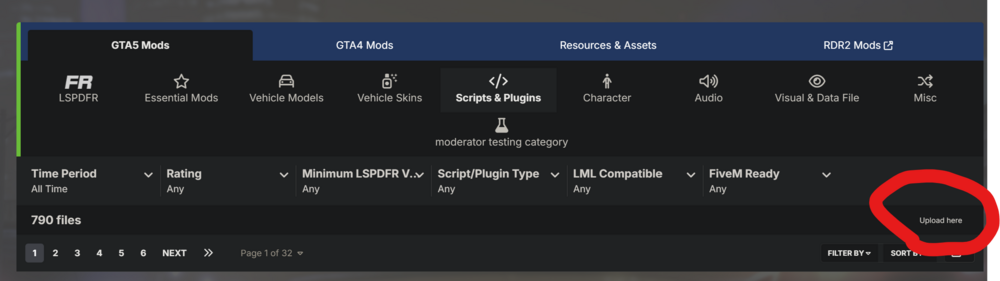
-
Your topic has been moved to LSPDFR 0.4 Support. Please post in the correct location in the future.
-
Your topic has been moved to LSPDFR 0.4 Support. Please post in the correct location in the future.
-
I cannot reproduce this problem with stock LSPDFR, so I can only assume it's Ultimate Backup or another plugin doing something it shouldn't be.
-
Your topic has been moved to LSPDFR 0.4 Support. Please post in the correct location in the future.
-
The problem is your inherent ability to upgrade over time isn't going to be much. You could upgrade GPU, but it will be likely bottlenecked by the CPU. I don't know how much of an upgrade path there is for that Xeon range, but its on DDR3 which suggests it's a little older now. I agree with Yasd that you can probably run medium, but I don't think you'll be able to upgrade this system too much if that's what you're hoping to down the road. There's a whole world of PC games out there, I really wouldn't get a PC that can just run GTA V, a very old game on medium, if budget allows
-
There's no way of changing character name at the moment, but you can create another and delete the old character.
-
Make sure you haven't set any silly compatibility mode on GTA5.exe.
-
You can no longer use GTA V on Win7/8.
-
Your topic has been moved to GTA V Support, this is not LSPDFR related. Please post in the correct location in the future.
-
you are on the website now?
-
Your topic has been moved to GTA V Support, this is not LSPDFR related. Please post in the correct location in the future.
-
-
No. It's not the latest. The latest is v3351.0.
-
The latest, which you should be on automatically via Steam, Epic or Rockstar Launcher. Verify your game files on the appropriate platform if somehow you are not on the latest version.




