



Bear82
Members
-
Joined
-
Last visited
Everything posted by Bear82
-
-
 It seems to work with version 1.2.0, thanks a lot! Also, thanks for adding more WAV files, great stuff! Perhaps in the future, it could be adjusted so that the sound is automatically read from the vehicles.meta --entry --> <vehicleMakeName>FORD</vehicleMakeName>.
- 18 comments
- 2 reviews
-
-

- 1
-
-
I’d be happy to take a photo of it later. It happens as soon as I hit an obstacle at high speed. The physical injury aspect is correct, but I don't remain seated. I'm standing inside the vehicle. However, if I'm the only one experiencing this, it must be due to another mod.
- 18 comments
- 2 reviews
-
-
- 1
-
-
-
-
Great, finally a seatbelt mod that works for me. Thanks for that! The only issue is that upon impact, I end up standing in the middle of the vehicle instead of staying seated. Is this just happening to me, or has this already been identified and is a solution being worked on? Many thanks.
- 18 comments
- 2 reviews
-
-
- 1
-
-
 I just wanted to politely inquire whether work is still being done on the project regarding these two points? - It's great that the windows are automatically adjusted, but could there be a check to see if the windows were already down and if they should remain that way? - Even when a female driver is patrolling, a male voice still plays. Thank you!!!
- 39 comments
- 5 reviews
-
 2.121 I've now tested it with men and women, but nothing works "SavedTattoos.dat" = ´`` or in the "SavedTattoos.json" = { "Male": { "tattoos": [] }, "Female": { "tattoos": [] } } saved, is there a solution for this? RagePluginHook.log:
- 16 comments
- 2 reviews
-
.thumb.png.b9e18d9931090871b064059f2c315cf8.png) If that’s okay, I can look up the coordinates over the next few days and send them to Ricy via PM so this thread doesn't get cluttered.
If that’s okay, I can look up the coordinates over the next few days and send them to Ricy via PM so this thread doesn't get cluttered.- 703 comments
- 24 reviews
-
-

- 1
-
-
-
 A great replacement and, above all, an expansion for the police computer/system. Excellent for customizing and translating!!! THANK YOU VERY MUCH
- 394 comments
- 40 reviews
-
-
 Thanks a lot for the update and the work you put into it! It's working for me now, too.
 -
Thanks a lot for the update and the work you put into it! It's working for me now, too.
-
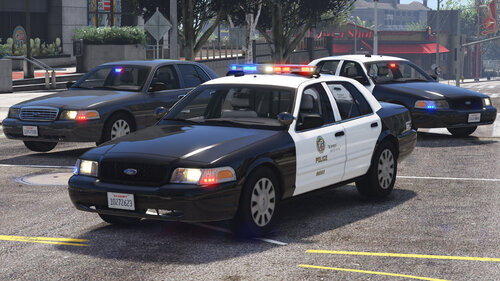 I love this car – all the more... all the better. Thanks! Now just need an ELS version :)
 -
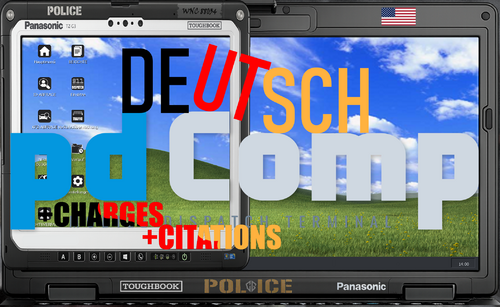 Hey, ich habe mich gegen Nexus MDT entschieden, da es nur mit Fenstermodus (Rahmen / ohne Rahmen) verwendet werden kann. Außer es wurde in den letzten Wochen angepasst? Und ich muss sagen, dass bei pdComp viel im Hintergrund abläuft, was evtl. auf dem ersten Blick nicht wirklich auffällt - wie zb das mit den Richtern und Staatsanwälte. Im großen und ganzen werde ich erstmal keine Übersetzung für Nexus MDT bereitstellen. Aber ich schaue es mir gerne die nächsten Wochen an, und wenn ich etwas Luft dafür habe und es relativ schnell umsetzbar ist, könnte ich darauf zurückkommen. Man muss aber auch dazu sagen, dass machen Begriffe einfach nicht übersetzbar sind - gibt es bei pdComp auch.
 -
Hi everyone, I have a question about the displayed panel: No matter which key I assign to "ToggleUIKey=", I can't get the panel to hide. If I switch "ShowUIWhenEnteringVehicle" to "false," it disappears, but then I can't get it to show up again, regardless of the assigned key. The VehicleSirenSetup.xml file is set up correctly, as is the folder structure, and there are no errors in the RagePluginHook.log. I’d be very grateful if anyone has a tip.
-
 Thanks for the feedback! By "Z," I meant this spot: "Press Z to see what zone you are located in."
- 19 comments
- 1 review
-
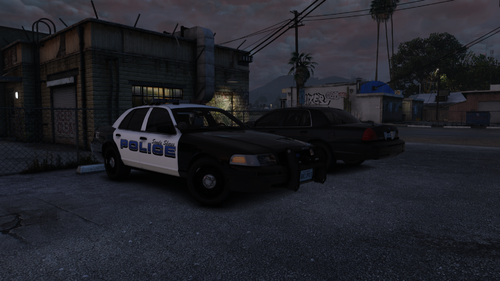 I love the Crown Vic—thanks for that! I just noticed that the speedometer needle isn't visible; do I need to adjust something in a meta file? Also, when there is front or rear-end damage, some LEDs appear larger and stick out into the air, far away from the vehicle.
- 10 comments
- 1 review
-
It sounds interesting and adds to the patrol experience. I have three questions, since I’m already using two similar plugins: a) Is there a setting in the .ini file to pause the plugin when I’m in a "scene" or marked as "busy"? b) Can I specify a time interval in the .ini—for example, having the trigger fire every 30 or 45 minutes? c) Can an additional key be assigned alongside "Z"? I’m running out of available keys to map things to. If these features or ideas aren't already included, they might be interesting for future updates. Many thanks!
- 19 comments
- 1 review
-
 That’s a very interesting feature you’ve developed. Often, you get positive feedback regarding a vehicle, but the owner isn't actually there to interact with. Does this enhancement kick in during specific callouts to allow the investigation to continue? Does *ComputerLite* need to be used to spawn the ped or enable GPS tracking, or can any system be used?
 -
 Thanks for improving the tow trucks. They now spawn correctly with hooks, but two additional drivers are spawning in the middle of the road nearby (see image). Also, two tow trucks are showing up in the menu:
- 736 comments
- 56 reviews
-
Dies ist nur die deutsche Übersetzung, das Original von CossackGames „pdComp — Police Computer for LSPDFR“ wird benötigt: https://www.lcpdfr.com/downloads/gta5mods/scripts/54106-pdcomp-police-computer/ Charges: MIT ÜBER 3.500 Zeilen an Anklagepunkte (i.V.m. Paragraphen, Beschreibungen & Erklärungen) Citations: MIT ÜBER 1.800 Zeilen an Verstöße & Verwarnungen (i.V.m. Paragraphen, Beschreibungen & Erklärungen). Deutsche Richter, Staatsanwälte & Verteidiger 💳 Führerscheine / Driver License USA inkl. VETERAN & DONOR Ich habe noch ein paar Grafiken inkl. icons hinzugefügt/angepasst, wobei die icons „court-docket, home, new-citation, ped-lookup, reports und settings“ aus einer alten Version von pdComp stammen. Beim Führerschein gibt es zwei Versionen, hier müsst schauen welche euch von den beiden mehr zusagen (Driver License / Driver License CA --> Erweiterungen in BEARBEITUNG) und gegebenenfalls den Namen ädern oder in der ini hinterlegen. pdComp - Deutsche UI-Übersetzung & Erweiterter Katalog [v1.0] Zukunftssicher ab Version v0.3.4+ (Komplett in reinem UTF-8 für fehlerfreie "ß" -Darstellung) Bringe dein deutsches Streifenfeeling in LSPDFR auf ein völlig neues Level! Dieses Paket liefert eine professionelle Übersetzung für das hochkomplexe Dienst-Tablet- und Notebook-Plugin pdComp. Alle Menüs, Buttons und das Vorgesetzten-Feedback wurden ins behördliche deutsche Rechtssystem übersetzt. Zusätzlich wurden alle historischen Delikte aus klassischen Katalogen (wie in meinen anderen Übersetzungen für z.B. CompuLite und ReportsPlus) präzise in das Justiz- und Gerichtssystem der v0.3.3+ integriert. Jedes Delikt wurde mit den korrekten Flensburg-Punkten, Euro-Preisen und Justizgewichten (courtWeight) ausgestattet! 💳 Geplante Führerscheine / Driver License: + VETERAN & DONOR ✨ Besondere Features: 📦 Modularer & zukunftssicherer Aufbau: 🛠️ Wichtige Empfehlung für deine config.ini: Hinweis zum Euro-Zeichen: An einigen Stellen (direkt in den Auswahllisten) wird systembedingt weiterhin ein "$" angezeigt. Dies liegt an der Hartcodierung im Quellcode (.dll) des Plugins und kann über Textdateien nicht geändert werden. Ein riesiges Danke an die gesamte Community. Gute Fahrt im Dienst, Cops! Mit freundlicher und kompetenter KI-Unterstützung aus meinen anderen Übersetzungen angepasst und integriert. Falls ein Bedarf an Änderungen / Anpassungen besteht, bitte mit mir absprechen! Alle Projekte von mir: https://www.lcpdfr.com/downloads/gta5mods/datafile/52602-policing-redefined-%C3%BCbersetzung-denglisch-suchergebnisse/ https://www.lcpdfr.com/downloads/gta5mods/misc/52603-compulite-%C3%BCbersetzung-deutsch-geb%C3%BChren-straftaten/ https://www.lcpdfr.com/downloads/gta5mods/datafile/50183-vehshare-license-plate-background-for-vehicles/ https://www.lcpdfr.com/downloads/gta5mods/misc/50339-stop-the-ped-deutsch-gegenst%C3%A4nde-search-items/ https://www.lcpdfr.com/downloads/gta5mods/datafile/50289-corpse-to-bag-deutsche-%C3%BCbersetzung/ https://www.lcpdfr.com/downloads/gta5mods/datafile/49506-reportsplus-deutsche-%C3%BCbersetzung/
-
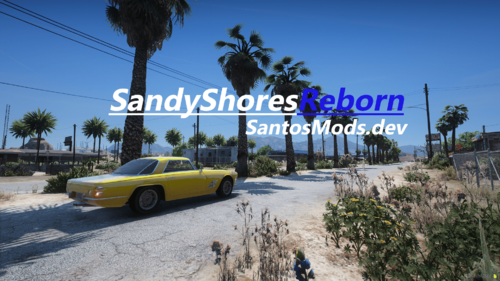 Thank you so much for creating and sharing! Are the traffic lights meant to be functional, or are they purely for aesthetic purposes?
 -
GREAT, it's not jerking anymore, THANK YOU! Just one small thing: when moving the "check vehicle" window, sometimes the license plate is there and sometimes not - depending on how it's moved back and forth or resized.
- 394 comments
- 40 reviews
-
-
- 1
-

.thumb.png.b9e18d9931090871b064059f2c315cf8.png)




