




Bear82
Members
-
Joined
-
Last visited
Everything posted by Bear82
-
 That update sounds really great! I'll give it a try later. I'm most excited about the direct units from the immediate vicinity finally getting involved, as well as the assigned zones. However, if I understood correctly, if I use backup units via PR, this won't be taken into account, since—by default—it is only triggered through LSPDFR?
 -
-
-
 Hey, I just wanted to quickly ask if future updates could include the option to translate the menu/interface into another language. Or have I overlooked a file? Thanks a lot for your work! I've noticed something: the first call always remains active, and all subsequent calls are routed through the first one. This means the callout name always remains the same as the first callout. It was determined that the problem lies with some callouts!
- 398 comments
- 45 reviews
-
-
 A question that might be related to this topic: Why should an old version of "ScriptHookVDotNet3.dll" be used? I have a feeling that this will cause some other scripts/addons to malfunction or generate errors. Thank you
- 47 comments
- 1 review
-
-

- 1
-
-
 Thank you for the tip, but unfortunately no. I have "ScriptHookVDotNet-v3.7.0-nightly.126" and the ScriptHookVDotNet.log says (maybe this will help): [DEBUG] Successfully compiled LAStreetNames.cs using API version 3.7.0. If you find the script not working as the author(s) intended, you could annotate an API version by adding a dot and a single-digit number for API version before the extension (e.g. "LAStreetNames.2.cs"). [INFO] Found 1 script(s) in LAStreetNames.cs resolved to API version 3.7.0 (script assembly version: 0.0.0.0, target API version: 3.7.0). [DEBUG] Instantiating script LAStreetNames ... [INFO] Started script LAStreetNames. Unfortunately, I can't make sense of this, as there are several such entries.
 -
Thank you for the adjustment! Unfortunately, the entire display disappears after the update. If no one else is having this problem, it must be due to me or some other mod.
-
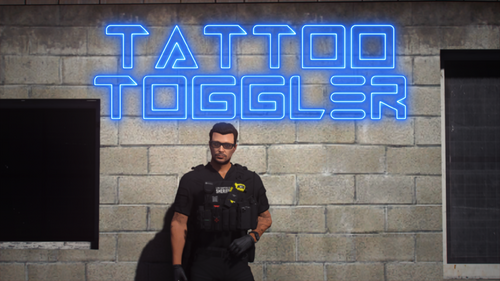 I assume so, since I'm using the character created by LSPDFR. Or am I making a mistake?
- 16 comments
- 2 reviews
-
Really great expansion, thanks for that! I'm having trouble saving/loading though - does anyone have any ideas? RP log: [5/2/2026 1:01:50 PM.619] Tattoo Toggler: [NORMAL] TattooToggler: [SavedTattoosManager] Loading saved tattoos for gender: GENDER_FEMALE [5/2/2026 1:01:50 PM.619] Tattoo Toggler: [NORMAL] TattooToggler: [SavedTattoosManager] No saved tattoos found for gender: GENDER_FEMALE [5/2/2026 1:02:19 PM.845] Tattoo Toggler: [NORMAL] TattooToggler: [SavedTattoosManager] Saving 0 tattoos for gender: GENDER_FEMALE [5/2/2026 1:02:19 PM.845] Tattoo Toggler: [NORMAL] TattooToggler: [SavedTattoosManager] Save successful for gender: GENDER_FEMALE [5/2/2026 1:02:30 PM.128] Tattoo Toggler: [NORMAL] TattooToggler: [SavedTattoosManager] Loading saved tattoos for gender: GENDER_FEMALE [5/2/2026 1:02:30 PM.128] Tattoo Toggler: [NORMAL] TattooToggler: [SavedTattoosManager] No saved tattoos found for gender: GENDER_FEMALE [5/2/2026 1:02:33 PM.425] Tattoo Toggler: [NORMAL] TattooToggler: [SavedTattoosManager] Saving 0 tattoos for gender: GENDER_FEMALE [5/2/2026 1:02:33 PM.426] Tattoo Toggler: [NORMAL] TattooToggler: [SavedTattoosManager] Save successful for gender: GENDER_FEMALE SavedTattoos.json: (remains empty) { "Male": { "Tattoos": [] }, "Female": { "Tattoos": [] } }
- 16 comments
- 2 reviews
-
Great stuff, thanks! Now LA is more realistic! A suggestion for the future: Adjustments (size, position, maybe color) Thank you very much.
-
Hi everyone, Is automatic virus scanning no longer being performed? It says (VirusTotal: NotScanned) on every download page I visit. - See screenshot:
-
 Alles gute zum Geburtstag 🎊 🎁 Danke für den Insi
 -
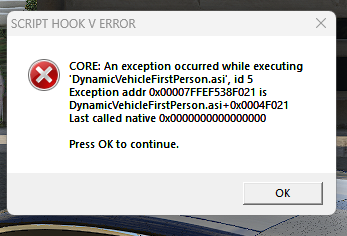
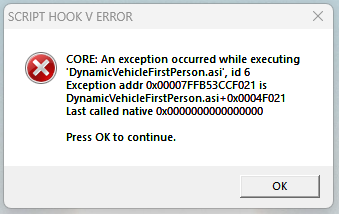
I just noticed that this affects almost all .asi files in the main folder as well as subfolders - such as VStancer, DynamicVehicleFirstPerson, A.G.S and/or LeFixSpeedo, etc.
-
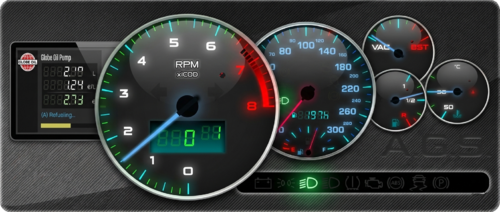 Same here: AGS v1.0.2209.26 ErrorLog started on Thursday, April 2, 2026 2:05 PM >> [02:05:22.576] > > DLC AGS not present or loaded. A.G.S. cannot run without legs. Exiting AGS v1.0.2209.26 ErrorLog started on Thursday, April 2, 2026 2:22 PM >> >> AGS v1.0.2209.26 ErrorLog ended on Thursday, April 2, 2026 2:25 PM AGS v1.0.2209.26 ErrorLog started on Thursday, April 2, 2026 2:27 PM >> >> AGS v1.0.2209.26 ErrorLog ended on Thursday, April 2, 2026 2:29 PM
 -
If anyone can help, I would be very grateful! I've tried it two more times now, upgrading from the previous version to the new one, but unfortunately, I keep getting the same errors. Error 1: when LSPDFR loads automatically after starting the game. Error 2: when I get into the car. 1 New UPDATE RagePluginHook.log asiloader.log ScriptHookV.log
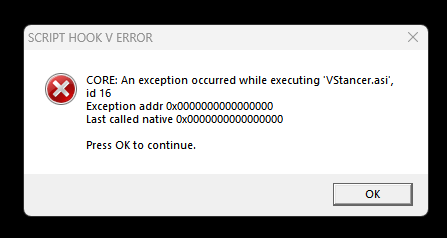
-
Old game version just tested without error message: RagePluginHook -Version before update.log
-
RagePluginHook.log Yes, AdvancedHookV is still installed. I'm just seeing something about "A.G.S.: ...memory is corrupt". But this worked in the old version – and there isn't a new gameconfig or anything like that yet. RagePluginHook.log Even if I remove A.G.S., the error message still appears.
-
Hello everyone, I updated the game including lspdfr_049_9572, ScriptHookV_3788.0_1013.33, and ScriptHookVDotNet, but I keep getting the same error message, or some things just stop working. Even if I remove the affected extension, the same error occurs, only with the name of the next extension (I think it only affects .asi applications). I also removed and reinstalled the ASI Loader and OpenIV.ASI via "OpenIV"—but without success. Can anyone help? I would be very grateful! Pasted content
-
.thumb.png.04d34e402e1b5c69bba1e7f450179ac7.png) It's great that there's already an update, also regarding the optimization – I had noticed that too. I'm looking forward to testing it later. Thanks for your work!
It's great that there's already an update, also regarding the optimization – I had noticed that too. I'm looking forward to testing it later. Thanks for your work!- 81 comments
- 3 reviews
-
-

- 1
-
-
 What exactly confuses you about my question? Perhaps I didn't express myself clearly enough; I'll try again. Does Policing Redefined have its own file regarding the unloading of prisoners, like Arrest Manager, or does it use the "DropOffPosition" from lspdfr/data/stations.xml? Unfortunately, not all positions are displayed or usable for me.
- 740 comments
- 58 reviews
-
A question about unloading prisoners: is this step taken from the LSPDFR station file? I couldn't find anything about it in the guide. Thank you!
- 740 comments
- 58 reviews
-
-

- 1
-
-
-
-
I have two questions regarding the settings in the "RoadWorthy.ini" file: How high and in what format can "ProcessIntervalMs=2500" be set – for example, to 99999 or must it be written as 99.999? Does the format for "EXCLUDEDMODELS=POLICE,POLICE2,POLICE3," have to be maintained, or can it be broken down into sub-mods – for example: POLICE, POLICE2, POLICE3, ? Thank you
- 47 comments
- 1 review



.thumb.png.04d34e402e1b5c69bba1e7f450179ac7.png)
