



.png.21c42c10539be5c9a4695b9f1f08fd95.png)
cherryaerie
Members
-
Joined
Everything posted by cherryaerie
-
Instead of posting the crash report, please try posting your RagePluginHook.log, a text (txt) file found in your main directory by uploading the file via drag and drop in a reply. Also try launching the game without RPH first.
-
In relation to your crash, your game crashed when loading your sheriff2 model. Give that a lookover. It is likely that either you have a bad vehicle, or something you modified, like the vehicles.meta lines associated with the model, is something the game does not like. In relation to your losing textures, I only really have 2 options for you. Install a Resource Adjuster. Go to Grand Theft Auto V/lspdfr and find lspdfr.ini (text/txt file) and change Main.PreloadAllModels to false. Otherwise, I unfortunately do not know much about graphical issues like texture loss, as I personally never come across it. Someone else, if those do not work, is very welcomed to lend you a hand on that portion 🙂
-
Please post your RagePluginHook.log, a text (txt) file in your main directory, so myself or someone else can help you 🙂
-
Post your RagePluginHook.log, a text (txt) file found in the main directory. As well, not all developers have a LML supported version of their vehicles, so it is entirely possible LML installed the vehicle incorrectly, causing the game to crash, or there is something with the vehicle download you installed that the game itself does not like, like a faulty vehicles.meta.
-
Foremost, typing in all caps does not get you any faster of a response and other people are likely not to respond to you in the first place. Completely unnecessary. In relation to your issue, you're missing defaultregions.xml from Ultimate Backup. Redownload this and install it correctly.
-
Typing in all caps does not get you a faster answer, you're just lucky that someone happened to come across this post in a relative manner and is willing to assist you 🙂. Anyways, I am not quite sure what you mean by this, as there was likely an issue with you translating from Italian. Can you post screenshots of your issue, or your RagePluginHook.log file from the main directory so we can better understand you?
-
Make your own thread, this is quite old. Myself or someone else will read it and help you 🙂 Be sure to present a screenshot of the message as well.
-
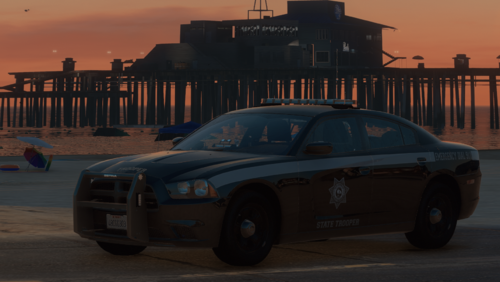 Amazing looking cars, as always. Though a question, I converted this to an addon supplement instead of replacing my vehicles, though, I am not sure if this is something I did with my graphics, my converting it, or if it is a simple texture thing. I only have this with the CVPI, where the wheels appear a glossy chrome like tint, no matter the time or the weather. I am not quite sure what would cause that, and I wasn't exactly wanting to convert the CVPI back and replace a slot, as I don't have an unmodded police slot. Any input would be great! (Edit: This has been resolved, missing texture files for the vehicle that was provided by the developer. Not quite sure if I lost them somewhere in transit when making the addon version or if that was an issue with the initial vehicle.)
 -
Update RageNativeUI.
-
Rename your mods folder to _mods and reload. If this loads successfully, there is an issue with something in your mods folder. Undo or uninstall any changes you have made to this folder recently. Try launching the game without LSPDFR. If it does not load, verify the integrity of your game files. If it loads, try reinstalling LSPDFR manually.
-
You should install the one from here. You should almost never install the ones provided in downloads as most of the time, they are outdated.
-
Find the vehicles.meta outside the mods folder, this should be located at update\update.rpf\common\data\levels\gta5. Export this to a safe location, such as your desktop, find the file in your mods folder (mods\update\update.rpf\common\data\levels\gta5) and replace/import the file you exported earlier.
-
Not exactly. I am saying if you have no idea what you modified or installed that is causing your game to crash, and you have taken the measures to uninstall or undo changes leading up to the crash, then you delete and restart the mods folder. If you can avoid deleting the mods folder, its better to do so.
-
Anything outdated, there isn't an "official list" of outdated mods or 'plugins that make lspdfr crash'. I would double check the comments section of each mod, and search online if you have doubts. There are plenty of things that are outdated, though everyone has their own issues.
-
Simply go to the file location pathway outside your mods folder and either copy them to the mods folder, or export the files to another safe location temporarily, find the files in the mods folder, and import the ones you exported. If that does not work, please attach your RagePluginHook.log, a text file (txt) in your main directory, so myself or someone else can better understand your issue to help you!
-
Please attach your RagePluginHook.log, a text file (txt) in your main directory, so myself or someone else can better understand your issue to help you!
-
You have done something to your police model that the game cannot load, which causes it to crash. If you have modified your vehicles.meta or something associated with it recently, I would ensure you have modified the file correctly for the police model.
-
The install pathway is correct. If you are 100% positive they are not there, which they should be, you can go to the same pathway outside your mods folder, export the weapons file, and import it into your modded one.
-
That is an error revolving around something you installed or made changes to in the folder. Undo anything recent, it is essentially impossible for me to tell you what mod or file is exactly causing the issue. Unfortunately worst comes the worst, you redo the entire mods folder.
-
A few things here. First things first; Deadly Weapons; is not a script. Remove it from the scripts folder and redownload it. The two files you have there belong is plugins/lspdfr, though there are more files that need to be installed in the plugins folder and the main directory for this. SImpleHUD; Reinstall this. You are missing the LemonUI files that are meant to be in the scripts folder. WYD (Watch your death); I cannot find anything online about anymore. I would personally recommend removing it as I am not sure this works as a script anymore anyways. You can try the steps I provided in the second part of this before removing if you'd like. Engine Failure; is also not a script. A plugin by Faya that needs to be installed to the plugins folder. Now, your actual scripts. No more Money Pickups, Radar Zoom & Scenario Groups; Make sure you have each of the dependencies and updated requirements. Also make sure you have installed Microsofts Updated .NET Framework and your VSC is installed correctly, in addition to being updated correctly. If this does not work, provide your ScriptHookVDotNet.log from your main directory. This is located under the ASI file.
-
(For English users, asking if they can animate the bus sign, which is static, from a mod implemented in older GTA's) No, unless there is a bus model mod somewhere that allows this. There isn't any mod otherwise to change the GTAV buses because there is no sign to animate there in the first place. It's a static image. If you have ZMOD, then maybe. I would ask in the development forum though. Não, a menos que haja um mod de modelo de ônibus em algum lugar que permita isso. Não há mod para alterar os ônibus do GTAV porque, em primeiro lugar, não há sinal para animar lá. É uma imagem estática. Se você tiver ZMOD, então talvez. Eu perguntaria no fórum de desenvolvimento. https://www.lcpdfr.com/forums/forum/892-tutorials-questions/
-
Well, no. Because everyone's mods folders are different to suit their own needs and purposes. Like mine very likely will not match another persons. Even if someone wanted to, they can't because they are then reproducing files almost every mod author does not want someone redistributing. My advice is to make sure you are reading the readme files associated with the download on how to properly modify specific files. You need to have a mods folder, never modify the base game files. You shouldn't ever have to reinstall the game if you are making changes to the mods folder.
-
At least on some of the vehicles, the text on the rear passenger doors say "proudly serving", usually aligned with their precinct. For example, "Proudly Serving West Hollywood". Not all vehicles have this, for example miscellaneous subdivisions like K9. On the front of most LASD vehicles, it's "A tradition of Service Since 1850". Again, not all vehicles have the back passenger door rear text.
-
Do you happen to have NVE installed? You will need to install the LSPDFR compatibility patch within the NVE download. This will delete your ScriptHookV.net files, so you will need to reinstall them. You can safely reinstall them without breaking the compatibility patch, I am not entirely sure why it removes them. If you do not have NVE, can you post a screenshot(s) of your main directory and scripts folder?
-
Nobody's just going to straight up provide game files that aren't modifications of those files. If you deleted it from your mods folder, simply find the dlc you deleted and copy it to your mods folder. If you deleted it from outside your mods folder, verify the integrity of your game files. I should mention this will not fix your EUP issue, as you will need to reinstall EUP to get those modifications back.
.thumb.png.2dde6de0042b025b695ed82f6d2c1e50.png)


