



.png.21c42c10539be5c9a4695b9f1f08fd95.png)
cherryaerie
Members
-
Joined
Everything posted by cherryaerie
-
Either a bad car pack, or there was a simple error with something you did inputted in the file, like adding a character where there was not supposed to be a character. If you still have the modded version you had before changing it out, you can try running it through an XML validator like Code Beautify and see if it mentions anything is inputted incorrectly, if it doesn't give you anything, then it is likely your car pack or another addon you added, like something that modifies the map.
-
Start off by renaming your mods folder to _mods and see if the game loads. Most frequently this is the result of your update.rpf files in the mods folder having something either corrupted or conflicting, or the file in the folder is out of date, which you can fix by simply deleting the file from the mods folder and copying the one from the vanila folder. I would just undo any recent changes you have made to the mods folder. You can also try installing a Gameconfig and see if that helps, as it could just be the fact that you installed a vehicle pack that game cannot load at the moment. If not, verify the integrity of your game files.
-
A reinstall of OpenIV won't fix broken XML files. You modified one recently that has a variable that was supposed to be something else. If you have an idea of what you have modified or installed recently, you can copy paste the contents into an XML validator, like XML Validation or Code Beautify to validate the files, check where the issue is at by the indicators, and change what it tells you through OpenIV.
-
Unfortunately, the AIs jumping curbs and what not is part of the GTAV pathing the game has, so they just follow that to the best of their ability. It really depends on location, as that seemingly happens more in city limits compared to the county limits. If you are looking for better pullover locations, I would recommend the Better Pullover Mod. For the traffic stop canceling, this is your traffic stop keybind, which you also used to initiate the stop. You can change this by visiting key.ini in Grand Theft Auto V/lspdfr and finding the TRAFFICSTOP_START_Key= value.
-
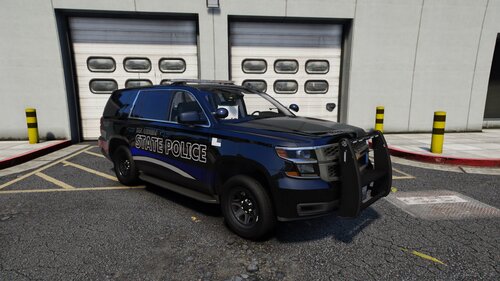 Well, yes, because chargers are different in their model designs. I just ended up checking, this livery fit a 2017, 2019 and a 2020 Tahoe, though I apparently have little Tahoe's in my game. There was also a 2019 SSV I tried, and it had a different mapping that was slightly different because the UV mapping (templates) are slightly different, so the hood text "state police" showed on the sun visor, but the rest of the car was normal. 2021 Tahoe's are the newer ones with the body I believe you are speaking of. Not every vehicle is going to have the same mapping as others, and again it all depends on the person making the vehicles. A 2020 charger isn't the same as a 2014 or "special" edition chargers, like the scat pack. Though I will say, there are not many templates for free vehicles (Tahoe wise) that I have seen.
 -
You've installed or modified an XML file recently that has a \ at line 22 where there is not supposed to be one. I am not sure where or what file otherwise is causing the issue.
-
Typically, especially for the Tahoe, there isn't much of a difference and it shouldn't depend on the year. To my knowledge for example, the 2020 Tahoe vs the 2018 have no exterior/interior differences, except for the wheel packages and some other performance things. It is more dependent on what the developers OV mapping is, or in simple terms templates as you know them. It's really the same for all models. Obviously a 2014 Tahoe isn't the same as a 2018 body shape wise, like a 2014 Ford Explorer isn't the same as a 2018 body wise. In terms of looking for the Tahoe, anything between 2015-2018 will work, just find a model that uses the same mapping or template, like the one SGN provided by ED.
-
If it successfully loads with the mods folder with it renamed, it is a problem with something you installed or a file you modified. This is not per say the vehicles you installed, as it won't load the models with the mods folder renamed. Undo anything you have changed or installed recently. I cannot tell you exactly what to remove or modify elsewise.
-
On the very last one, 'unmarked20'. You are missing a >, so it should be <Item>dlcpacks:/unmarked20/</Item>
-
Install the latest version of Callout Interface, and make sure you install CalloutInterfaceAPI to the correct location. You can also find the file in any callout interface integrated callout pack.
-
You have an issue with loading a vehicle model with hash 0x8a63c7b9, which is your police4. This can be anything related to the model, likely the vehicles.meta if you have recently modified it. It is essentially impossible for me to tell you exactly what is wrong with the model. Try undoing any recent changes you have done to police4.
-
Well, your log is indicating on several occasions there was an issue hiding ambient game blips. Fix this by visiting lspdfr.ini (configuration file) in Grand Theft Auto V/lspdfr and change Main.DisableGameBlipHiding to true instead of false. If this does not work, please attach a new log. This was a 'spammed' warning message.
-
I would recommend removing Speedy Pursuit as it has been "retired" and issues have been mentioned with it elsewhere. If it still happens after 1 or 2 pursuits, please report back with a new log in case something else has changed.
-
 I mean... it does tell you in big highlighted bolded text at the top of the description it is a deprecated plugin and only works for older versions of LSPDFR...
- 3,646 comments
- 306 reviews
-
-

- 5
-
-
Do you have a compatible version of RagePluginHook, and the proper requirements for the 2845 version? If you have a RagePluginHook.log from your main directory, a text file, please attach it when you reply. 🙂
-
Sirens will act this way for any vehicle that is not ELS integrated, which then uses the vanilla GTAV controls. The controls for lights, which sometimes will automatically activate sirens, is E. Changing the siren is J. If you are using DLS for non-els cars, make sure the cars are DLS integrated. I am unfortunately not familiar with DLS so I cannot accurately tell you anything about its installation unfortunately. As for ELS, ensure the vehicle is ELS compatible. The vehicle you downloaded should have came with files corresponding to the vehicles game name (ex; police) and is an XML file, which should be located in ELS/pack_default. ELS will not work with the default game vehicles unless you install some form of lore version online. Also ensure you have installed ELS and it's requirements, such as ScriptHookV, correctly.
-
This is typically a random crash, and is the result of a mod trying to use something such as a ped while another plugin was trying to use it, or it simply no longer exists. I see however you are active in a chase/pursuit when the crash had happened, are you actively chasing a subject, or are you doing another action like arresting? Does this occur for only a specific callout, if so, can you force the callout and try and see if it crashes again? I unfortunately cannot tell which callout you were active on. If the crash is inconsistent, you do not need to worry and you can continue as you please.
-
It's not exactly an issue per say. Depending on the model, some models may not allow for you to actually disable the coronas. To turn them, they should look something like the values below, being 0. <ACORONAS> <Headlights DfltPattern="0" ColorL="white" ColorR="white" /> <TailLights DfltPattern="0" ColorL="red" ColorR="red" /> <IndicatorsF DfltPattern="0" ColorL="white" ColorR="white" /> <IndicatorsB DfltPattern="0" ColorL="red" ColorR="red" /> <ReverseLights DfltPattern="0" ColorL="white" ColorR="white" /> </ACORONAS>
-
Если можно спросить, что сработало для вас? Рад слышать, что это сработало.
-
Yes, make sure it is updated and you have both RageNativeUI.dll and RageNativeUI.xml in the main directory. Download and install the one I linked. If you installed this from any mod you installed you may have an outdated version.
-
Well, a few things wrong. Follow each of the following steps as all of this is related to your crash and will not work otherwise. Firstly, completely reinstalled Callout Interface. You are missing 2 files here the plugin cannot find. Everything except for the readme should be dragged and dropped into your main directory. Surprisingly enough it spit this out about missing files for this mod several times. Install RageNativeUI. Nothing is going to load without this, and you are missing this file. Installed EUP Menu. EUP will not work or function as you wish it to without this. When launching RPH, hold your left shift key, wait around 10 seconds and change your Plugin Threshold Timeout value to 60000. When all of those steps are completed, if it still crashes, attach a new log like you just did as you will likely have a new issue if it breaks again.
-
Можете ли вы прислать скриншот папки "Плагины" (plugins), пожалуйста?
-
I do not know what error you are getting or what you downloaded, please upload your RagePluginHook.log, a text file in the main directory, in a reply so myself or someone else can understand what the potential issue could be. Your issue likely lies with the mods folder, though I cannot be sure without the log. You can try renaming your mods folder to _mods and see if that helps. If it does, it has something to do with the vehicle(s) you installed, or potentially whatever tutorial video file you downloaded.
-
Are your phone notifications in GTAV disabled, or have the mod to do so? When in game, go to Pause Menu -> Settings -> Notifications -> Phone Alerts and configure this to be on/true.
-
Have you installed RageNativeUI? If you have, please ensure it is updated from the link provided, if that does not work and it is updated, please provide your RagePluginHook.log, a text file in the main directory, so myself or someone else can attempt to help you further. 🙂
.thumb.png.2dde6de0042b025b695ed82f6d2c1e50.png)

