



.png.21c42c10539be5c9a4695b9f1f08fd95.png)
cherryaerie
Members
-
Joined
Everything posted by cherryaerie
-
*sigh* This is an inevitable post, but for those following the topic it (I guess) came a day early.
-
Yes, as long as you have the Patreon version, you should not have to worry about anything.
-
This is usually because two plugins are trying to handle one thing at once, or something was deleted a plugin is trying to look for. Unless this is a persistent issue, there is no need to worry. Also, Rreinstall or remove Automatic Siren Cutout. You are missing a file.
-
Install ScriptHookVDotNet. Make sure you install all of them to your main directory (except read me and liscense).
-
Move your plugin "SimpleCTRL.dll" to Grand Theft Auto V/plugins, along with its associated folder. After that, provide a new log. (Also complete the below, I somehow missed the better hit reactions line)
-
Apparently, at the moment, Epic Games Services is experiencing an outage, which includes a majority of their services. Stay up-to-date with the outage on their status page below, and let us know if thats a continuos issue after they have resolved the outage. https://status.epicgames.com/
-
Apparently, at the moment, Epic Games Services is experiencing an outage, which includes a majority of their services. Stay up-to-date with the outage on their status page below, and let us know if thats a continuos issue after they have resolved the outage. https://status.epicgames.com/
-
Unfortunately, I have only heard that the original Patreon version is safe. I switched from QuantV over to NVE because of the entire issue regarding that. As far as I know, its been mentioned that its been removed and yes, it was for removing pirated versions according to the developer. I still know people run it to this day, but it could be from versions that were before the entire malware thing. I switched over as there was a month period from when I started modding to when that allegedly happened, but I wasn't going to take the chance. TLDR unless you are planning to purchase it from the developers Patreon, which mind you is safe, then don't bother.
-
... Delete all the ones that Bastion asked you to remove except for Riskier Traffic Stops. Simply update that one. If Bastion had mentioned that you should remove a plugin, it's for good reason.
-
Many of those plugins are known to cause crashes, simply because they have been abandoned for over a year or other reasons. Downloading them again won't fix the fact that they are broken and outdated unfortunately. Like I said, you can keep Riskier Traffic Stops, just download the latest version, which you can find here.
-
You don't need to remove Riskier Traffic Stops, simply update it now, but the mods Bastion has listed are outdated and broken, which can cause problems to your game now or in the future.
-
Give Damage Tracking Framework an install, this is a dependency for Better Hit Reactions. If you still crash, please provide a new log.
-
Following up on what Lenny mentioned, I would recommend SimpleHUD over PLD, but that's really because I use it more. You can decide for yourself, but SimpleHUD offers customizability and looks significantly better than what PLD offers. I cannot say the same for Rages option though unfortunately as I have never seen it or used it. Alongside the Forests of San Andreas mod Lenny mentioned, I like to use LA trees, which add a variation of trees to the city area. There are other preferences such as replacing dirt roads with paved ones and colored street lighting, but I won't overwhelm you with those unless you want to try them out as its more visual preference. I have some ideas for you, though I would need to load LSPDFR and look at the callouts I have installed, as I haven't finished making a mods list unfortunately, though I do have some I tihnk you might enjoy regarding that. (686 isn't a bad choice at all though, so I highly recommend you give that a try)
-
Expected this to be a little longer of a release not going to lie lol
-
Thanks for catching that! Clearly just missed some 🙂 (DeLuca's is sort of difficult to differentiate from other "county callouts")
-
Rename your mods folder to _mods and try loading your game. If this works, there is an underlying issue with your mods folder. Verify the integrity of your game file, which will readd/replace any missing or corrupted files. Go to your game library -> GTAV -> Click the 3 dots that should appear here -> Manage -> Verify the integrity of your game files
-
Oh my... your issue is revolving around a callout I am telling you to remove in the.... lengthy list below. Remove; Reinstall/Update/Install; Other things;
-
I've never personally used the Liberty City maps, but sounds interesting!
-
From what it sounds like, it's an issue with your LODs. Each vehicle slot has its own unique LOD, in simple terms model rendering. If you have recently installed any vehicle metas or the like, that can cause that. You can either do this manually or install this mod for increased LODs, which is just a preset instead of doing it manually. I would only recommend doing that if you haven't made changes to the vehicles.meta or have changes you're willing to re-add. For doing it manually, follow the instructions I have provided below. Go to \mods\update\update.rpf\common\data\levels\gta5 Find and edit vehicles.meta Search for the model name of the car (Ex fbi2) Change the values of <lodDistances content="float_array"> for that model. Depending on the computer, you may only be able to handle certain distances or could experience performance drops, though I have never encountered that issue. (See spoiler for preset)
-
 Easily one of the best FHP packs out there. Simple, and straight to the point, and have not encountered any problems with the models so far (only been using them for about 5 days for about 4-5 patrols). I can't comment on accuracy as I am not from Florida, not that accuracy is the point of every model, but goes very well with the Florida theme I have been attempting to get to for a while now. Spectacular job!
- 132 comments
- 20 reviews
-
-

- 1
-
-
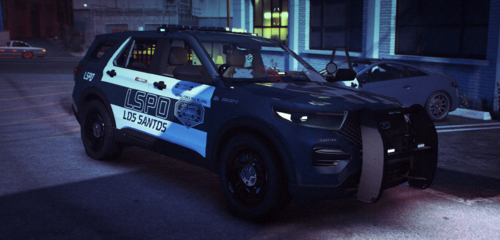 Love to see love for Cyberpunk!
 -
 Phenomenal vehicles. Only replaces vehicles I have used since release, and an amazing change from the constant LAPD lore. In the months I've used it, I have encountered 1 issue which, somehow, was on my end. Otherwise very well built pack.
- 239 comments
- 24 reviews
-
Tell them to install RageNativeUI to their main game directory.
-
Let's start off with some basics. If you have a mods folder, rename it to _mods and see if your game loads. If it does not, rename your folder back to mods and proceed to the next step. If it does, there is an issue with your mods folder. Please undo any recent changes made to your mods folder. Verify the integrity of your game files. This depends on if you have the Steam or Epic games version. For Steam: Find GTA in your Steam Library and right click on the menu. From there go to properties -> updates and verify the integrity of your game files. For Epic: Click the (...) button and within the drop-down menu select the verify option. Provide your RagePluginHook.log and a screenshot of your main directory in a reply if none of the above options work for you.
-
You can download a Tahoe that has it. Mine is from a 2020 Tahoe model, though most fit other models as it is similar in the base. You can try using the one I provided below, though I don't take credit for the creation of the template.
.thumb.png.2dde6de0042b025b695ed82f6d2c1e50.png)


