




Yasd
Community Team
-
Joined
-
Last visited
Everything posted by Yasd
-
Go to mods/update/update.rpf/common/data Open 'dlclist.xml', copy <Item>dlcpacks:/eup/</Item> and check if its in there
-
No stress, whenever you have time
-
if you need help, here are the links to it: https://ragepluginhook.net/Requirements.aspx
-
I recommend to reinstall l&o, better with a clean mods folder Double check if the l&o is in the dlclist.xml
-
Have you installed law and order?
-
Post the ragepluginhook.log from the main gta folder and give us more context of what’s happening…
-
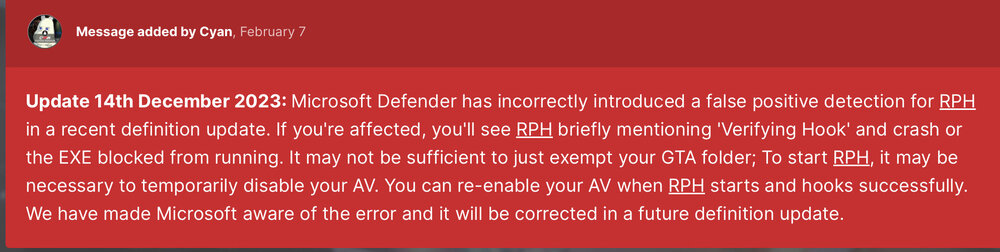
No virus, it’s a false flag because of the new update. You can add it as an exception in your antivirus.
-
this crash looks random, i suggest to install a custom gameconfig, heap adjuster/ resource adjuster
-
its the name of the folder you added otherwise see the documentation of the vehicle for addon vehicles
-
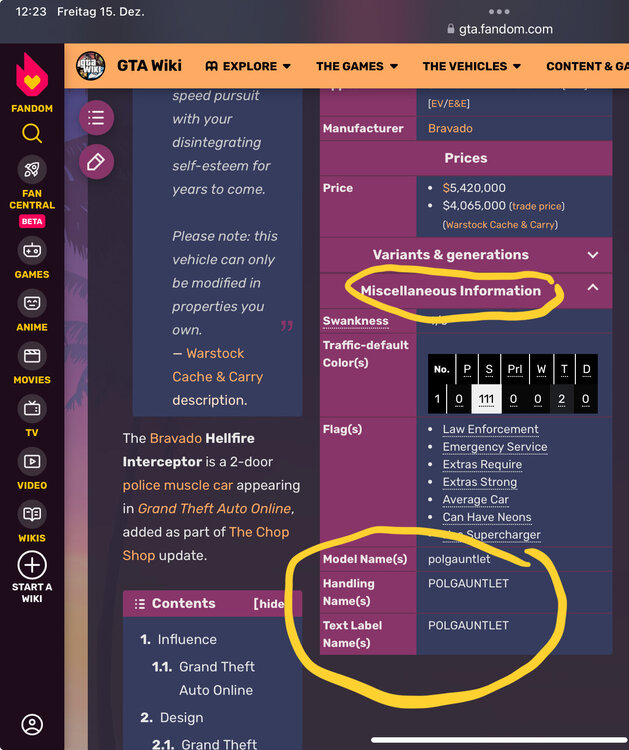
You can google the vehicle name and search for the spawn name. f.e. The new gauntlet interceptor google the name and go to https://gta.fandom.com/wiki/Gauntlet_Interceptor scroll down click on
-
1. Optional: Error while loading plugin D:\SteamLibrary\steamapps\common\Grand Theft Auto V\Plugins\SuperCallouts.dll Pls move SuperCallouts and all files that belong to it to GTAV/plugins/LSPDFR (Im just letting you know that you are not on the newest gta and lspdfr version, but right now there there is a gta update, so this would be a bad timing for upgrading anyway 🙂 ) Police Tape: Police Tape will now exit due to LML package/DLC missing. 2. Important: Looks like you have a broken vehicle named "police". Double check or remove it. It caused a crash.
-
Can you do that? First readd dinput8.dll
-
awesome, now we know that the problem is within an .asi file. first re-add dinput8.dll That means either directly an .asi file is causing the crash or a file that is loaded by an .asi file like ScripthookVDotNet, which loads all files in the scripts folder is causing it. for this folder you can rename it to _scripts to disable from loading. Now you have to find out which one is causing it (by f.e. removing each one after another or remove half of the files and see if it was in there) pls post the asiloader.log from the main gta folder
-
First of all, i understand your frustration, but i do this in my free time and i have other things to do, too, so pls be patient… i recommend to rename the mods folder to _mods do you use lml (lennys mod loader)? remove dinput8.dll temporarily to disable the .asi files now try only launching gta until it works
-
Post the ragepluginhook.log from the main gta folder
-
Looks like a permission issue, since you already disabled the mods folder. Check the faq under: I keep getting the “Insufficient Permissions or Bad Antivirus” message. What do I do? https://docs.google.com/document/d/1Hp2Qco0qsgKfohkhjYWUxTr2OF7NSCkp8uSZwWz6rRQ/edit?pli=1#heading=h.mg0mifebjf6 basically add the gta folder as an exception in antivirus and set the permission for the folder.
-
Can you play gta on its own?
-
-
what new mods have you installed?
-
rename your mods folder to _mods
-
The backup function does not work anymore. I recommend to search in YouTube for revert videos, which means you need to have a backup before restoring. i use the retail version (there is the steam and epic games version, too), but for retail I haven’t found a solution other than waiting for updates on lspdfr.
-
Hello! Update ragenativeui in the main gta folder: https://github.com/alexguirre/RAGENativeUI/releases
-
check the faq: https://docs.google.com/document/d/1Hp2Qco0qsgKfohkhjYWUxTr2OF7NSCkp8uSZwWz6rRQ/edit go to "RagePluginHook doesn’t open after double-clicking it. How do I fix it?" at page 6
-
rename mods folder to _mods and try again. if that doesnt work, rename the scripts folder to _scripts and temporarily remove the dinput8.dll file to disable .asi files.
-
go to \Grand Theft Auto V\lspdfr\chars and rename the chars folder to _chars




