




Yasd
Community Team
-
Joined
-
Last visited
Everything posted by Yasd
-
Hello! You are missing CalloutInterface, install it in the main gta folder, it comes with 686Callouts. The Following Plugins Need To Be Updated (3): 686Callouts, Installed: 1.6.0.0 - Latest: 1.8.0.0 ManiacCallouts, Installed: 1.2.6.0 - Latest: 1.3.0.0 SuperCallouts, Installed: 3.5.0.0 - Latest: 3.9.4.0 The Following Plugins Need To Be Removed (6): Arrest Manager, (Replaced by StopThePed) AssortedCallouts CalloutsV OP_Immersive_Dispatch, (Features included in GrammarPolice) RegularCallouts RichsPoliceEnhancements
-
Additionally install Pyro.common from SuperCallouts in the main gta directory.
-
if you still expierence that error, create a new topic, if you need help
-
-
you are propably talking about bejoijos plugins and this has nothing to do with "stable"...
-
-
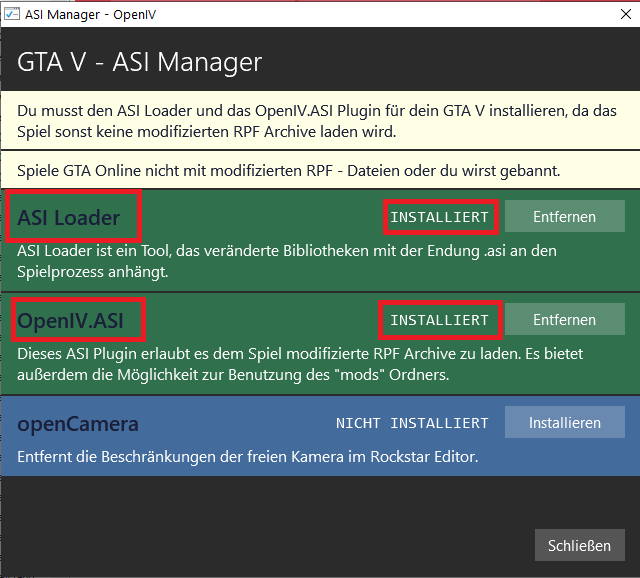
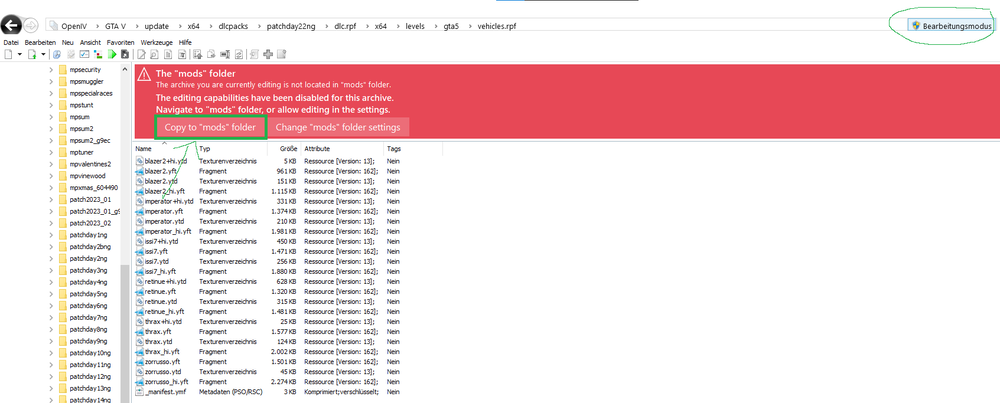
This could be story mode related. Install a 100%savegame or switch the character (without lspdfr/ rph running) and saveHi! To have the patchday22ng folder in the mods folder, you need: 1. Start OpenIV and go to ASIManager 2. Make sure you have ASILoader and OpenIV.asi installed. 3. Go to your path, which you want to have in the mods folder -> update/x64/dlcpacks/patchday22ng/dlc.rpf/x64/levels/gta5/vehicles.rpf -> make sure edit mode is activated, then you get a red banner which allows you to copy it automatically to the mods folder, click on it, then it jumps to the copied file in the mods folder

 this means the error is in the mods folder. you can "fix" this by reverting the latest changes you made or starting a new mods folderHi, you marked my post as the solution, can you tell me what fixed it for you?Since it’s an English forum, pls go ahead and start a new thread in English, so everyone can read it and help.Type: System.Int32, Reading section: "Miscellaneous", key: PluginTimeoutThreshold Read value: <null> Open RPH and hold shift until the rph windows opens. Or open RPH and click on the gear settings symbol. Then set the value for plugin timeout threshold to 60000. then try if it works now. Can you start gta on its own? If yes, disable the automatic loading of lspdfr plugin and load it manually via rph console once you are ingame. alternatively you can start gta alone and once the siren in the loading screen appear, alt + tab out and start rph then.Post the ragepluginhook.log from the main gta folder, and give us context of what you have done before it crashed.Wrong file, post the ragepluginhook.log from the main gta folder.Update RageNativeUI in the main gta folder, download here.i guess you installed it in the mods folder, try renaming the mods folder to _modsAs I told you yesterday, post context of whats going on... instead of just posting a file... Exception message: Access to the path 'D:\GTA\GTAV\plugins\lspdfr\LidarGun.dll' is denied. Yesterday you had the same kind of error, that looks permission related. go to the faq linked here to page 4 and do the steps. add the gta 5 folder as an exception in your antivirus GeForce Overlay, XBOX Game Bar & RivaTuner cause issues, disable them.Wrong file, post the ragepluginhook.log from the main gta folder and give us context what you have done/ installed before the crashException message: Could not load file or assembly 'Spotlight HeliAssistance requires Spotlight, install it:can you start gta on its own?what mod are you talking about?this step was to figure out if the mods folder causes the crash. i guess so, that means sth in it is causing the crash. revert the latest changes or start a new mods folder.Dont get irretated by the log, as you said you installed some mods before it crashed. You can rename the mods folder to _mods to prevent it from loading as a diagnostic step




