




Yasd
Community Team
-
Joined
-
Last visited
Everything posted by Yasd
-
you are missing DamageTrackerLib, install that:
-
what mods are you talking about? vehicles, graphic mods?
-
you do not have lspdfr installed. drag and drop the files from the lspdfr download under -> plugins -> mark 2 files named lspd first response.dll and .dpb and drag and drop them in the folder you screenshoted.
-
post a screenshot of gtav/plugins
-
Nice to have such an amazing team! 🙂
-
Post the Ragepluginhook.log from the main gta folder. Writing complete sentences with some details might help...
-
i cannot see a lspdfr crash in the log. the only error i can find is: [GrammarHandler] SpeechRecogitionEngine initialization failed!
-
some questions: - is gta opening at all when starting with rph? - can you open gta itself? - and what error message or window does appear?
-
ave you added it to the dlclist.xml?
-
crashed right after lspdfr is loading... you can try first start gta until you can move your character, then alt+ tab out and start rph. you can also try to disable auto load of lspdfr and once your ingame (with rph), laod lspdfr manually.
-
ManiacCallouts is requiring StopThePed, install it: https://www.bejoijo.com/post/stop-the-ped
-
For this log yes
-
Exception message: Could not find a part of the path 'C:\Program Files (x86)\Steam\steamapps\common\Grand Theft Auto V\plugins\LSPDFR\GrammarPolice\textures\radio'. Install GrammarPolice again fully and correctly.
-
Hey there! How are you doing? I hope you're not smoking all that weed there 😉 Exception message: Could not load file or assembly 'Spotlight HeliAssistance requires the Spotlight plugin:
-
You're missing ParksTools from BetterEMS, install that in the main gta folder.
-
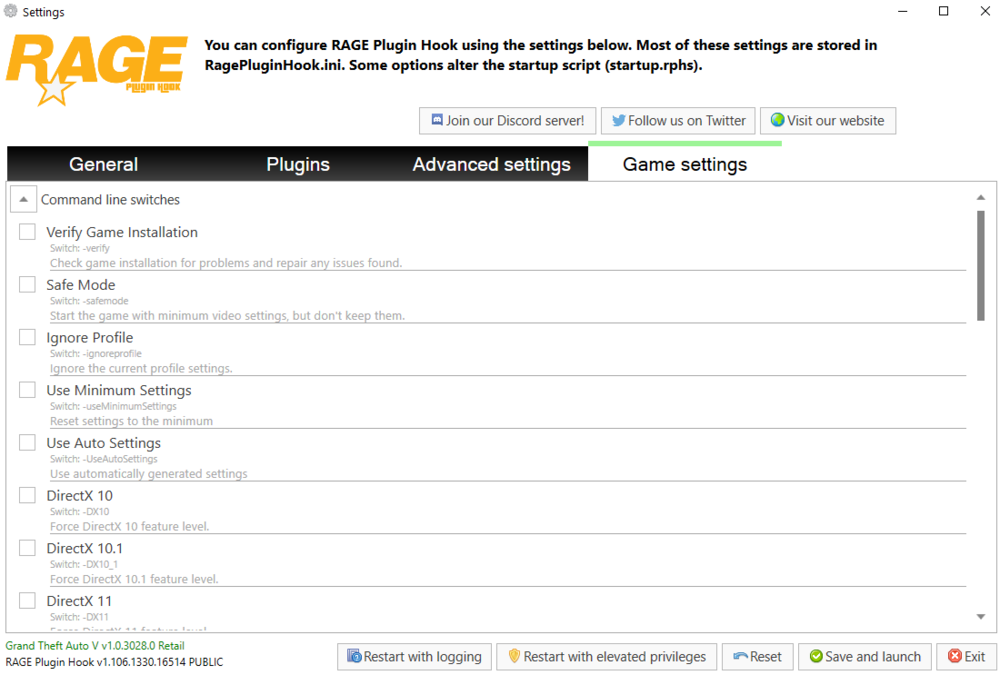
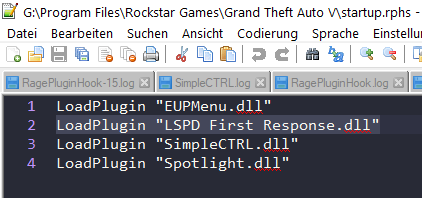
start ragepluginhook and hold shift till the settigns window pops up, then go to game settings nad make sure verify is NOT ticked to make sure lspdfr get ONCE automatically loaded, go to your gta folder and search for startup.rphs, open with notepad++ or windows editor make sure LoadPlugin "LSPD First Response.dll" is only once in there then hit save
-
Remove the verify setting in ragepluginhook. make sure lspd first response gets loaded once, in your log it gets loaded 3 times and that causes problems. this could be do to appearing 3 times in the plugin loading file or to manually loading lspdfr via ingame console.
-
1. Command line option "verify" is specified pls remove that, that setting is in ragepluginhook 2. rename the mods folder to _mods to see if the crash is mods folder related
-
Ich vermute mal, dass das an einem bestimmten Fahrzeug oder config file von dem els mod liegt. Probiere da config files oder das ein oder andere Fahrzeug rauszunehmen und so den Fehler einzugrenzen Poste doch mal das els.log aus dem gta Hauptordner.
-
Post the ragepluginhook.log in the forum right here
-
Renaming the mods folder means disabling it from loading. To reenable it (might be the black sky) rename it to mods again.
-
Your error could mean anything permission related, check the faq: https://docs.google.com/document/d/1Hp2Qco0qsgKfohkhjYWUxTr2OF7NSCkp8uSZwWz6rRQ/edit#heading=h.ga53kl28476 You can also try to rename the mods folder to _mods
-
you cannot teach someone how to read a log in 5 min 😄 at least scroll down to the bottom and read what error is there, sth you can fix it yourself then. just post the log
-
you cannot use the latest lspdfr version with an old gta version. if you have the lspdfr download for gta v2944, put the lspd first response.dll and. pdb inside of gtav/plugins. if not, you have a lot of work to do like updating gta, maybe updating mods folder updating scripthookv etc.
-
Exception message: Could not find a part of the path 'C:\Program Files (x86)\Steam\steamapps\common\Grand Theft Auto V\plugins\LSPDFR\GrammarPolice\textures\radio'.


