




Yasd
Community Team
-
Joined
-
Last visited
Everything posted by Yasd
-
This topic has been moved to the appropriate forum. Please post in the correct location in the future.
-
have you installed mods like cars directly in the game files?
-
post the ragepluginhook.log from the main gta folder, NOT from your logs folder.
-
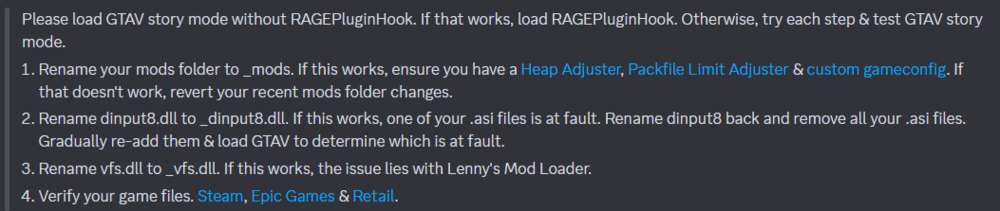
rename mods folder to _mods
-
pls only post the ragepluginhook.log from the main gta folder, not the logs folder. there should be no date or numbers on the file name.
-
do you use lml? post a screenshot of your gta folder.
-
try adding this line to gtav/lspdfr/lspdfr.ini: Ambient.DisableEscapedSuspectEncounter = true WorldEvents.IntervalMultiplier = 0.0f WorldEvents.MaxNumberOfEvents = 0
-
rename mods folder to _mods otherwise remove scripthookv and dinput8 temporary
-
Rename vfs.dll to _vfs.dll and temporary remove scripthookv and dinput8.dll
-
1. pls speak english in international forum 2. create your own topic, thx
-
rename mods folder to _mods according to the log it is
-
this log is from 2022, post the ragepluginhook.log, a text file, from the main gta folder and NOT the logs folder, i recommend to post it as a file.

-
post the ragepluginhook.log from the main gta folder. is lspdfr even loaded?
-
post the log again
-
Update LSPD First Response.dll and .pdb in gtav/plugins
-
Update RageNativeUI in the main gta folder: https://github.com/alexguirre/RAGENativeUI/releases Remove ExternalPoliceComputer. In your log you do not have plugins installed, so i cannot see the issue.
-
post the ragepluginhook.log from the main gta folder
-
Hello sir, this is an english forum, pls post in english then. Thx!
-
You're welcome 😄
-
more context would be nice, what have you done/ installed since last time? do you have a desktop crash? can you play gta on its own?
-
Command line option -nodx is specified. Remove that line from RPH
-
Oh, maybe you got that error from SuperCallouts because Pyro.common was missing
-
it says invalid characters in path, whats your gta path?
-
Pls post a screenshot of the error.
-
Probably not, but glad to hear!



