Yasd
Community Team
-
Joined
-
Last visited
Everything posted by Yasd
-
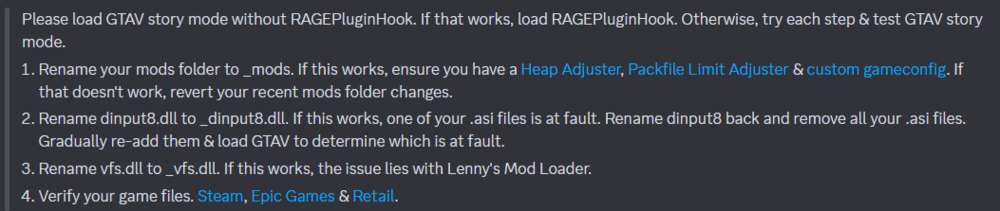
Rename mods folder to _mods
-
What have you done before the crash? rename mods folder to _mods
-
First Post your scripthookvdotnet.log and the asiloader.log and the scripthookv.log file from the main gta folder additionally you can remove all scripthookvdotnet files, then try again.
-
shift + f7 to open the menu that line is from the readme, i guess he meant the simplemenu.ytd.
-
pls post a screenshot of the main gta folder 🙂
-
You’re right, they are not needed.
-
Install a custom gameconfig: reinstall scripthookv: http://www.dev-c.com/gtav/scripthookv
-
To enable the menu go into simplehud.ini or config setting in general and scroll all the way down enable the menu and select a key. Deafult is F10. For simplehud.ytd go to mods > update > update.rpf > x64 > textures > script_txds.rpf in OpenIV and place it inside there make sure edit mode is on.
-
can you post another log after you get a crash? Because the log hasnt got a crash.
-
-
Do you have a desktop crash or LSPDFR crash? For LSPDFR crash, post the Ragepluginhook.log again.
-
Could not find file 'E:\Juegos\Epic Games\GTAV\ScriptHookVDotNet.ini'. Install that file from the SHVDN download. You have 2 installations of LemonUI, one with the RPH and one with the SHVDN version. Remove one.
-
Post the Ragepluginhook.log from the gta folder, not the logs folder.
-
Temporarily Remove ScripthookVDotNet files and try again 😄
-
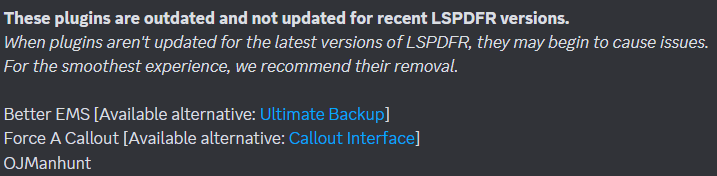
Remove ALPR+, its incompatible and has to be removed, this is also the crash reason.
-
i recommend using the manual version to update, its not that hard 😉 the auto installer is not working sometimes... update your gameconfig, additionally (if you havent already) install heap adjuster and packfile limit adjuster. https://de.gta5-mods.com/misc/gta-5-gameconfig-300-cars https://www.gta5-mods.com/tools/heapadjuster https://www.gta5-mods.com/tools/packfile-limit-adjuster
-
rename mods folder to _mods
-
you can use stop the ped, there you have the option to stop or slow down traffic.
-
Post the asiloader.log
-
Sometimes, -nodx disables DirectX and so the RPH console does not work, which means all plugins do not load. That's pretty simple, right? 😉
-
 Some good stuff, nice code and pretty stable, also has a lot of callouts! Keep up the work! 😉✅🚓🍓
- 1,007 comments
- 63 reviews
-
-

-

- 2
-
-
-
Hello! Command line option -nodx is specified. Pls remove that line in RPH.
-
Install a 100% savegame and you can do happy patrolling! https://de.gta5-mods.com/misc/100-save-game
-
This topic has been moved to the appropriate forum. Please post in the correct location in the future.