


JBin818
Members
-
Joined
-
Last visited
Everything posted by JBin818
-
I forget if it was LP or Law Callouts but one of those you can request a vehicle and someone would drive up in the vehicle you requested, get out and walk away. Then you take that vehicle. Some times I've had cases where my vehicle was too damaged after a pursuit or all heck broke loose or simply civilian or suspect got in my vehicle and took off. I know you can spawn a new car but I like the slightly more realistic way of calling for another car. Through the menu, you can choose which vehicle you want and someone would drive it right to you. Be sure you get in it in about 10 seconds or the guy who delivered it will come back and drive off thinking you don't want it 😄. That was in Law or LP and those don't work too well for me because they are just outdated. I really liked the request a vehicle part of it though. Unless there is some other mod I missed that does that.
-
 I'm having a problem with traffic stops. I don't have any callouts installed right now but I do have a lot of other mods. It happens with the ambient events. Whatever the event is I blip and activate code3 and one problem is that it takes a good minute before they pullover. They are not trying to get away, they just keep driving for a minute, sometimes more until they finally pullover. Another issue is that when I ask them to get out the the vehicle they will get out but then get right back in. So I have to ask them to get out again and arrest them quick before they can get back in. I also added a couple add on vehicles and some times during the traffic stop my doors are locked and I can't get back in. I use simple trainer and it says there are no vehicles with locked doors. Nothing crashed. Since TP has that auto lock feature maybe there is a glitch there.
- 3,646 comments
- 306 reviews
-
I don't know what it actually does. lol. All I know is if you have that traffic stop problem then change the line to false. Then when you signal them to stop they won't floor it and go straight until they crash into something. That what happened with me. A lot of people had that problem and that's the fix.
-
It's cool he has his own site now. If he's not happy with being here then I guess that is what you do. Didn't Darkmyre do the same? We just have to go to Bejoijo's site to DL it. The other day after going on Duty it said there was an update to STP and UB. I was thinking where? It's not here. Just found out now he has his own site. It's too bad that we have to go to another site but honestly there are mod on gta5-mods that are useful to lspdfr that aren't on here. So that is just what we have to do. For me, I'm just happy we can get his mods again.
-
Thanks, but I figured that out. I forgot about this post. Old post.
-
It's an ELS issue. Open the ELS ini file in your main and change this line to false. ElsTrafCtrlOn = false Yours most likely says true.
-
It's hard to see what is in your main GTA directory but do you have a Heap Limit Adjuster and Packlife Limit Adjuster? Also make sure you have a recent gameconfig that matches the version of the GTA update, (currently 1737). I had install those and that helped stabilize computer+.
-
I install LSPDFR Jurisdictions+ which I think is supposed to enable you to customize that. I haven't looked into XML's thoroughly to know what to add. But I think that mod is what will do that.
-
Well there are a lot of mods out there so which ones did you put in? Also make sure you have a back up of the game in your Rockstar folder in case you really mess up. Install one or 2 mods at a time and then go into the game and check. So which ones did you install?
-
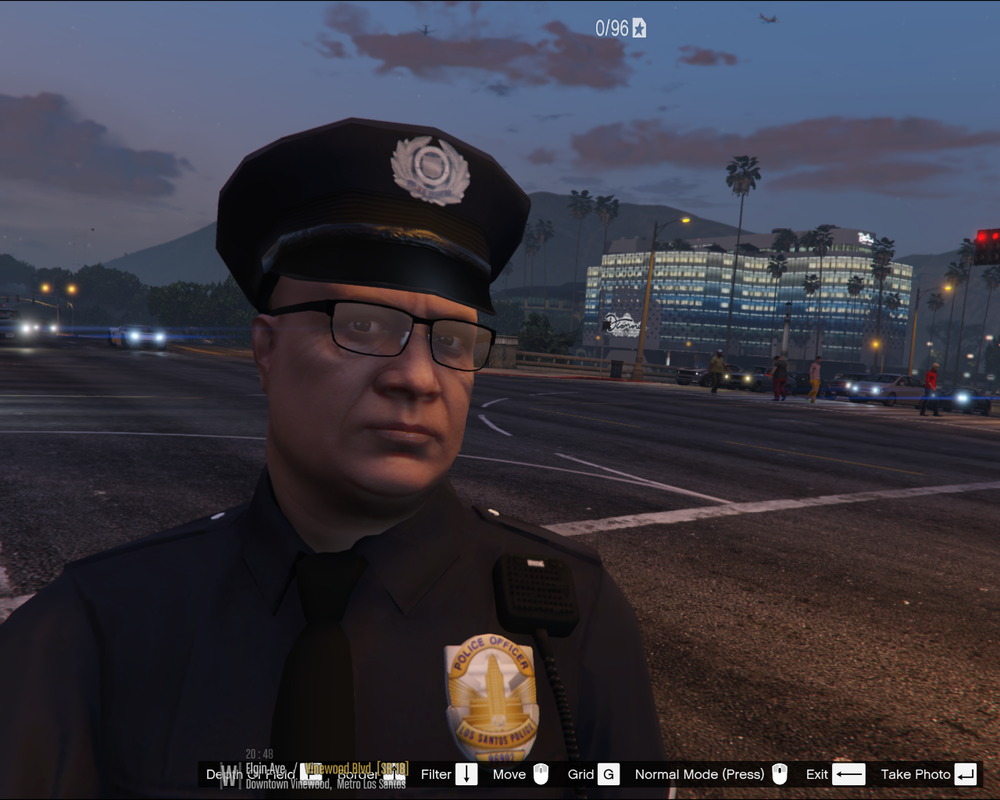
Here is a pic of the Diamond Casino Resort from the Vinewood PD. I actually had another pic but I didn't notice until after a big box truck drove in front blocking half the view.😄
-
If you have Albo's Traffic Policer, that has ambient events that happen and you can change the frequency on how often those events happen. You can chose which event you want to happen more or less.
-
I tried the search here and the internet but can't find a clear answer. So sorry if this is repeated. I'll be installing my first add on police car and I'm not clear about the extra police slots. Do you need to download a mod that has extra police slots? I have a latest game config. I'll probably be adding 10-12 vehicles. ELS and Non-ELS. I'll probably be using Albo's DLC pack. A lot of vehicle install videos out there don't mention that you need to DL extra police slots and i see some extra police slot mods to DL on here. So what do I need before starting to add on?
-
Do you have a Heap Adjuster and PackLife Limit Adjuster installed? That usually helps stabilize it.
-
Just Copy everything in the lspdfr folder you just downloaded paste it in the main GTAV folder. Make a backup copy of your GTAV folder before you put anything in it in case you have to redo it.
-
Do you mod? When I started about 1.5 years ago here i didn't know how to mod, put things in certain folders, ini, xml, what's that? I learned. I suggest watching a lot of youtube vids on how to install. It's not hard to install but sometimes it's nice to see it done instead of reading. For the minimum download and install LSPDFR and Rage. Run LSPDFR (GTAV) through rage and explore LSPDFR until you get a bit familiar with how it works. I wouldn't jump in the mods too quick because you may have problems and the more mods you have installed the harder it is to see where the problem is. So be patient and install a little at a time. LSPDFR and Rage is what you need to play LSPDFR. Can't get Rage or GTA to load? Disable your antivirus. That is a common problem. Also there are some pinned articles on these forums that tell you how to do things. I don't have time to attach links, maybe someone else can. Or just look at the pinned articles at the top the GTAV Support, LSPDFR Support and here in Dis & Sug.
-
I was hesitate also but something about scripthook came up and I couldn't avoid the update for some reason. So I updated everything. I haven't updated any mods though and the mods I use there are no new updates. UB and STP still work thankfully. I did have a problem where it wasn't loading. I changed the mods folder name and it worked so something gets glitched in the mods folder. I deleted and reinstalled everything that had to do with the mods folder ( a lot more than I remember was installed in the mods so that took a while). Now everything works. So 4.3 works with me.
-
Thanks for the video. What did you move? What video number is that of Albo? I installed mine his way also so I could look at his video and see. I kinda remember getting an error like that also in the beginning when i first started but I don't remember what I did. It was something simple and never had a problem since. I have retail. I don't know about Steam but I heard to Verify Game Integrity which i think you said you tired. Which antivirus you have? Keep it disabled every time you try to load Rage. Also once I had to load Rage 3 times until it loaded the game. When you get that error load Rage again. I think it will say do you want to start in safe mode, just do Normal. Try that a couple times in a row and see if it will force. If not I almost think it is something in Rage settings. I remember I had to do this for something a while back, but click Rage but before it starts click the gear icon to go into settings. Go to Advanced Settings and check Enable Countermeasures against..... Then try. I had to check that a while back to get something to work. If not then go back and uncheck.
-
Also in the Rage settings go to the Game Settings tab, Command Line Switches, and check force window mode. Sometimes that will stop Rage from loading. Once it loads then you can Alt. + Enter to go Fullscreen. Might try that.
-
So I installed the R* update about a week ago but didn't see the Diamond Casino. It was still showing the old Casino on both LSPDFR and GTAV Story mode. Last night I saw for the first time the Diamond Casino. Not sure why it took a while to actually see it after the install. When you are in LSPDFR as an Officer you can't go in. So that is too bad. I guess that is for online only. When you get up to the doors there is a "picture" on the doors that simulates that you can see through glass doors into the Casino but you don't see people moving. I haven't been on GTA Online in a long time because I got tired of people killing me just for RP, Money and Ammo you dropped and money you have if you didn't deposit it. I still have very little RP, money and ammo and I can't get any weapons because of it. So I got tired of the online. Anyway it was just interesting to see the Diamond Casino.
-
If that was made by BejoIjo I think he took all this mods down for some reason. Also no one here is allowed to send you the file even if they had it because of this websites policy and it probably goes deeper then that. Hopefully it will come back just keep a look out. Meantime you may just have to do without. In the future, keep all your DL's. So if you have to reset something then you still have the DL. Everything I use I still have in my DL folder so if I have to reinstall something after a little R* update like we just had then you call reinstall since you have it in your DL folder. Unfortunately, LSPDFR, GTAV and all the plugins, mods, dl's take up a lot of space. Keep looking, hope that mod comes back for you.
-
When i listen to the LAPD scanner I sometimes hear dispatch say the units ID number followed by CODE 1. LAPD Code 1 is where a unit isn't responding to the dispatcher so dispatch says Code 1 meaning Answer Your Radio. 1-L-18 Code 1. Respond to dispatch 18. Sometimes another unit that is with the unit that isn't responding will tell dispatch that the unit they are trying to reach is.... So at least dispatch knows what is going on with the unit. I've heard Code 1 repeated every few seconds over and over for a couple minutes. Then a supervisor gets involved. Code 1 seems to mean a couple different things with different agencies.
-
No you don't have to beat the game. I think you should at least do a few missions. If I remember you need to at least get started in the game.
-
What do you think about this one? Says OIV install so there you go. You might back up your files before installing it in case something didn't install right. Sometimes Manual installs are better than OIV but it depends if the package was structured correctly.
-
 Hey there, Nice Pack. I noticed for the BMW bike, for the replacement, the Vehicle Meta file says for the driver; <drivers> <Item> <driverName>A_M_M_Hillbilly_02</driverName> <npcName /> </Item> <Item> <driverName>A_M_M_Salton_01</driverName> <npcName /> </Item> </drivers> I changed it to the Highway Officer and should probably only have 1 driver. When I was on the freeway and saw a redneck on the CHP bike, something just wasn't right 😄. So if you update you might change that.
- 955 comments
- 158 reviews
-
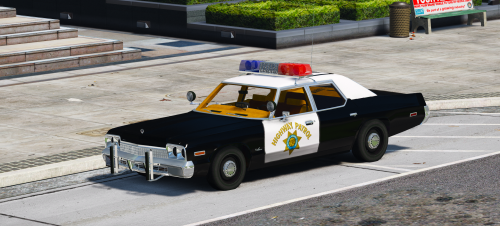 Would you be able to make the vehicle an add-on at some point? This goes into the police slot and I don't really want to take my vehicle out of the police slot. I'd like for it to be an add-on instead.
- 16 comments
- 4 reviews



