


JBin818
Members
-
Joined
-
Last visited
Everything posted by JBin818
-
Are you using Better EMS? I've had that kinda happen. For me there is a callout where there was a homicide and there is a witness with the dead victim in the middle of the street. Witness tells you the type of car and you are supposed top go find. I like to clean up the scene before I leave. I call EMS (Better EMS) and they come and revive the victim. They go into the ambulance and then I get a notice like you saying the victim died. What? EMS revived him/her and walked into the ambulance. I just figure victim died en-route to hospital. But that happens every time. There is a glitch where if you call LSFD Ambulance (LSPDFR) the EMS might save that person and then the person just stands there, doesn't go into the ambulance. So I'm not sure which plugin has the conflict it has happened to me to.
-
 Thank You so much ThruZZrd! I really like the way this mod works. I was hoping you would get it going. I'll DL it now.
- 126 comments
- 25 reviews
-
-

- 1
-
-
I just added disable camera focus and disable big radar. Disable camera focus works for me, it doesn't focus on the suspects every time anymore. But the disable big radar is not disabling it. Radar still enlarges when i get a callout. I'm using 4.0 still. If you have 4.1 then I guess they didn't get to fixing it. I don't think there is anything else we can do. Seems like something the creators have to fix.
-
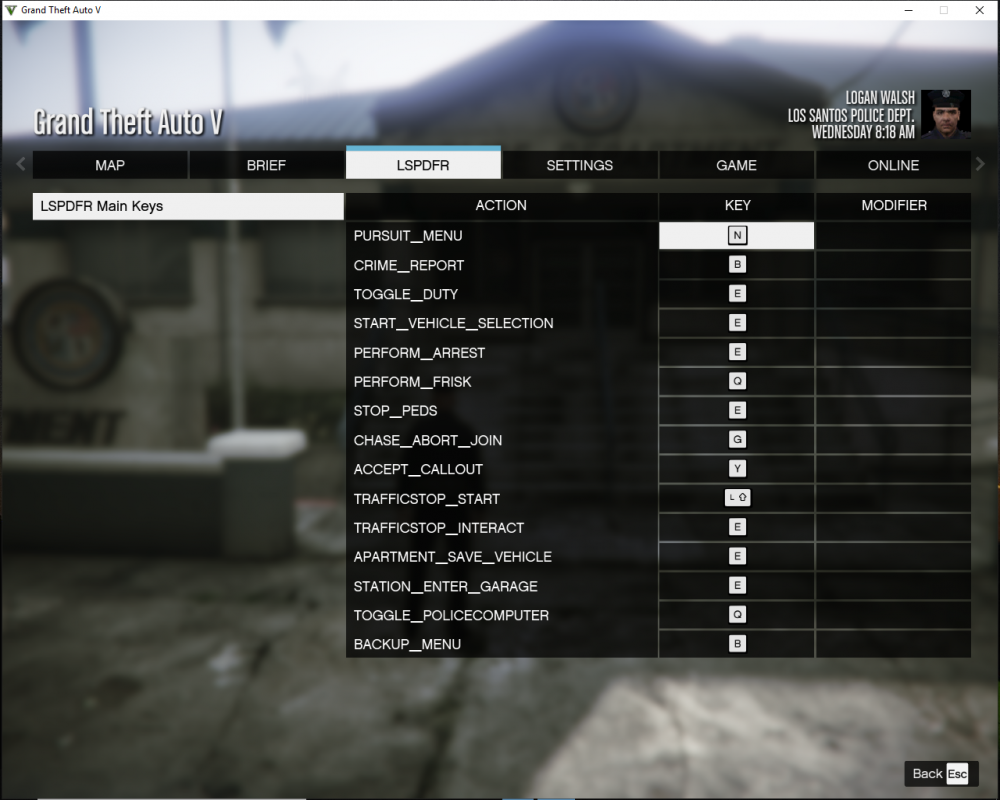
I noticed on youtube players who have Ultimate Backup will press B and both menus will show up ( LSPDFR and UB menu). I have not installed UB yet so I'm not sure if the ini has a override option. If not, then in the LSPDFR ini keybind can you type NONE and will that disable that key and fix the problem. I think there maybe another key I would like disabled in LSPDFR ini keybind but I don't remember which. Just wanted to know if you can type NONE to disable the key in LSPDFR.
-
Does that happen with only a certain vehicle or all the vehicles? If so which vehicle? What happens when you get closer to the light, does it look more out of place? Sounds like a problem with the vehicle(s) that the author has to fix. You might go the that link you posted and go to the comments section and ask there. Maybe the author will respond with a fix. I don't know.
-
 HI, So, Clear the Way is supposed to make vehicles move over with emergency lights only, unless there is more to it but I think that is what that mod is all about. In 0.4 they made this possible so do we even need Clear the Way for your mod? Is there something else in Clear the Way that is needed to make your mod work the best?
- 366 comments
- 32 reviews
-
I didn't have time to watch the whole thing but from that first call Amy is sure out of shape lol. How did she pass the academy? Yeah, it sure is jumpy. You have a poor video card or other things running in the background? Poor glitchy buggy Amy.
-
A little video clip of me messing with the cops. Gotta turn the table every so often 😀. This was on 0.3
-
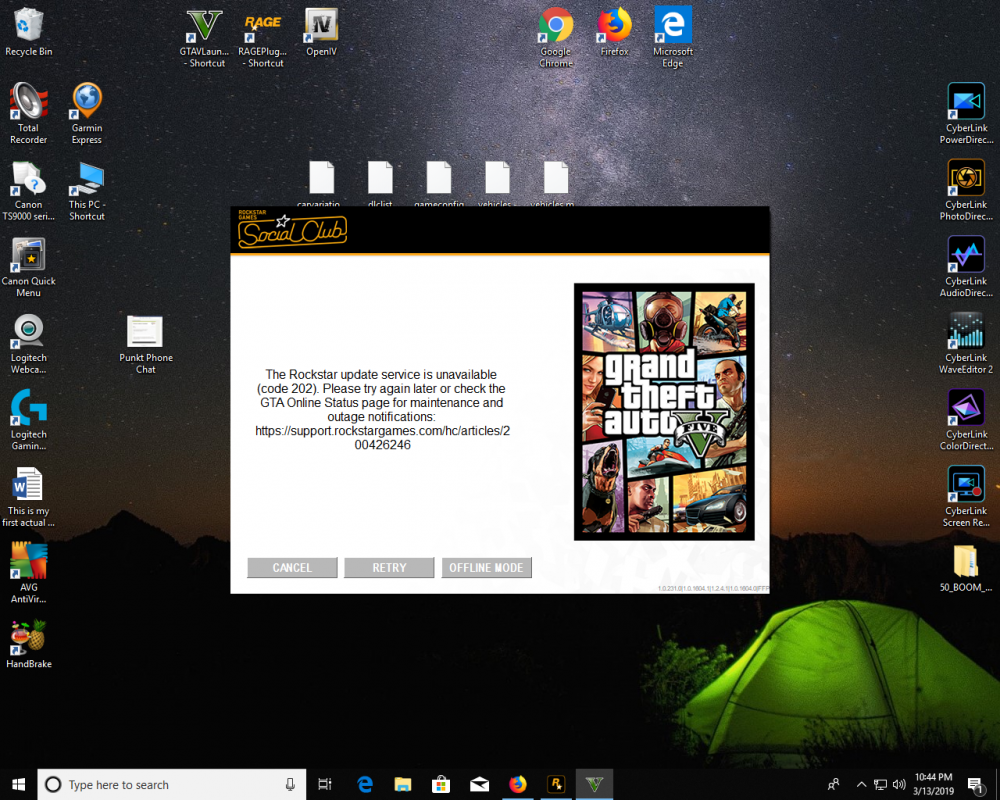
You should be prompted if you want to play offline. I block Rockstar Updates until I'm ready and it will prompt me with this message. Start with Rage, click Offline and it will load.
-
Radiance V is supposed to make the emergency lights brighter but it is so outdated I would hope it would work on 0.4. I haven't installed it yet on 4. I guess make a back up of visualsettings, I think it replaces, and install it. I'm not sure of any other mods that make the emergency lights brighter. Rad V is the most well known to fix that problem.
-
Ok, I'll try that.
-
I've had that issue to in the LSPDFR robbery callouts when I arrive and the suspects are just leaving the store, they blip up but then a few seconds later the blip is gone. I press B for backup but since there is no blip, backup doesn't think there is a suspect. Backup arrives and are like "What do you want?" Yeah, don't you see me chasing after this suspect? So pressing B brings up backup menu but I have to hold down B to call it in? I didn't know about holding B down. I'll try that when I play next.
-
Those are available on the download page. When it prompts you which ones to DL choose 6.14.3 for Policer and 1.1.2 for Radio.
-
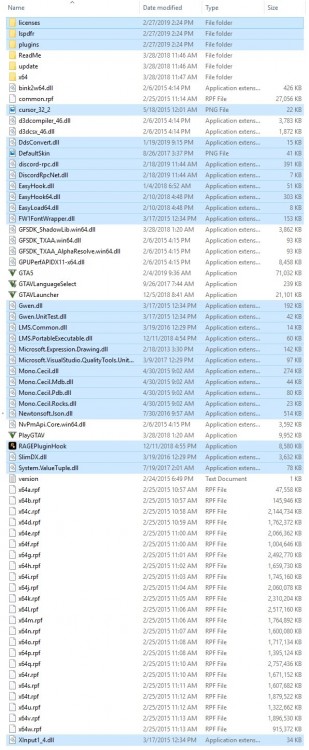
The blue highlights are LSPDFR install files. All the others are GTAV files. I took this screen shot right after i installed LSPDFR. Who knew it would come in handy. Interesting, I just looked and I don't see an uninstall file. I still have the whole folder for 3.0 and there is a file in the main that says LSPDFR_uninst but not in 4.0. I don't see an uninstall anywhere. Wonder why they took that out?
-
I did a quick Google search since I don't use that trainer but someone said to go to " Time / Time Flow Rate / Game Speed While Aiming". I guess change something there. Did you try that?
-
That was cool! First pursuit with a flying CHP unit, T Boned by your fellow officer, rear ended a civilian (well, should have gotten out of the way), faked out the suspect by removing the spike strip just before he passed. Then right when you get up to the trash truck the game crashes. Love the end too. Took a selfie, admiring it, then get hit by a car. That was classic.😁
-
 I must be one of the few who don't miss it lol. During a pursuit especially, I would press C to look behind me to see how far back the other units are and I would accidentally press X since it is right next to it. Therefore, cancelling the current call and forcing a new one. I never really did have to force a callout. The calls seemed to come quite frequently. Good call on making the X changeable to another if you like that feature.
- 117 comments
- 19 reviews
-
-
- 1
-
-
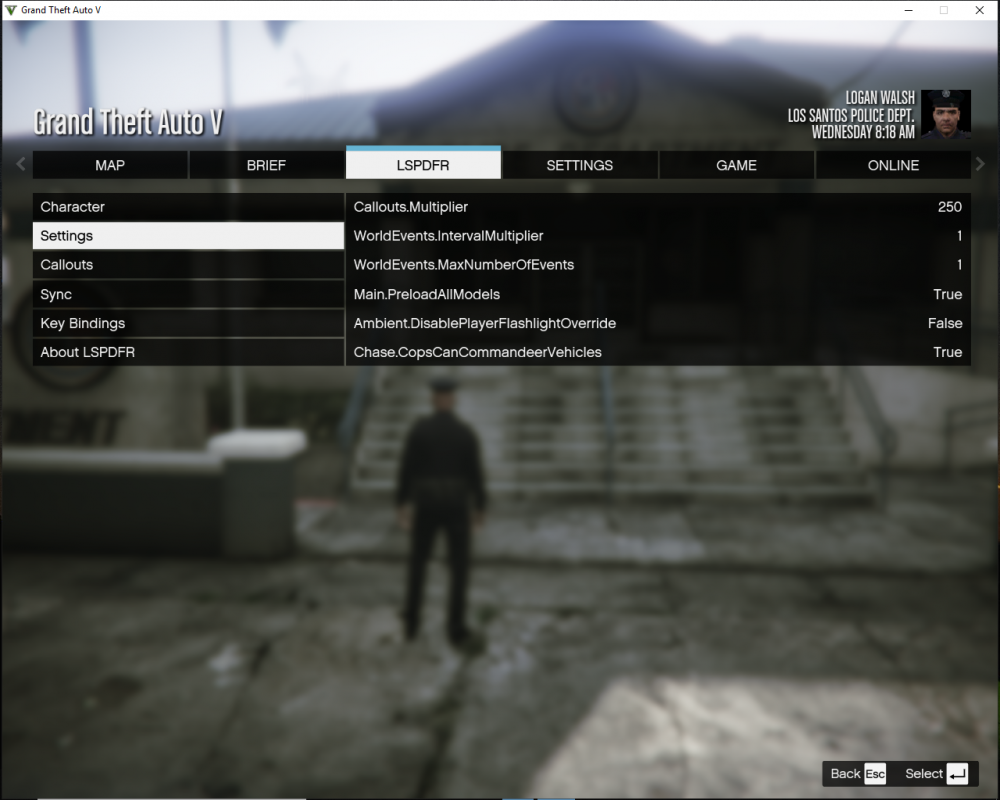
When you press ESC and go to the LSPDFR tab; 1) On the Wiki 0.4 section on this site, under settings there are more lines then the 6 lines I have. I am looking to disable the camera when it focuses on suspect. I don't have that option line in my settings unless it is somewhere else. How do I add those lines or how do I disable the camera focus? If you can explain it to me. 2) How do you change the key bindings? I pressed enter to highlight the key but then what? I pressed another key to change the current one and nothing happens. Thanks! Ok, forget number 2. I just saw in wiki that you can't change the key bindings the menu, only in the ini. Didn't see that before. But still need #1.
-
I think it's numpad 8. You can also change it in the ini file to whatever key you want.
-
You never know. Sometimes people don't think of the obvious.
-
Disable your antivirus then try.
-
Yeah like Canelo said there is this one but don't know if it is what you're looking for. Not sure how it totally works either, I never used it. Also not sure if it is compatible with Rage and 4.0 since it is a bit outdated.
-
I was using Police Search on 0.3 and I liked that for the vehicle search because you have to go to each door and trunk to search that spot. I guess that isn't working anymore from what some on here say. I was just going to install Stop the Ped for the first time then 4.0 came out and i figured i would start fresh. Does Stop the Ped have it's own search feature or do you still need to install Darkmyre's search for Vehicles and Peds? 4.0 looks like it has a frisk feature and items that are on the ped but can't search vehicle.
-
Here is a video I made about 0.4 with no other mods. Talk a bit about how somethings work as far as I figured out. Also what I would like to see adjusted or maybe make an enable/disable that particular feature. I'll probably make 2 more vids going a little more in depth but I'll try not to make them as long as this one was. Ok, so here is all 3 vids that I was doing finally done. Now 4.1 is out so maybe some of my issues are fixed.
-
I think I read to change the Main.PreloadAllModels to false. Press ESC/LSPDFR/Settings and it should be the first one. Whatever you have change it to the opposite. I think for texture problems that would say True so change it to False.



