


JBin818
Members
-
Joined
-
Last visited
Everything posted by JBin818
-
Well you can just do the missions until you get to the point when the henchmen let you back into LS. You will just have to complete a few more missions. If you switch to Trevor then when ever you drive by the Lost gang they will attack you even when on duty. Can you just switch to Franklin or is he not available at that point. Some characters aren't available at times. If you can then switch to Franklin and do a quick save or go to safe house and save. If not, then when in game go to the save game and select a past save point. Hopefully you didn't save the game on the same save slot over and over.
-
I would leave B for the backup. You might change some of those keys to the Function Keys (F5, F8, F10, or whatever) F1 and 2 are tied up with GTA recording to start and stop. I like to open most menus with the function keys. That frees up the lettered keys.
-
I think what Arrest Manager and LSPDFR+ does is about the same as what Stop the Ped offers. Except STP doesn't have a court system. So if you can do with out that then You might remove Arrest Manager and LSPDFR+. Unless there is a reason you see why you wold like to keep it, let us know. That would eliminate some key conflictions. I have custom instructions on MS Word on my PC that has the mods I use and which keyboard key does what because, yeah, it gets complicated. Also, I think Ultimate Backup should override LSDPFR Backup but if it doesn't then go into the LSPDFR.ini (configuration Settings file) at GTAV Folder/LSPDFR/keys and delete the B and type NONE under the backup line. Also if you use Computer+ you might not be interested in LSPDFR computer (when you press Q) and you can disable that too in that same file. That will help with some key conflictions. BACKUP_MENU_Key=None BACKUP_MENU_ModifierKey=None TOGGLE_POLICECOMPUTER_Key=None TOGGLE_POLICECOMPUTER_ModifierKey=None
-
Stop the Ped and Ultimate Backup is what most of us use to replace Albo's mods. Traffic Policer is still required for STP though. All those mods listed still work with the latest LSPDFR. I had to disable the ambient events in TP.ini and a few other things. I still use the mimic, custom pullover spot in TP. I use Computer+ which works for me. A lot of users seem to have a problem with it so they use CompuLite. Small mods/plugins like these are good to. Ambient FX = Makes fire and smoke a bit more better on vehicles. Cop Holster = Animation of pulling out your gun. Better EMS = It's not updated but still works. Ambulance gets called from nearest Hospital which makes wait time vary depending on where you are. And if they can save the person the patient goes into the ambulance and to the hospital. Player Location Display = So you know direction and what street you're on and nearest cross street and city. Spotlight = Makes a spot light turn on on driver side of the vehicle. Can use it to track ped or vehicle. I also use Exempt Plates which makes all police vehicles numbers only and says Exempt or something like that. Removes the famous EEK license plate on Civilian Vehicles.
-
 So from what I understand, if I'm correct the ElsMaxRangePl & AI is how far the light reflects off the walls/buildings? I thought that was the visualsettings file. After you install ELS you notice your emergency lights are very dim and users recommended radianceV to brighten and I thought RadV (Visualsettings file) changed the distance of how far the light reflected. In 0.4 they created where there is a traffic stop that spawns and at night you can see the reflections off the walls/buildings. So I would go look for the stop and after walking around 2-3 buildings in some areas and finally see the stop and think how could I see the lights off the walls from where this stop is? Example is in Paleto Bay there is a traffic stop that spawns in the Ammunation parking lot. I can see the reflections off the building of the Sheriff Station on the corner. The Ammunation Parking Lot, which is on the East side of Ammunation, then another building and then across the street is the sheriff station and some how you can see the reflection. I didn't know what the settings were in the ELS.ini except the traffic control which I had to set to false because it would cause the suspect to drive forward until it crashed. From the ELS original download the ElsMaxRange for AI=500 and PL=800 so no wonder I could see the reflections through 3 buildings. Also why is PL 300 more than AI? In the wilderness maybe the light will bounce off trees and bushes. Like you said maybe up that to 250. I'll try this out. I'll check out your visualsettings too. I use RadV but would like to try someone else settings. Thanks!
- 18 comments
- 4 reviews
-
-

- 1
-
-
I had that problem. If you have the cop walk style selected when you go on duty that may make it crash, it did me. Change to another walk style before you go on duty.
-
In your main GTAV folder go to ldpdfr and then keys. Open it and you should see 2 lines that are like this BACKUP_MENU_Key=B BACKUP_MENU_ModifierKey=None If you use UB then UB I think overrides the LSPDFR backup menu but sometimes it doesn't. I would type NONE where it says B. The UB go to your mian GTAV folder again and then Plugins then LSPDFR and then open the Ultimate Backup configuration file, not the folder. When you open the config file the lines to change Ultimate Backup Menu are one of the first ones listed.
-
I can't fully remember but i think it's either E or G. Next time you're in game just start pressing each keyboard key. You'll eventually find it. I've had to do that.😁
-
If you installed add-on vehicles then you should have a decent game config that will support the current version of the game. It also supports extra vehicles. Download and install one of these. Either one. I don't think there is much of a difference between the 2. Install with OpenIV. Then try. If it still crashes then you most likely didn't install some thing right. If you had to install carvarations or vehicle meta then you have to be very careful installing those. Hope you had a back up for those. First try the game config and see if that fixes it. https://www.gta5-mods.com/misc/gta-5-gameconfig-300-cars or https://www.gta5-mods.com/misc/gameconfig-xml-dilapidated
-
It was downloaded into your download folder, right? Did you download the Manual install or the other Install. I can't remember what the other install says but basically it an express/auto install. I prefer the manual install, since all you need to do is copy the files (after extracting) and Paste them into your main GTAV folder. Read the Readme that will come with the download. As for finding where yours when? Search your computer for LSPDFR_044 and see what shows up, I don't really know. Also your antivirus may be blocking the files. Disable your antivirus before installing. Then you will have to install RAGE.
-
Nope, not too late. The author of Ultimate Backup took his work down from this site BUT made up his own site and you can get UB and this other mods like STP is a popular one here; https://bejoijo256.wixsite.com/bejoijo
-
I think what more then half of us use is Stop the Ped and Ultimate Backup instead of Arrest Manager and LSPDFR+. Stop the Ped is more updated and more stable than Arrest Manager. I would go with STP.
-
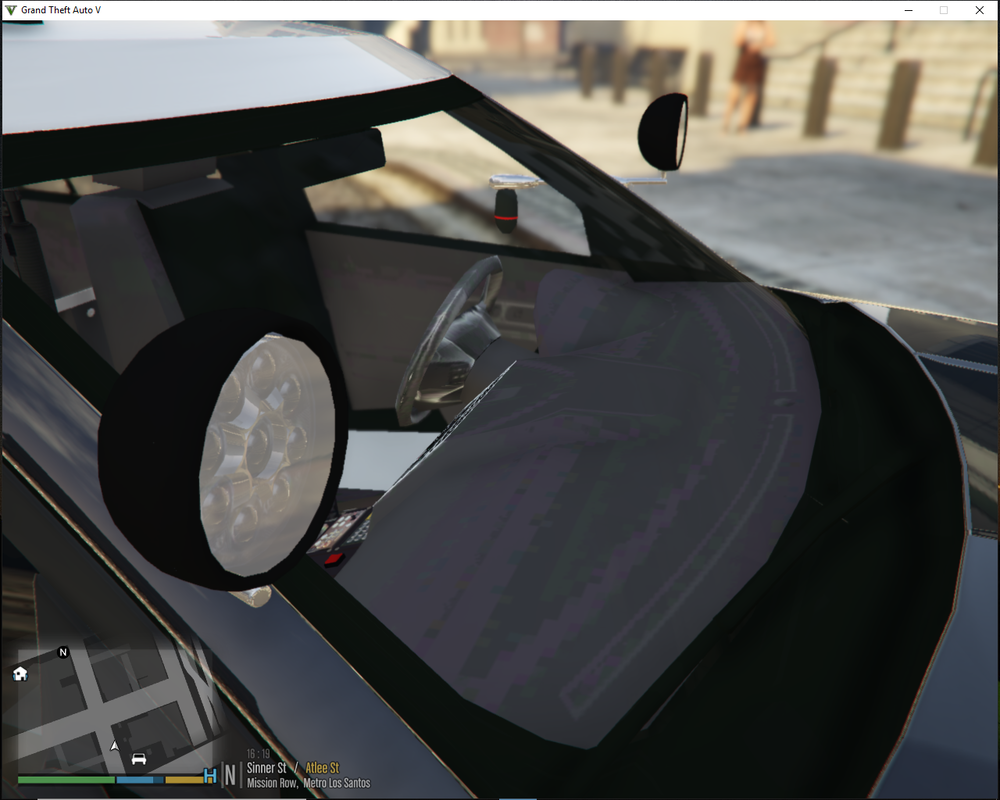
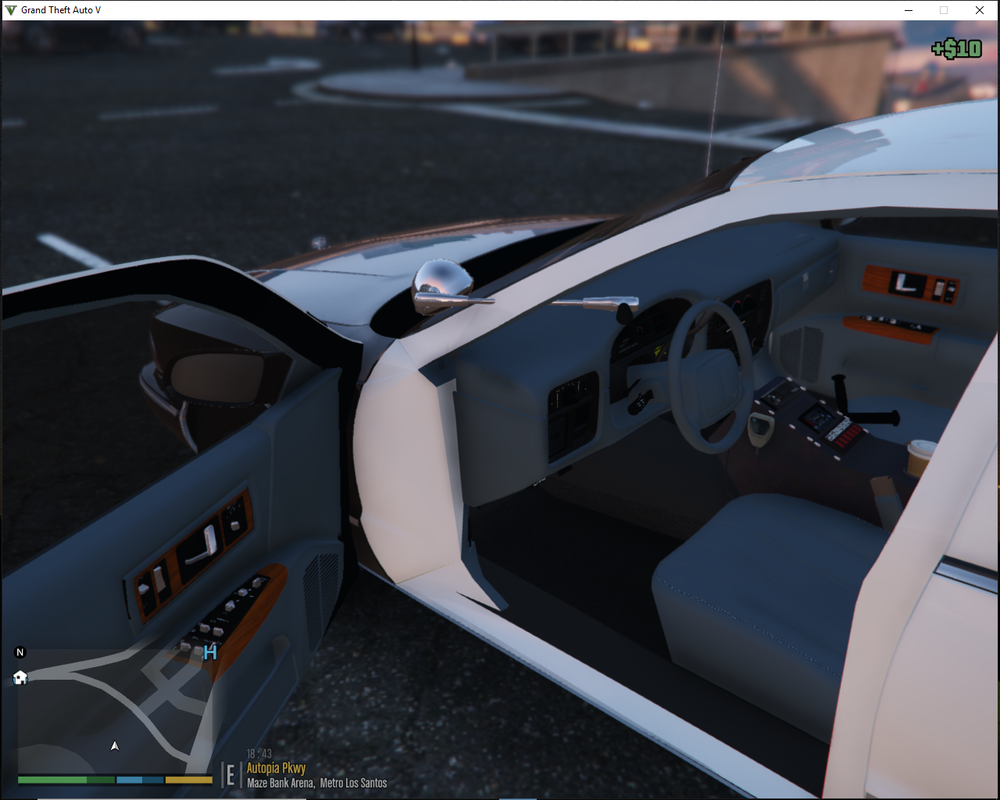
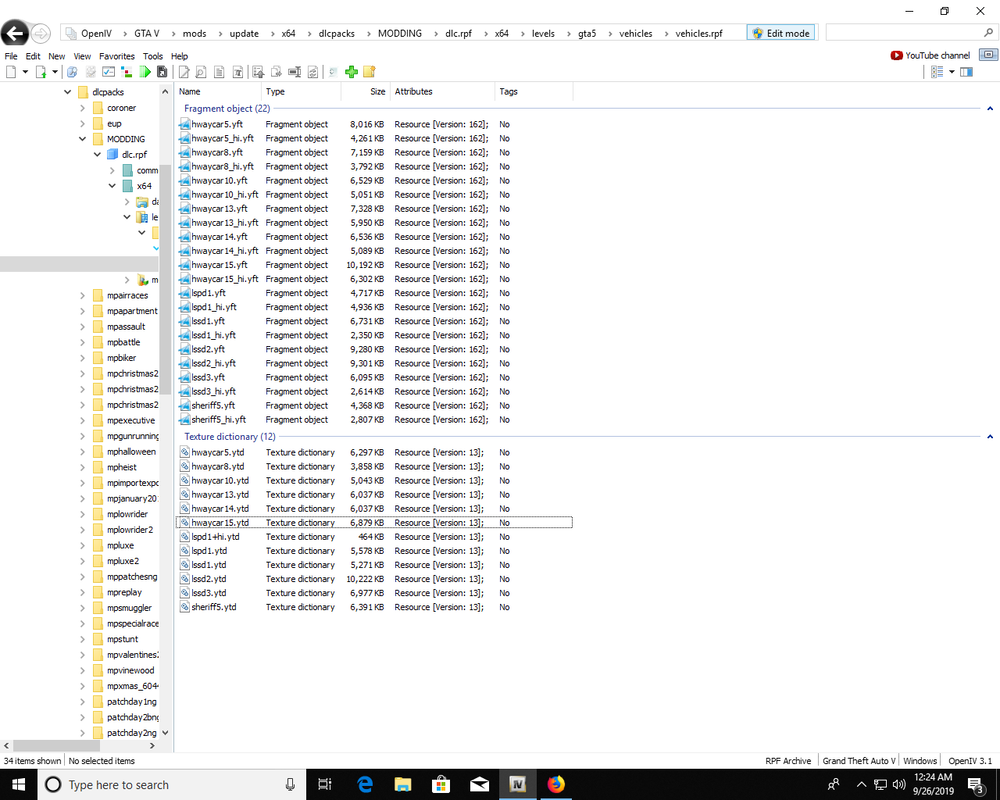
Hi there, Can you check my pictures? I have some interior texture vehicle problems on my add on and replacement vehicles. I also see it happen with some AI vehicles too. Usually always the dashboard, side door panels and some other areas. Outside looks fine and all vehicles. Just some interior problems. Also noticed some texture glitches here and there but not nearly as bad as in your vid. Don't have problems with building popping in late but like the street surface will be one shade and then another shade as I move the mouse. Not all streets and not all the time. I noticed after installing my 5 or 6 add on vehicle but the problems slowly get worse and worse. Didn't have interior texture problems but now I do. Most of my add on and replacement vehicles are under 20mb. I think I noticed about 2 or 3 that are over 25mb. Could those 2 or 3 be causing the problem? The screen shot is just the add ons. You'll see that Hwaycar15 is about 23mb. Under the hard limit but over the recommended 20mb. I think I have one replacement that is 27mb, not pictured. Just wanted to know if this method will fix it. I don't really want to have to do all that if it doesn't fix it. So what are the chances? Don't worry, if you say the chances are good and it doesn't work I won't nail you to a stake. 😁
-
A couple weeks ago I had a post about the game crashing when going on duty at any police station with the cop walk selected. Changed it to another walk style and no crashes at the station. So yeah, there is a glitch with that style. I use the tough guy walk now. I actually like that better. Looks like a badass walking up to people. Maybe a bit too intimidating but hey! 😄
-
Most likely you have ELS. No additional plugin needed. Just go into the ELS.ini file in the main GTAV folder and open it. Change the line - ElsTrafCtrlOn = false Yours probably says true. Change it to false. Save and close. That's it.
-
On all of my add on and replacement vehicles parts of my interior are kinda weird. Check pictures. Also on some of the regular civilian vehicles too but not all. The dashboard this the biggest notice. The side door panels. Sides or all of the seats. I even tried to reinstall one of the vehicles and it didn't fix it. Everything it up to date. Same thing when normal GTAV is launched. So could it be a game file? I haven't installed anything else lately. I noticed once in a while a civilian vehicle would disappear in the distance. A couple other very minor glitches. I noticed those after the 5 or 6 add on vehicle I put in. Yup, I have the latest game config. So I'm not sure what else to try. My video card is up to date. What do you all think?
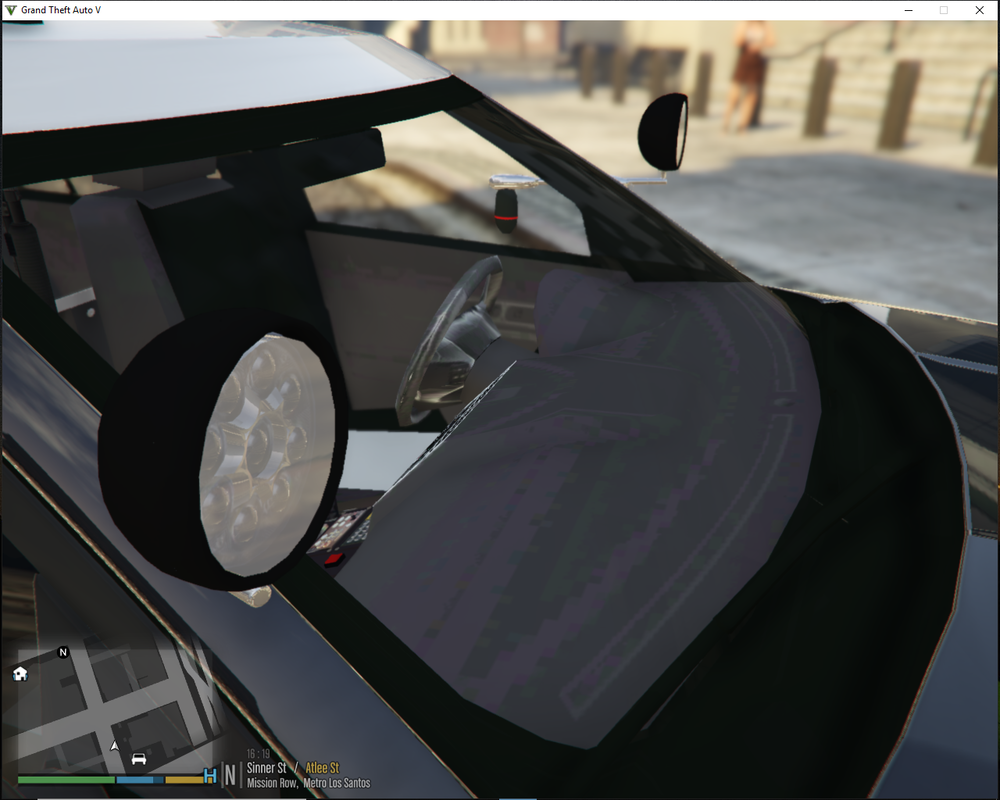
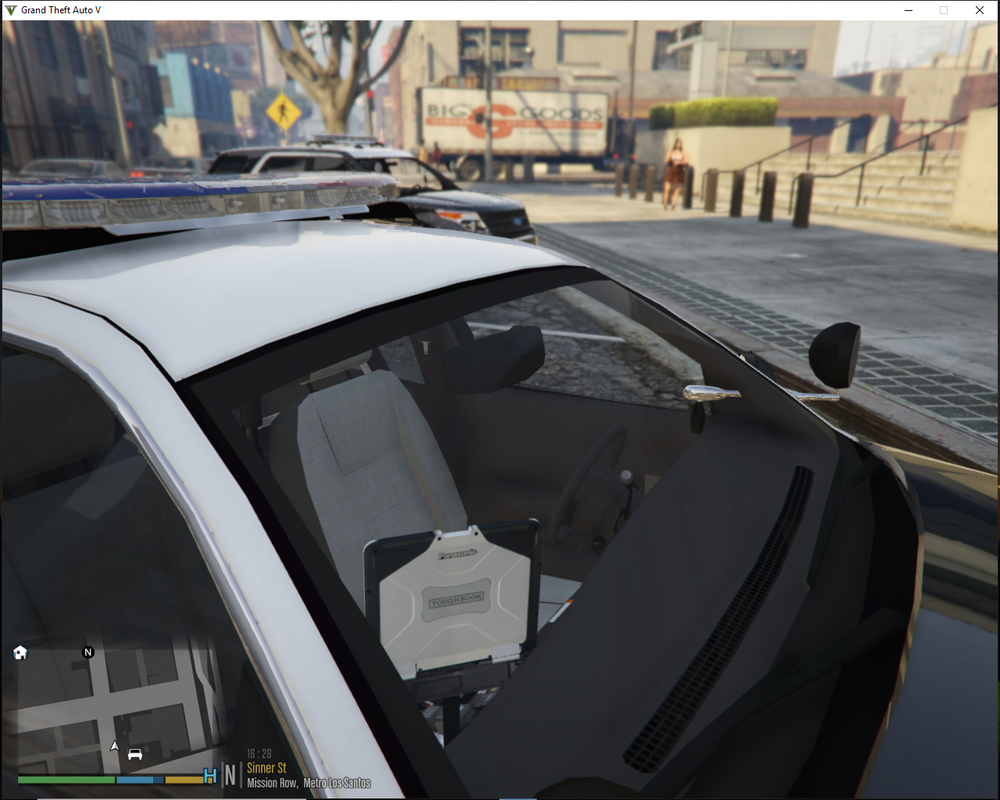
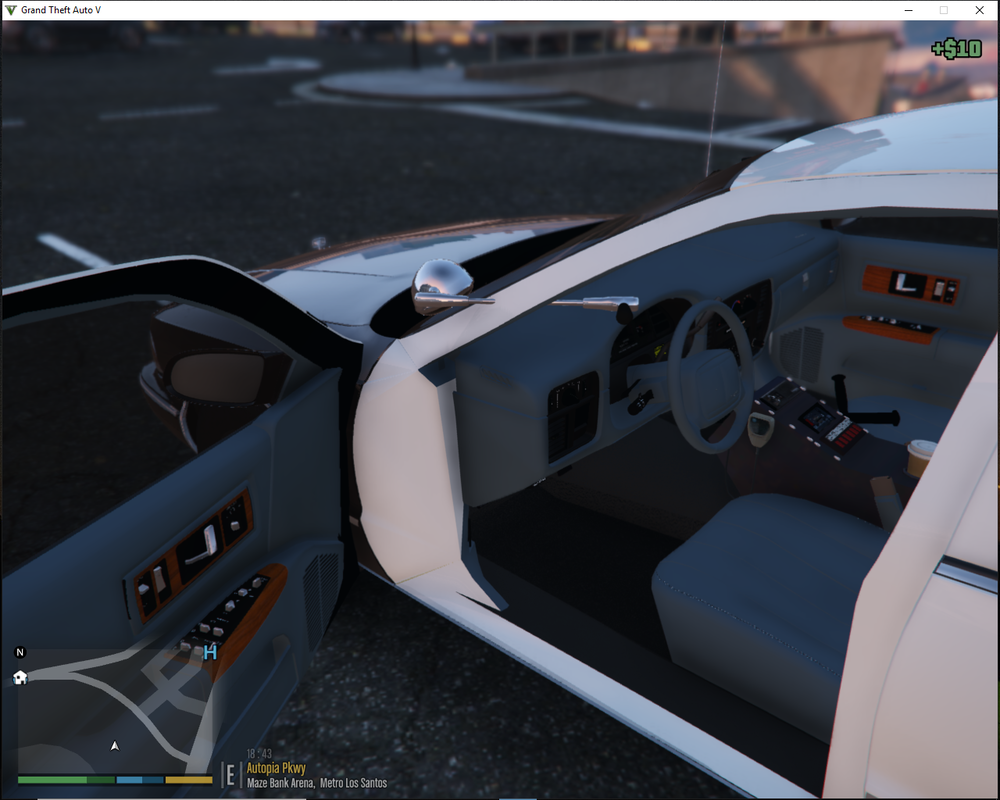
-
I prefer the Vinewood hills house rather then the new apartment. I didn't like the look of womens lingerie on the bedroom floor but maybe if your character is a female. Thanks for giving us the choice to choose which one we would like.
-
I was thinking about the same thing. Except I would install an additional internal HD in my case since I have a slot for that. Which means I would have to install GTAV, LSPDFR, Rage, ect. all on the new HD. My main drive is 500GB SSD. I have a secondary that is 1TB HDD. I really like the SSD so I think I'll swap out the 1TB HDD for a 2TB SSD. With all my mods and GTA fully updated it takes up about 142GB. Also I keep a backup or 2 of the vanilla GTA. As of right now GTAV fully updated is 85.9GB. So the 142GB modded folder + the 85.9GB Backup vanilla takes up 227.9GB. I have about 40 or so GB left. I can't remember what else is taking up room. I'll have to see.
-
HI there, I haven't been prompted to update the launcher yet. I don't have anything blocked. My version looks like 1604. What is the new version number?
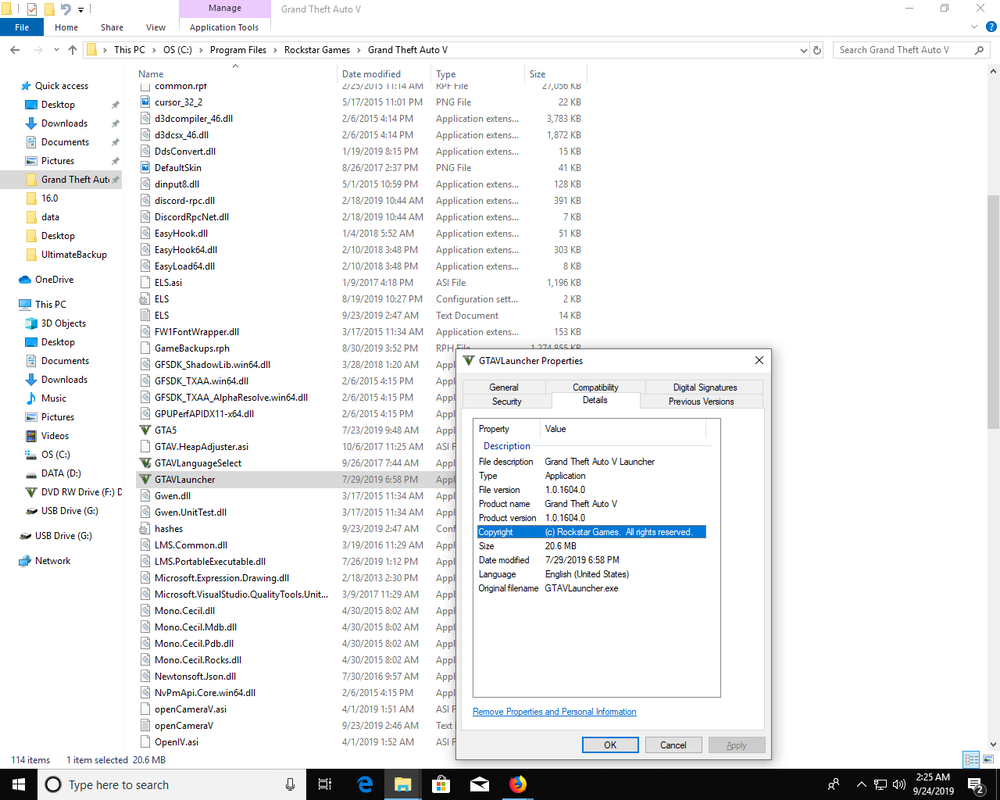
-
For the Livery that is the difference in the "skin" of the ambulances. Check the pic here and see the 3 different skins of the ambulances? Those are the different liveries. One is livery 1, the other is livery 2 and then livery 3. So if you want one of those particular ambulance to spawn then change the livery number. I don't remember which livery number is for which one. I just went through and added my add ons and stuff to XML files and changed uniforms. Uniform customizing is a real pain but I did it and it would be tough to explain how. I'm not familiar with Dispatch of Varitey you are using but the XML files for your mod would probably be somewhat similar with Uiltimate Backup, that's what I use. I also use Juridiction+ which has additional XML files. So do you use Ultimate backup or LSPDFR's backup?

-
I don't use LSPDFR+ anymore because Stop the Ped does what LSPDFR+ does, except a court system. It doesn't have a court system. Download Stop the Ped here. https://bejoijo256.wixsite.com/bejoijo
-
On GTAV updates I can block the updates when one comes out. I assume that this would work on this launcher update that just came out. This is a video by Albo from a couple years ago and he shows how to create a firewall rule that you can enable and disable. You would enable the rule when an update happens. When you launch the game and it shows that it is going to update click cancel. Go to the firewall settings and enable the rule. I'm not going to explain step by step how to do that, you just need to watch the video. Whole video about updating is interesting but how to set up the rule starts at about the 7 minute mark. He said that this works for the retail version, but not sure about the steam because they have their own update system I guess. I'll block updates for a while until something won't let me continue. Usually when scritphook gets updated there is no choice to update later like Rage will give you a choice. If I remember last time I couldn't continue unless scripthook got updated, which means the Rage had to be updated and everything else. I think a few of us wait on downloading updates until all the kinks are worked out. Anyway, I just loaded LSPDFR through Rage and it loaded without updating. Maybe the game didn't detect the update yet but it will. There is no running form it😁. I'm guessing the next load will update and if the update is like all the others then I should be able to block it through the firewall rule. Just have to click cancel before it is done updating. So if you haven't updated yet and you have retail version then you might try this. It will prompt you to play offline though. So click offline when prompt.
-
I use F7YO gameconfig, a good game config is recommended by the author. What helped me but some don't like to use it is a heap adjuster, packfile limit adjuster.
-
Have you tired EUP? https://www.lcpdfr.com/files/file/13245-eup-menu/ https://www.lcpdfr.com/files/file/8151-emergency-uniforms-pack-law-order/ https://www.lcpdfr.com/files/file/16256-emergency-uniforms-pack-serve-rescue/ https://www.lcpdfr.com/files/file/22400-lspdfr-eup-configurations/
-
Do you use the LSPDFR computer or another mod computer? Also do you use ELS? You can change the LSPDFR Computer key in the ini file. Line looks like this. TOGGLE_POLICECOMPUTER_Key=E Or if you want to add a modifier key there is a line for that too. I think when you hold the E it sounds the horn and also makes the vehicle move to another spot. If you use ELS then go into the ELS ini and change the horn key.



