


JBin818
Members
-
Joined
-
Last visited
Everything posted by JBin818
-
Hope you don't mind if I chime in. If you open OpenIV does it say you have an outdated update.rpf in your mods folder? If so then you might update it. Keep in mind that anything you changed in the update.rpf you would have to reinstall.
-
If you have the latest version of EUP then install this if you haven't already.
-
Can you put the LSPDFR's Keys and Settings ini into the custom folder or is it only what's in the Data folder (all XML's) you can put into the Custom? I have a lot of Key changes and setting changes from the default and if I update LSPDFR, I copy/paste the whole thing, easiest way I think. But then I have to go to my backup and replace those 2 ini. I was wondering if I put them in the customs folder then would the game still see those changes? The custom folder has all XML's so i'm not sure if you can only put that file type in there.
-
The longest I've waited for a Scripthook update is about 2 weeks. RPH is usually updated within a couple days after a R* update. There is a staff member on this site that updates RPH so that's why that gets updated pretty quick. Scripthook is updated by Alexander Blade who isn't part of this site and he'll get to it when he gets a chance. He is most likely busy with work and life so depending how what is going on with him depends on how quickly he can get it updated. Like with a lot of authors this is a hobby they do and may make a little money doing it but a real job is needed to pay the bills. Unless you're one of these huge content creators on youtube. 😃
-
ScripthookV just updated a bit ago. Go to the link that MeltingSteele linked and install it.
-
Another user asked about this a few posts above this one and one replied to update RAGE NativeUI. Latest version is 1.7. If you need an update then go here and update RAgeNativeUI. https://github.com/alexguirre/RAGENativeUI/releases
-
 Hi There, here 3 more logs that crashed. I removed Super Events and reduced the percent of Heli Support on your ini to 20 and lowered the max AI callout to 140 in your ini to see if that would stabilize it but it still crashes. See if these logs are related to AIC or if they are LSPDFR related. But the game has been crashing more sooner (within 15 mins) with AIC. Usually could go an 1 - 1 1/2hr before it crashes. See if these tell you anything. RagePluginHook_13032021_085115.log RagePluginHook_13032021_092024.log RagePluginHook.log
- 346 comments
- 43 reviews
-
Stop the Ped should not be the problem. Someone mentioned Arrest Manager above and that could be the problem. Remove Arrest Manager. In fact, you should remove any of Albo's plugins since they are all outdated. STP is up to date.
-
In between "Initializing texture system; phase 10 and phase 11" there is a line [3/8/2021 5:29:34 PM.424] Pixel Shader 5.0 not supported. Falling back to 4.0. Wonder if that is causing the texture problem and crash. I don't know what that means though. I don't have an interruption when loading the texture system phases on my log. Maybe someone else may know what that means.
-
I thought there was something in the lspdfr.ini for that but I don't see anything. The only thing is, like you said is in the STP.ini. here // Take control all peds arrested by LSPDFR Cop and prevent the suspect being transported (yes/no) TakeOverAllArrests=yes I have mine set to yes, where you should have yours to no. I'm not sure where else it would be that it's preventing the AI from transporting the ped after they arrest. You got me thinking there and I can't figure it out.
-
The LSPDFR keys bindings are under the "keys" ini. Go to lspdfr/keys & open it. Make sure the backup menu key looks like this if you want to use UB's backup. BACKUP_MENU_Key=None BACKUP_MENU_ModifierKey=None BACKUP_MENU_ControllerKey=RightThumb BACKUP_MENU_ControllerModifierKey=None I don't use a controller so i didn't do anything with that. Then from root folder go to plugins/lspdfr/UltimateBackup ini and make sure in there it says B to bring up that menu. Save. That should be it.
-
Do you have any security or live scanning software at all that could be blocking Rage from launching? You have the latest update of Rage? Launch Rage and click on the Gear Icon to go to settings. Go to Game Settings Tab and Click the Command Line Switches. Check the Box for Force Windowed Mode. See if that will work. If it does, then once you are in game you can go fullscreen by L Alt + Enter.
-
Rage in LSPDFR is outdated. LSPDFR didn't have to be updated with the last Rock* update but Rage did. If LSPDFR had to be updated then they usually put in the updated Rage. That's why you had to go to that RPH site that Charlie linked. So just keep in mind that the RAGE that comes with LSPDFR might sometimes be outdated like it is now.
-
The callout plugins I use is Simple Callouts by Bejoijo and Super Events and Super Callouts. Along with LSPDFR callouts. I think I read from another user is that LSPDFR doesn't seem to handle ambient events too well. I think I'll remove Super events and see if that will make Ambient AI more stable. Since you can have AI respond to your rejected callouts, I wonder if the more callouts you reject the more AI responds meaning the more events are "running" in the background. Wonder if that is causing strain on LSDPFR. I do reject sometimes quite a few callouts because they are too far, just don't want to take that type of call, busy with another call, so AI would be taking those. I know I can change to false in the ini for that but don't really want to. I could change that and test to see if that stabilizes it. I might try that. Glad there was something you could find in that one log.
- 346 comments
- 43 reviews
-
-

- 1
-
-
The only way I think you can is to use simple trainer. Go to Model Spawning / Voice Menu. Try to find it. I think you have to save it in the trainer.ini or next time you start the game it will revert back to the last one.
-
Opps, Uploaded wrong log. I made three new ones now that all crashed. One, LSPDFR crashed but stayed in game. Other 2 closed the game. On one the game lasted a bit longer because I was called out to the county for a little bit but once I got into the city it didn't last. RagePluginHook_27022021_093232.log RagePluginHook_27022021_092301.log RagePluginHook_27022021_084530.log
- 346 comments
- 43 reviews
-
-
- 1
-
-
I'm not sure if stungun needs to be in there or if it causes problems if it was taken out. I never edited this file. This is the original. I would change these and see what happens. Also, if you have multiple weapons that the swat can choose from, make sure in that category (Swat) that the weapon chance adds up to 100. You'll see in my screenshot that all the weapon chance numbers add to 100. <Inventory> <Name>kogelwerend</Name> <ScriptName>kogelwerend</ScriptName> <Weapon>WEAPON_PISTOL</Weapon> -Change this weapon to another that would be more suitable. <Weapon>WEAPON_NIGHTSTICK</Weapon> -Might just delete this or change to another weapon <StunWeapon>WEAPON_STUNGUN</StunWeapon> <Armor>100</Armor> </Inventory> You could delete stungun and see what happens. I don't know.
-
Which mod do you use to call backup? LSPDFR or Ultimate Backup? Also, my Inventory_eup for SWAT looks like this;
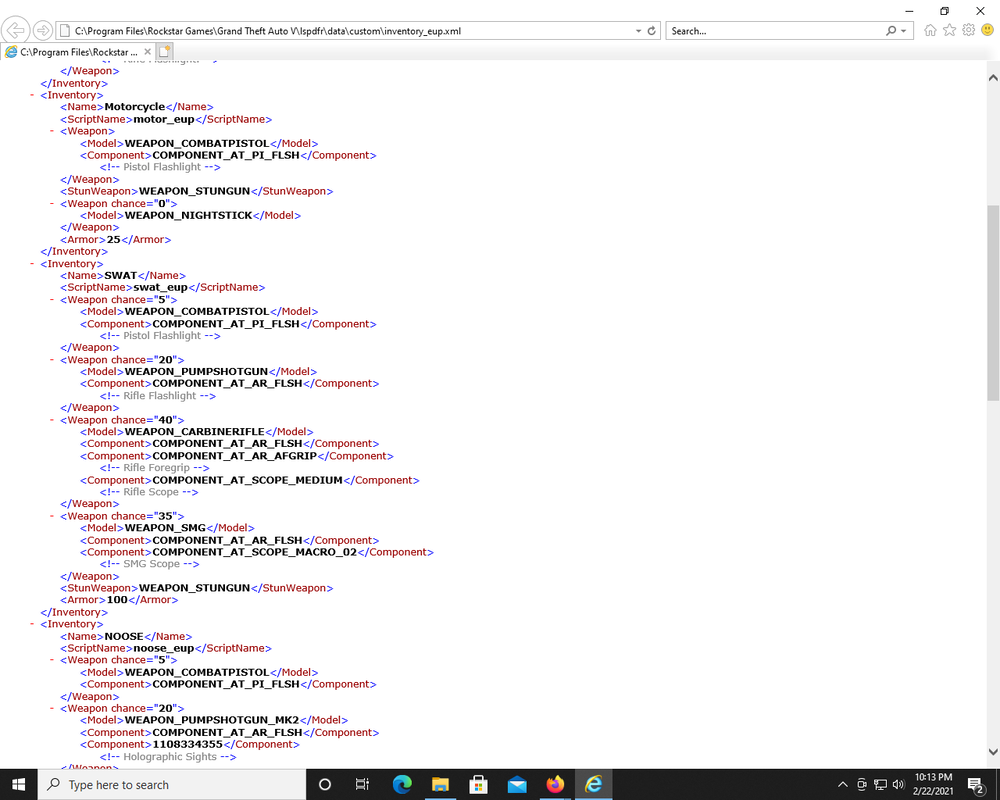
-
https://ragepluginhook.net/Downloads.aspx?Category=1 Download and install. The new game version is 2215.
-
That is from one of this callout packs he's using. In that video (427), in the description, he lists the callouts he's using. Callout Manager - https://goo.gl/zfnmKJ Assorted Callouts - https://goo.gl/5mPbYJ Attempted Crime Callouts - https://bit.ly/33386gj United Callouts - https://goo.gl/WMfto2 More Robberies - https://bit.ly/2ViYmyh Simple Callouts - https://bit.ly/2Ou7sEF Store Robberies - https://bit.ly/2ViYmyh Super Callouts - https://bit.ly/2MftiZI Super Events - https://bit.ly/2MkIRzr Assorted Callouts is so outdated I don't think it's that. Don't use that one. Callout manager is just a menu I think. So it must be one of the others. Sorry, don't know which one.
-
-
I have GTX 1070 TI and I remember I had performance issues with GTAV alone when I first started. My comp came with GeForce Experience and it has section where it will optimize your game settings with your game card specs. Worked good for me. I have a heap adjuster. Wonder if that would help.
-
Very cool plugin but it seems to crash LSPDFR or Rage after a while. For me it is after a few minutes going on duty, for others that have had problems that seem to be related to this have gone 10-20 minutes then crashes. It seems like it creates a lot of events and that overloads what LSPDFR or Rage can handle. Is there anyway to look into this and see if you can make this less of a strain on the game? Again, a really awesome mod. Neat to hear the raidio traffic, other Al get callouts, they respond to your rejected callouts and you can attach as secondary to some of their callouts. Very cool.
- 346 comments
- 43 reviews
-
I'm in the same boat. Mine is crashing after a few minutes going on duty using AmbientAiCallouts. I also hate to delete it because it is a cool mod. I was going to try a few things but haven't gotten around to it yet. I'll set Ambient Response to False and see if that will let it go further. Thanks.
-
I was looking into free music for an intro and outro for my gaming vids to upload on youtube. Looking into Free music for use looks like it is anything but free. Free to listen to, sure, but to use in your video, looks like you are going to have to pay a license fee. Any of you have music in your videos? Music that you don't pay to use. How does that work? I have less than 20 subs on YouTube, so I'm not making any money or anything. I don't want to pay for a license. What do you all do?



