


JBin818
Members
-
Joined
-
Last visited
Everything posted by JBin818
-
So the Ai when you call for back up are wearing the American uniforms? Are you using Ultimate Backup for Backup or LSPDFR's backup? If you are using UB then you would have to add the uniforms to plugins/lspdfr/ultimatebackup folder and in there is a default regions xml and in there you would have to add your uniforms to the proper agencies. But, UB has a different uniform format so you should use Sebo's EUP conversion tool to find the right way it's typed out. If you are not using UB then I'm not sure what the problem is. Normal lspdfr backup you would change in the lspdfr folder/data/agency xml. Oh, BTW, here is the coversion tool.
-
I recently had that problem. I can't see your "Quote" maybe you uploaded a pic we can't see? You might go into the GTAV settings, in-game, and under graphics turn Vsync off. I heard that may help but it didn't with me. You might try that first. A pinned topic on here does mention the vehicles should not go above the 25mb "hard limit" so you might down scale the textures of vehicles that go over that. Do you have the Packfile Limit Adjuster installed? If so in the PackfileLimitAdjuster.ini change the number to 52080. That worked for me. Does the texture loss only occur when you are playing LSPDFR, meaning launching through RAGE? Does the texture loss occur in Story Mode, launching GTAV normally? When you launch GTAV in Story Mode your addon vehicles don't load along with other mods that might be causing the texture loss.
-
What callout packs do you have installed? I remember having that issue and it was because of an outdated callout pack I had installed. You should be able to press E (default) to open the STP menu with the driver in the vehicle. In the LSPDFR .ini file, you should change the traffic stop menu to None so it doesn't interfere with STP traffic stop menu.
-
That is a neat .gif you put in. Nice quick little visual for someone to see. Sometimes that is more clearer than explaining it.
-
I would also like to Thank all the authors of all the mods/plugins they created to make LSPDFR better. Also, the main people who created LC/LSPDFR, the Staff. Nobody really gets paid for this, I assume lcpdfr.com staff does, by ads so they can keep this going. There are bills to pay running a website. For most of the creators this is just a hobby like all of us playing. I don't know how to make mods/plugins, vehicles, uniforms, callout creators, ect. I just modify and play it. So without all those "extras" it would probably get boring fast. And of course to everyone who plays this. If there weren't people who used this mod then this would be a dead website. 👍
-
1) Not it's not multiplayer. It's single player, like story mode is, actually I don't know what it's called in GTA4, never played 4. 2) Yup, it's free. 3) You just need to have a real copy of GTA4. This mod will not work on pirated copies. Also, for GTAIV support, you can go into this link. This is where users would know about GTAIV. Won't see me in there since I've never played 4. https://www.lcpdfr.com/forums/forum/906-gta-iv-lcpdfr-support/
-
-
-
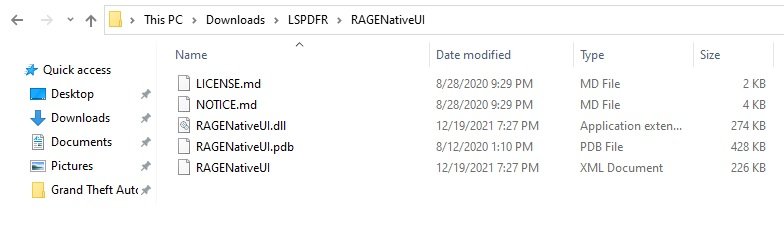
I noticed I haven't updated RageNativeUI in about 2 years. One of those files i just can't remember to keep track of. You normally just drop the .dll in the main game folder but there are a couple other files I'm not sure if they go in or what. Check attachment. The License and Notice .MD I'm sure aren't used in the game. It's like a Readme where it is just there for user info. I'm not sure what the .MD format is, I can't open it. I read on other sites that the XML is for developers only so you don't need to put that in unless you need it for developing something. The .dll I know for sure goes in the main game folder. How about the .pdb? I've seen in some other plugins you have to install the pdb along with the dll. Is that the same here? Thanks
-
I bet that took some time. Well these are things we do to customize the game how we like. We spend a lot more time modding than playing the game. But usually in the end it's worth it and you probably learned something. I know I have in the past modding this. 👍
-
I didn't think about adding then to the stations.xml. Forgot about that. Where did you find those line items? Script Name, Position, Heading or did you figure that out yourself? Also, since I have a Blaine County Truck, there would have to be a separate Blaine County area ( I guess) that the game would see. Like GTAV has separate LSPD and BC Sheriff (LSSD). Like the Paleto Bay or Sandy Shores Station, do those have the Agency name as lsfd_sta or is there a BC agency name for the fire stations? I could probably figure out the outfits. For me, first thing is can addon trucks spawn at certain stations. Some fire truck authors show their trucks sitting in front of the station where the spawn point is. I'm not sure if the truck spawned there or maybe they just spawned it in then took screenshot. Not a big deal for me. It would be nice to see a Blaine County Fire Truck spawn at a Blaine County Station area but if not possible then I could just use the BC trucks to call in a fire/EMS through Ultimate Backup or BetterEMS. I thought maybe GTAV has a file that has the stations laid out that you could edit but maybe not. BetterEMS has an xml with the stations but it's laid out differently and maybe that is just for calling them out not for stationary spawning. I should contact Parks and clarify that. EUP in their duty select xml has the agency separated. Not sure if it's possible. I saw your other post too. Thanks for uploading the samples. Helps me see what it should look like.👍
-
Not sure what Rachel hook script is. Haha, looks like an auto correct. Anyway, after installing GTAV it probably needs to update. It should do that automatically. That is probably why you're getting that version difference. LSPDFR and Rage are up-to-date.
-
Under the Agency XML, make sure you have those vehicles flagged as to Spawn Ambiently. Also you could adjust the Vehicle Chance number (percent) to a higher number for your addons to make sure they are spawning in ok.
-
I don't know what that could be. If it's like a flashlight, where the light is in front of you, you might press Tab and see if it turns it off. You say it turns on automatically I guess. When your character has the flashlight on I have to press Tab to put the flash light away. That's why I suggest that and see what happens. I'm not sure. If you can take a screen shot and upload it so we can see what it looks like, that would be good.
-
Flashlight on your chest? Like a bodycam? Do you have any bodycams installed?
-
I was wondering if there is a way to have your addon Fire Trucks spawn at Fire Stations like they do normally for the Fire Truck vanilla model. I installed a Blaine County Truck and want it to spawn in Sandy and Paleto Bay. So when I drive by I'll see it there. Also to use it for actual emergencies. In BetterEMS there is a XML that you can put your Fire Truck models in any fire station. But it doesn't spawn at the station, only the vanilla spawns. Any of you have addon Fire Trucks and get them to spawn at certain Stations? If so, how?
-
Another thing you could try is going into the GTAV settings, in-game and go to the graphics settings. Turn off Vsync. I think I also read that the most recent DirectX is 11. You might down scale that to 10. That is also there in the settings. Sometimes that helps. There is also this post which might help. https://www.lcpdfr.com/forums/topic/95719-guide-how-to-get-rid-and-avoid-texture-pop-ups-disappearing-assets/
-
Oh ok thanks! I didn't think there was a line for that.
-
The one I could do a lot less of is the Red Blip that pops up when a suspect drives by you and then there is the progress bar that that says joining pursuit or something like that. I might be in the middle of something or I just don't want to go after that person so after a while it will go into search mode. Somethings are disabled when in search mode. That is one I would like to have disabled.
-
Thanks for all that and the pics! Now I can see how the layout should look. I didn't think about the Outfits xml until later so I explored it but still wasn't sure how to do it. I'll try to work on that later if I get time. At least I see how it should be done. Ulitimate Backup it easy to figure out. I've customized outfits there in the past. There are examples in the UB' xml files I can go off of. And yes, that new EUP convertion tool is great.
-
Ok, thanks for that pic. That helps. Yeah I did see similar in the vanilla and was trying to put it together but something was still wrong. I'll try this and see what happens.
-
I didn't use variations. In the outfits XML's I noticed variations later but wasn't sure how to put it. I do have a customized character. I looked in the chars folder but they are .ls and .bak so i can't open them. I'll go in game and see what I can customize more with that character. So I am supposed to use Freemode, got it! For the variations should it look like this? <variations> insert the outfit variations here </variations>
-
I don't see any preset outfit Motorcycle Uniforms for LSSD or BCSO that your backup could use. So I have this custom uniform for a LSSD Motorcycle officer that I made through EUP and converted it to LSPDFR uniform id's thanks to SEBO's new EUP Conversion Tool. I have 6 different variations of this uniform. This is just one of the variations. In the LSPDFR Agency XML or in the custom folder under Agency_EUPFR (because I have EUP's config) I need to make these uniform id's so the game can make a "ped" Officer with this uniform. I just need the one line made so I can see how it should look. Then I can add the other variations under it with the ped chance. It would be for a male officer only. I'm not sure which you are supposed to use mp_m_freemode_01 or s_m_y_sheriff_01. So I think it would look something like this? <Peds> <Ped chance="16" <Component id="1" drawable="0" texture="0" /><Component id="3" drawable="20" texture="0" /><Component id="4" drawable="32" texture="2" /><Component id="5" drawable="53" texture="0" /><Component id="6" drawable="13" texture="0" /><Component id="7" drawable="8" texture="0" /><Component id="8" drawable="38" texture="1" /><Component id="9" drawable="13" texture="0" /><Component id="10" drawable="0" texture="0" /><Component id="11" drawable="200" texture="2" /><Prop id="0" drawable="17" texture="2" /><Prop id="1" drawable="5" texture="5" /><Prop id="2" drawable="0" texture="0" /><Prop id="6" drawable="0" texture="0" />mp_m_freemode_01? or s_m_y_sheriff_01?</Ped> </Peds> If someone could adjust this so the game could read it then I'll put it in the xml and try it out. Thanks
-
I wish I knew how to create callouts and other mods but I don't. I'm too busy with work and stuff to pay the bills that I don't really have time to learn how to do that. I could probably come up with some good callout and mods. There is one, I would think would be a small plugin/mod where you can request a new unit if yours got destroyed. You request it through a menu and someone would drive to your location and drop of your new patrol vehicle for you. You could pick which ever vehicle you wanted including addons. All editable in an .ini file if you added more vehicles. I can't even do something like that. That idea came from an old callout pack that was either LP Callouts or Law Callouts about 2 years ago. I always liked that feature.
-
For this one, I think the 1 gb of GTX 650 is a bit low. it would run but picture quality would be low. From what this one looks like this video memory is 1 gb where I think GTAV recommends at least 4 gb. That is just GTAV recommendations, not including LSPDFR & mods. I put a thread on here when I updated my video card, actually whole computer. I'll see if I can find it. It is just pictures from the game with the old computer vid card compared to the new computer vid card. I'll see if I can find that thread on here. Then you can see the quality difference between a 1gb and 8 gb graphics card look. Also, when I had the 1gb it ran fine but I was just really wanting a better look, meaning better graphics card. I hate for anyone to invest in a computer and then a year later want better graphics but their computer wouldn't be able to support it.



.thumb.png.9d0943161b37f863c291d6d6664edefb.png)
