



Harper
Friends of LSPDFR
-
Joined
-
Last visited
Everything posted by Harper
-
Somehow, using an ENB released on here made my FPS increase dramatically
-
Nothing to see here! This topic has been closed by G17 Media staff. If you feel that this topic has been closed in error, please report this post.
-
Nice work, for the second version you should probably make the head and tail lights flash
- 10 comments
- 2 reviews
-
7 is where its at.
-
There's an Ambient Fire Inspector Script. When a car explodes, an engine will arrive on scene and put out the fire. The Chief will have a clipboard and begin investigating the scene whilst the other firefighters use broom's to sweep debris away.
-
Yup, Rockwell extra bold.
-
Have you checked your visualsettings.dat ?
-
Am I the only one who can hear CJ's voice when Franklin first speaks? I'm serious, it sounds EXACTLY like him. Maybe the voice actor is back, but obviously as a different character? Head to 0:52. Listened to it a few times through my headphones, sounds just like him
-
http://uk.ign.com/articles/2012/11/05/ign-live-presents-new-grand-theft-auto-v-trailer-revealed
-
![enb2012 10 30 17 10 19 [1]](//s3-gallery.int-cdn.lcpdfrusercontent.com/gallery/album_954/sml_gallery_9318_954_88985.jpg) Could be a draw distance issue.
Could be a draw distance issue. -
The site will crash. Too many people will rush to watch the trailer. I suggest you have a list of sites at the ready, like IGN or even youtube.
-
-
T-Mobile have had the iPhone in stock since the 3GS. I've got a iPhone 4 on T-Mobile, although they are now called Everything Everywhere and I like it, I take the same stance on my ownership of one the same as my fandom for Nickelback. I don't care what others think, I like it and that's all that matters. Although I agree, they are overpriced wank. The only time I'll ever be upgrading would be in a few years or if my current one broke.
-
MORE IMAGES!!!!
-
Post your links/suggestions about Computer Configurations and on what to buy in this thread here: , Closing Topic. Nothing to see here! This topic has been closed by G17 Media staff. If you feel that this topic has been closed in error, please report this post.
-
Nothing to see here! This topic has been closed by G17 Media staff. If you feel that this topic has been closed in error, please report this post.
-
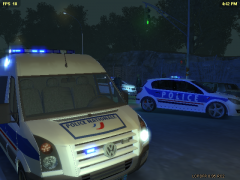 That's a Vauxhall Astra (Opel)
 -
Nothing to see here! This topic has been closed by G17 Media staff. If you feel that this topic has been closed in error, please report this post.
-
People who visit those sites without anti-virus are basically "visiting" a very unclean girl without wearing a condom. Yeah, the experience will be great but you'll be left with a ton of infections.
-
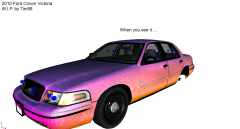 Its kinda hard to "see it" if there's a hood covering it.
 -
Not even I know when the release date is. And I'm staff. Sam and Jay have been working hard on the SA-MP server so I wouldn't expect anything just yet. It could be just round the corner however
-
Why would a UK Email offer you Euro's? It'd be GBP. I don't trust this.
-
-
What's that supposed to mean? We have lives you know.. If I have a choice whether to head out with friends or stay inside and model something for a video game, I think I, as well as other "jerk modelers", would choose the first option.
-
I just exploded everywhere. Seriously Well, I can't fucking wait.

![enb2012 10 30 17 10 19 [1]](http://s3-gallery.int-cdn.lcpdfrusercontent.com/gallery/album_954/sml_gallery_9318_954_88985.jpg)

