




unitedOrange66
Community Team
-
Joined
Everything posted by unitedOrange66
-
-
For non-els vehicle, the lighting is controlled by "carcols." If you're replacing it in x64e, you need to edit or replace "carcols" in mods/update/update.rpf/x64/data with the one included in the vehicle pack.
-
That's what I predicted. Also copying the dlc.xml from update.rpf to common.rpf is not how you install addon mods. Those dlc.xmls are completely different.
-
1. This has a lot to do with your PC specs and in-game graphic settings. 2. High-quality vehicle mods that spawn around the map may cause textures or objects to pop in. Outdated plugins, poorly coded callouts, and overloading plugin folder with lots of plugins can cause noticeable lags and shutters. Clean up your Plugin and Plugin - LSPDFR folder, install only essential plugins and those that you need the most. Install Resource Adjuster to minimize performance-related issues. (notice I didn't say eliminate)
-
 Make sure you're using the one on GitHub: https://github.com/scripthookvdotnet/scripthookvdotnet/releases
- 540 comments
- 26 reviews
-
 Incorrect. Only certain plugins and callouts that their functionalities depend on the connection to an online server, then internet connection is required. The perfect example is Bejolijo's plugins. Any other plugins that are not hosted on a server do not need internet connection for it to function properly.
- 56 comments
- 10 reviews
-
-

- 2
-
-
Thanks for the update! "Tim Ross (the cop guarding the suspects) was a too excited to see you. He was still greeting you when the case was solved." He reminds me of Sheriff Tim Breaker from Alan Wake 2.
- 56 comments
- 10 reviews
-
It is likely caused by the vehicle itself, try to add another vehicle from a different modder.
-
That was a two-part question. Woah don't be too serious here, I'm just trying to give it a shot. Sorry, I will leave you to it Seg.
-
ELS config name has to match the vehicle name, the one that has the lighting problems.
-
Well, my point is, whatever the model he installed, it probably has its own els configs. He has to use those configs included with the vehicles. Does the els config name match with the vehicle name? Did you rename the vehicle to something else?
-
Yes, he will be able to if he is using the replacement method for installing car models. Only the lights won't work properly with the default config, which is likely to be the issue in this case.
-
Did the crash occur after adding the new add-on vehicle? Crash at this stage usually means the vehicle you're trying to install is causing issues.
-
You have to install the ELS config for any ELS models you're installing. Those are usually included with the vehicle downloads.
-
-
I started to have this issue after updating my Nvidia GPU driver about a year ago. But changing the in-game shadow to "sharp" or "softest" fixed it.
-
If you are replacing it, just rename the mod model to the one you're replacing. Otherwise you can install it as add-on, you'll need to install a base folder and copy/paste every necessary meta files.
-
I doubt those are related. Do you have sounds in general? Such as weapon sounds? Did you change anything in x64 - audio?
-
 Under very rare circumstances, duplicated roadblocks would spawn on the wrong side of the street. Is this supposed to be a bug? In this screenshot, the same roadblock was spawned three times and placed right next to each other: https://imgur.com/rHuaxoA
- 248 comments
- 17 reviews
-
This might be the issue, dxgi.asi might conflict with many other .asi mods including ELS.
-
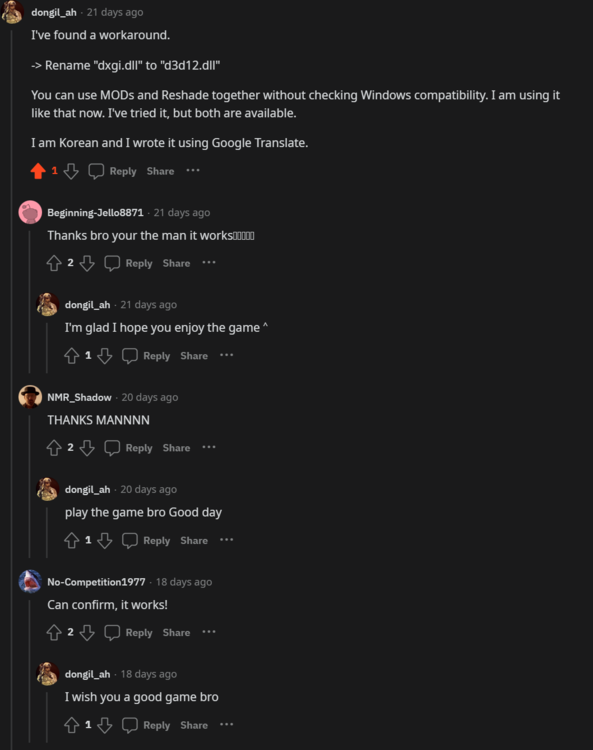
Reshade has been having issues with a lot of games including GTA V a while ago, and I must agree with you that the author couldn't care less. Despite the overwhelming reports on issues related to Reshade and .asi mods, I do believe this fix I found on Reddit months ago still works on this day: (please see attached screenshot), as I am not experiencing any of these issues myself. I'm using VisualV and Reshade at the same time.
-
I don't think you can do anything about that, unfortunately. Unless the author is willing to remake this model for ELS only.
-
I didn't mean to bump this old post. But, I do believe that installing the latest version of ScriptHookV and its .asi loader: dinput8.dll, will fix the issue with random .asi mods crashing; not only limited to ELS.asi.
-
By process elimination, I was able to eliminate all the other .asi mods I have installed, except "Low props restore," which conflicts with LML.
-
I'm glad this plugin is still being updated! I've been using it for a while now.
- 248 comments
- 17 reviews





