




unitedOrange66
Community Team
-
Joined
Everything posted by unitedOrange66
-
 Realistically speaking the wires aren't all white like bubble gum: https://imgur.com/PtYMTX0
- 30 comments
- 6 reviews
-
Here is a suggestion, it would be great if you would consider it in the future updates: Change the material of the wires and the color to simulate real taser wires.
- 30 comments
- 6 reviews
-
-

- 2
-
-
This topic has been moved to the appropriate forum. Please post in the correct location in the future.
-
This topic has been moved to the appropriate forum. Please post in the correct location in the future.
-
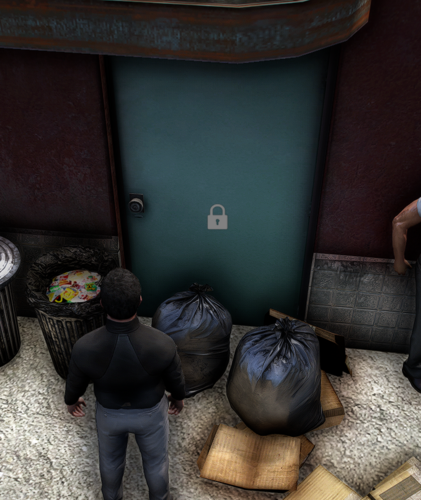 I've noticed the "short_lock" audio does not work at all, I even turned my audio volume all the way up. Also, here are some suggestions: Add the ability to resize the icons; Add the ability to lock/unlock garage doors only in a vehicle; For double doors, add the ability to lock and unlock both of them at the same time with one lock, instead of locking both of them individually. Edit: After testing a bit more, there seems to be a critical bug where sometimes when loaded into the game, some doors are completely missing, or disappearing after unlock it, or turning into this "double door:" https://imgur.com/vpQ5wEL
 -
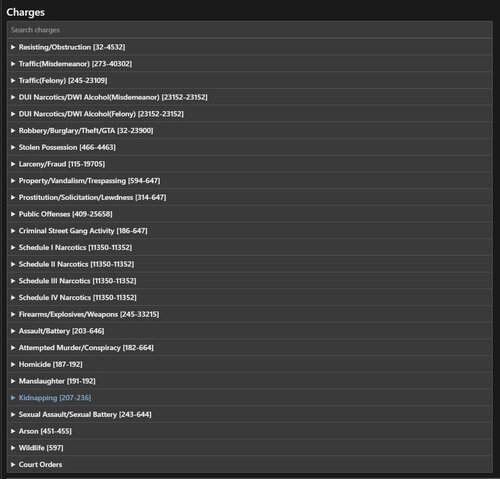 This still works as of today - 9/5/26, since there are no major EPC updates.
 -
This topic has been moved to the appropriate forum. Please post in the correct location in the future.
-
-
@krosby I have merged the new post you created regarding editing PR backup.xml and Agency.xml with this post, since those two are very similar.
-
 Would it be possible to add the options to change the hotkeys for "free mouse" in a future update? I've noticed the same issue. When holding down the PTT key via Grammar Police, the transmitting text only appears once.
- 83 comments
- 10 reviews
-
-
- 1
-
-
Hello, As far as I'm aware, the latest version of LCPDFR is 1.1, and it is designed to work with GTA 4 1070. The versions that are available on our website are from 1.0 to 1.1, I have no idea where you got 0.9. With that being said, we do not support older versions. Consider updating your game if you wish to play LCPDFR.
-
Your topic has been moved to GTA V Support, this is not LSPDFR related. Please post in the correct location in the future.
-
 Yes, I have. With only LSPDFR.dll and DTF.dll, no plugins inside the LSPDFR folder either. When DTF is loaded, the average FPS is 41 with noticeable consistent micro stuttering; without DTF, the average FPS is 46, with no micro stuttering. A difference of 5 FPS, however, I do not expect this plugin to have zero performance impact, but 5 FPS is still quite significant.
- 45 comments
- 5 reviews
-
 For those who are confused. Simply put, this is a custom UI / texture for Albo's plugin - SirenMastery, with a slight change that it displays different UIs in different police vehicles. It is not the same as a scripted fivem siren controller.
 -
 Very creative plugin, here are my suggestions: Can you possibly remove the restriction that prevents police backup units from entering the scene where the player is downed? So in the event of an active shooter, backups can engage and secure the scene. Would it also be possible to add an option and allow the player to change the ambulance model depending on where the player is? (County EMS / City EMS). Customizable localization to change on-screen texts, button texts, and dialogs.
- 12 comments
- 1 review
-
- fr
- us
- lspdfr plugin
- legacy
-
Tagged with:
-
Please stop creating duplicate topics. Creating multiple topics stating the same issue won't encourage others to respond any faster. Continue the troubleshooting process on your original topic, which can be found here: https://www.lcpdfr.com/forums/topic/156603-my-lspdfr-keep-crashing-going-to-a-callout/#comment-829207
-
Your topic has been moved to LSPDFR 0.4 Support. Please post in the correct location in the future.
-
After using the Damage Tracker Framework since October 2025, and after some in-depth testing with no other plugins loaded, I have also found that the Damage Tracker Framework causes some consistent micro stuttering and a noticeable performance drop. For reference, I am running GTA V on a RTX 5060 Ti 16 GB, i9-9900K, with a total of 32 GB of RAM. I'd get 60 FPS in 2K resolution without LSPDFR, and 40-50 with LSPDFR and other plugins (those that don't have a heavy performance hit).
- 45 comments
- 5 reviews
-
Yes, the UI is from SirenMastery, and the texture is from a paid FiveM siren controller UI.
-
This topic has been moved to the appropriate forum. Please post in the correct location in the future.
-
This topic has been moved to the appropriate forum. Please post in the correct location in the future.
-
I don't use that plugin. This was made for EPC exclusively.
-
Set Main.DisableMultiplayerMap to false in lspdfr.ini.
-
This topic has been moved to the appropriate forum. Please post in the correct location in the future.
-
I do. I play in 2K, and I get 30-40 FPS average, depending on where I am. Sometimes as low as 20, espiecally where there are lots of trees and/or custom MLOs(interiors) around me. So I am convinced this is normal when running LA Revo or 5Real with LSPDFR. Although more VRAM will help with AI traffic spawns, it doesn't really make a huge difference in improving FPS with LA Revo. CPU: Intel i9 - 9900k Motherboard: MSI MPG Z390 Gaming Edge AC LGA1151 GPU: ASUS RTX 5060 Ti 16GB OC Edition Storage 1: Samsung 970 EVO 1TB - M.2 NVMe Storage 2: Samsung 970 EVO Plus 2TB - M.2 NVMe Memory: HyperX Fury 32GB 3466MHz DDR4 CL16 DIMM

