




unitedOrange66
Community Team
-
Joined
Everything posted by unitedOrange66
-
Use the RPH included in the LSPDFR manual installation package, which is the latest version.
-
"In the config" means in the callout configuration.
-
Grammar police, tell dispatch you are unavailable.
-
Let me see your LSPDFR plugin folder, take a screenshot.
-
You probably have other plugins that forcing callouts.
-
-
 In the older version they actually shoot first, as soon as the player arrives on the scene, not even that close to them, they started to shoot while the player was still in the car lol. Now they wander around holding their weapons, or standing there and doing nothing, ignoring AI cops and the player. Maybe they are not "seeing" the player and other AI officers?
- 1,023 comments
- 63 reviews
-
I don't know if this is intended, but most of the time (99%) the suspects in SWAT callouts does not do anything other than stand there, frozen in place. Unless you open fire on them first, they will return fire of course. Probably because your SWAT vehicle mod and your SWAT EUP officers' uniforms have taken up too much game memories, since super callout automatically dispatch SWAT units on certain SWAT callouts.
- 1,023 comments
- 63 reviews
-
-

- 1
-
-
All I had to do was set "Ambient.DisableAmbientGameCopSpawnBlock" to true in lspdfr.ini.
-
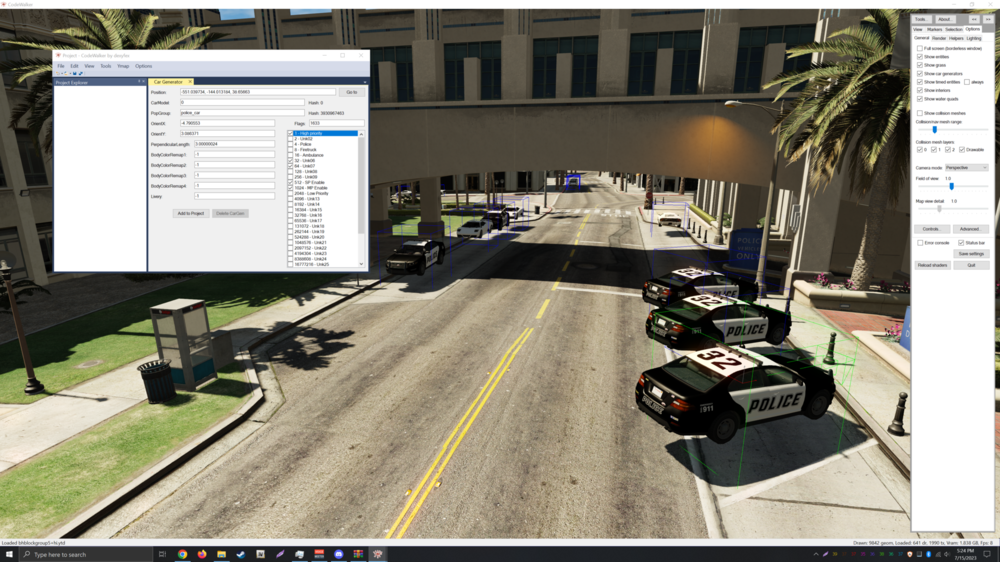
Hi, I've been trying to modify police vehicles' spawning pattern at the police stations' parking lot by editing ymaps related to cargen via Code Walker. There's one problem I can't figure out, no matter what I do, such as changing the spawning priority to high, or attaching a "force spawn in cargen" flag to the vehicle in question, they will NOT spawn at all. This issue only exists at every police station's parking lot, I tried to create a custom cargen for spawning coroner van near the medical examiner's office, it works every time and it spawns all the time. In Coder Walker those police vehicles' spawn locations are clearly marked with blue boxes, but none of them spawns accordingly to cargen. I'm wondering if this has something to do with LSPDFR's ambient spawning system, does it disables default GTA V police cargen around the stations? This screenshot below shows where the police vehicles are supposed to spawn via cargen:
-
 " Warning If you use an alternative plugin to start callouts you may see a second callout. This are only the left overs of something that I have abandoned for now. Stick to the LSPDFR default way to start callouts to not get frustrated. There is only ONE callout in this plugin. I may remove this with the next patch. "
- 58 comments
- 10 reviews
-
-

-
- 2
-
-
-
-
 Just a quick feedback: Could you please add an option to disable the timer for certain calls, and an option to disable auto camera focus upon arriving on the scene? As for the traffic stop backup call, I understand it's new, but could you add some actual traffic stop scenarios? Sort of a bug report: Police convoy sometimes gets stuck in traffic if population density is set to high, he will keep making U-turns on the highway, crashing into cars and blocking traffic.
- 201 comments
- 18 reviews
-
-
- 1
-
-
- rph
- lspdfr callout
- legacy
- rph
-
Tagged with:
-
.thumb.png.9d0943161b37f863c291d6d6664edefb.png) "Reinstalling" stuff definitely won't "fix" a crash related to a particular set of codes. There's no logic in doing so, and I don't even understand why people still believe in some "miracles" in doing this and still doing it.
"Reinstalling" stuff definitely won't "fix" a crash related to a particular set of codes. There's no logic in doing so, and I don't even understand why people still believe in some "miracles" in doing this and still doing it.- 368 comments
- 33 reviews
-
 You might be missing one of the requirements in order for this mod to work.
- 555 comments
- 26 reviews
-
-
- 1
-
-
Modify global2.txt. The easist way to do it is to install a "real street names" mod.
-
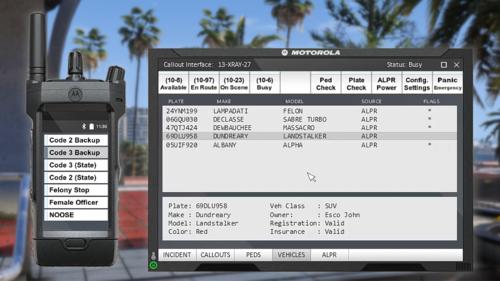
 To the author/developer: Are you considering adding shoulder and chest radio animation for the police radio? And can you add an option to enable the radio animation only after a key has been pressed?
- 1,360 comments
- 85 reviews
-
 You don't necessarily need to "spam" it "rapidly." This bug can be reproduced every time at a regular speed when selecting a vehicle via the "vehicle selection menu." The camera angle's position changes depending on the vehicle type.
- 291 comments
- 27 reviews
-
A minor bug report: Camera changes when cycling through vehicles in LSPDFR vehicle selection menu. Upon removing this plugin, this "bug" no longer occurs. Here is a screenshot of what it looks like: https://imgur.com/A7At0Et
- 291 comments
- 27 reviews
-
-
Most of the callouts are failing upon arriving at the scene. Same issue as others mentioned above. RagePluginHook.log
- 1,023 comments
- 63 reviews
-
One more thing, I noticed when enabling "real time" via SimpleTrainer, the bodycam/dashcam's seconds in display time will freeze, while the hour and minute still works.
- 291 comments
- 27 reviews
-
That is so true. 🙂 No one reads anything these days. But, for those of us like me who always read everything before installing a mod, the notification feature is quite annoying. I think you could add a "hidden" setting to disable such notifications in the .ini file, blend it in with other settings, and make it hard to find. So those who never read anything they will never be able to find the setting, and they will still see the notification in-game all the time; which servers its purpose. 🙃
- 291 comments
- 27 reviews
-
Can you consider adding an option to disable the annoying notification of "you can edit offsets with AxonSignalOffsetMenu" every time this plugin is loaded; when switching to first-person and activating the vehicle dashcam?
- 291 comments
- 27 reviews
-
-
- 1
-


.thumb.png.9d0943161b37f863c291d6d6664edefb.png)
