


Aquamenti
Members
-
Joined
-
Last visited
Everything posted by Aquamenti
-
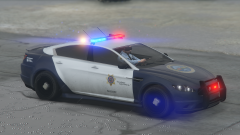
From the album: Aquamenti Police Workshop & Museum
-
Wait, so we can use patterns with binary values of more than 32 characters? Can we use less?
-
Sirensettings is a value in the carvariations.meta file. Read installation instructions carefully when installing new cars; it isn't all drag and drop.
-
Which sirensettings does Lundy's car use? The default rotator lightbar, I assume you mean the one from police/sheriff, uses sirensetting 13. LED lightbars use something else and there are more rotator lightbars in the game (police transport, towtruck and North Yankton cars for example) EDIT: Another important question is what did you do with the lightbar in zmodeler. Did you scale it? Make sure the dummies are correctly placed. You might have also overlooked positioning the collision volumes, however that won't affect the lights flashing.
-
Here, this is what I could do with the white background. But I recommend using a black one with no background. You can edit curves or create an adjustment layer in Photoshop to change it to whatever tone you need it to be.


-
 That you did, and I must admit, I didn't notice as I joined the community much later myself. I can only applaud your great choice!
- 4 comments
- 1 review
-
-

- 1
-
-
What light reflections? Can you be more specific? Maybe a screenshot of what's wrong.
-
The right place is mentioned in the first post:
-
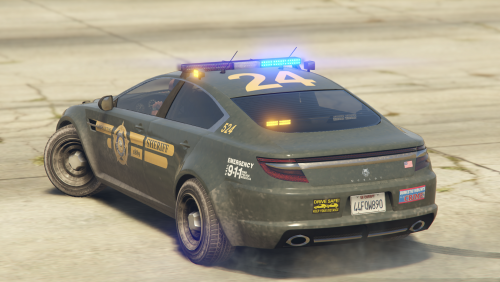
A new update adds a bullbar and the green liveries that are pictured on the screenshots. It also fixes an issue with the .ytd file that would prevent the vehicle from loading for some users.
-
I found the problem, against all odds, in the .ytd file. It was too many mipmaps on the liveries.
-
You're talking to make-believe cops, of course there's going to be questions asked. Now go ahead, tell us what are you looking for.
-
The car's been out for a few days now, and I figured I should create a thread here as well for my projects, and for people to report any bugs, problems with installation, post suggestions/requests and maybe share cool pictures or custom liveries for the cars I've released. To any who have not yet had the pleasure to try the vehicle out, let me get straight down to brass tacks here and explain what sets this vehicle apart from others. The vehicle exploits carcols.ymt editing and has amber lights on three sides of the car. It's UV-mapped on all LODs and comes with a 4096x4096 template. Headlight coronas and dirt/mud don't look out of place. To summarize, it looks very natural in-game and is lore-friendly. Full features list: (Optional) Carcols lines (or replacement file) for amber rear LEDs and side-facing lights Slightly tinted windows by default Breakable glass and functioning dials Default dirt mapping is preserved Detailed UV-mapping of the vehicle and a HQ template for custom liveries Eight high quality LSPD liveries with a .psd for an example BONUS! Before going on duty, visit LS Customs to give your cruiser a unique look. Jackal default body modifications enabled. Planned features currently include a functional push bar and more liveries.
-
No, I suppose they weren't. Is that your modding question?
-
I'm having trouble spawning a model, which has worked in the past. Using the RPH console's spawn command, the vehicle will not spawn, no error message is conveyed and as I collapse the console the game world loses detail - in particular, all cars are at best L1, the map takes longer to load etc. It's an add-on car, but I tried replacing a default one, and I've tried other add-ons - I can conclude the problem is specific to this one model. Which worked fine two days ago. I also tried a different dlcpack to no end. Has anyone run into this before? What could be causing the problem?
-
Hide all layers except the chassis. You have to enter polygon view, it's roughly in the middle of the top toolbar. Then click on the chassis. Select the polygons you want to delete and hit Del.
-
Edits to vehicle models have to be made in a modeling application, such as ZModeler3. Now, that is no original fbi2.
-
Lightsettings come from carcols.ymt. Each light setting has an id number and a <name>, the 75th one happens to be <name>fugitive</name>
-
 Thank you for the kind words! The models in question were some of my preliminary attempts and, as such, they're poorly mapped, the dirt is all out of place and so on, worst of all - they lack lower LODs and that really demands in resources. However, I'm actually thinking about reviving the Pony transport vehicle now that I'm a bit more adept, and I'm glad to see these projects could actually find a place in the community. As for the liveries - I'm glad you enjoy them and if you have any special requests I only hope I can accommodate. They're by no means private. EDIT: I found some more angles on the Pony. I suppose you can expect a similar setup in the near future.
 -
I've converted this default GTA V car to a police vehicle. The model makes use of carcols edits, and provides amber emergency lights under the rear window and on both sides of the roof (check the pictures). Also included in the package is a variant with standard siren values and no amber lights. The car is optimized for Radiance V, but will work regardless. Features list: (Optional) Carcols lines and an optional replacement file for amber rear LEDs and side-facing strobes Carvariations and vehicles.meta lines, although the model could probably replace police2 Breakable glass and functioning dials Default dirt mapping is preserved Detailed UV-mapping of the vehicle and a template for custom liveries Eight high quality LSPD liveries with a .psd for an example The model is unlocked and community edits and improvements are encouraged. Use the template and make me proud.
- 4 comments
- 1 review
-
-
- 8
-
-
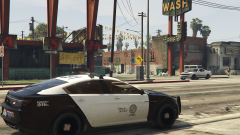
From the album: Aquamenti Police Workshop & Museum
-
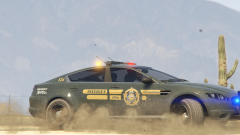
From the album: Aquamenti Police Workshop & Museum
-
I have a thought. Maybe the siren toggle sound should be deactivated for blipping and manual siren?
-
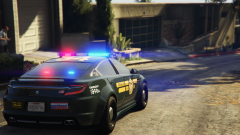
From the album: Aquamenti Police Workshop & Museum
LSSD is about to expand its fleet as I'm test driving this Ocelot Jackal. WIP. -
Alright, it seems I didn't adapt paint3 properly. If anyone else with the same problem stumbles upon this thread, this is what you want to do with your material:
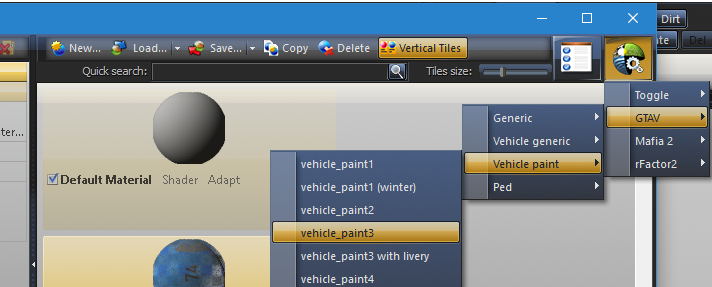
-
Dude, it's three posts above you.

