


Aquamenti
Members
-
Joined
-
Last visited
Everything posted by Aquamenti
-
A dream that police cruisers will not be divided by the color of their emergency lights
-
Traffic advisers are complicated, because there seems to be a hardcoded limit of 20 sirenlights and if you've got 4 going one way, you need 4 going the other. A lightbar typically uses at least 6 sirens, and sacrificing 8 sirens out of the remaining 14 for a clumsy 4-light adviser that requires a trainer to use properly ... there's got to be a better way. And modders are out there figuring it out. Currently, I don't think models can use more than one siren of the same number, and they sure as hell can't switch sirensettings mid-game. So we're currently "stuck" with one pattern per model. Adding yellow lights that don't change pattern, however, is very easy, though it requires a few quick zmod3 edits. I did that to my default Stanier to give it a slow amber wig-wag.
-
Under <flashiness>, the multiples value seems to determine how many times the corona will flash during 1/32 of the whole sequence. For my steady burn lights, I set it to 0, otherwise 2 or 3 should suffice. If you want them to flash faster, up the BPM.
-
 Oh, right. I mean when changing back to the primary siren, whether it starts mid-way or from the beginning.
- 851 comments
- 108 reviews
-
I just changed the keys for Siren Mastery: 1) change Tap Horn and Blip to None 2) change Toggle Secondary to DPadLeft 3) change Toggle Sound to DPadUp 4) change Toggle Sound Modifier to X With this configuration: When turning sound on/off, hold down X for a bit until your selected weapon pops up. It won't change the weapon and this will prevent the mobile phone from popping up. Since you can't disable the default ones, you can use Left Thumb as you always have for activating or deactivating the emergency lights altogether, and also for horn and blipping (if you turn your siren on and off quickly). You can also quickly turn your sirens on by hitting DPadLeft (hit it twice to coolly switch over to your primary) Hey, could you possibly have this as a setting in the .ini? I actually kinda like it for adding variety!
- 851 comments
- 108 reviews
-
I meant the default ones, so I could use the ones provided by this mod instead. EDIT: Never mind, found a work-around as it is.
- 851 comments
- 108 reviews
-
Hey Albo, this may be a bit off topic, but is there a way to disable key bindings for the game controller? I'd really rather have quick control over my sirens than headlights and the minimap. I appreciate your effort and absolutely love the mod. I particularly like the high customization and that when I switch back to the primary, it continues where it left off. It's a nice touch.
- 851 comments
- 108 reviews
-
Are you suggesting changing the whole thing, including that one line, will yield any different results on the part of handling?
-
I've tried replacing it with an Esperanto, a Gresley, and a van. They all rolled over even if I copied the vehicles.meta lines from elsewhere.
-
As with every other model, I do. It just doesn't work for sheriff2.
-
A word of warning, though: replacing sheriff2 has proven to be a bit tricky for me, because it doesn't really let you replace the handling, so if you replace it with anything smaller than a full-sized SUV, it will roll over in the corners.
-
I've really been waiting for this since day one playing LSPD:FR. I'm very excited!
-
Guys ... ... listen .... They're different for each sirensetting and most of the time they're in a fairly logical order. The lights in the lightbar usually come first, left to right. disregard, accidental double post
-
If you know which car uses which sirensetting value, you can import it in Zmodeler3 if you have it and take a look yourself. Alternatively, open this thread and scroll down to OfficerFive0's February 23 post listing all of them: http://www.lcpdfr.com/forums/topic/53854-exploring-custom-lightbar-gtav-siren-lightsels/ If you need to know which default vehicles use which sirensetting values, check out the first post in this thread (it's near the end of it). http://www.lcpdfr.com/forums/topic/50909-adding-a-new-emergency-vehicle-is-possible-now/ Finally, add-on vehicles already have their sirensetting value in their carvariations.meta lines.
-
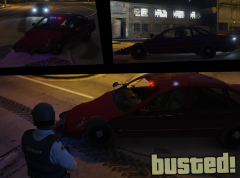
From the album: Aquamenti Police Workshop & Museum
A word of advice: never EVER try to box a tank! -
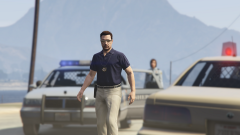
From the album: Aquamenti Police Workshop & Museum
Here's another variant of Lundy's Premier. -
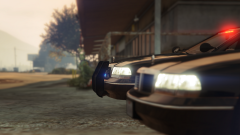
From the album: Aquamenti Police Workshop & Museum
-
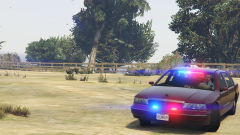
From the album: Aquamenti Police Workshop & Museum
This is my alteration of Lundy's admirable old school Premier. -
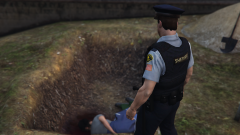
From the album: Aquamenti Police Workshop & Museum
-
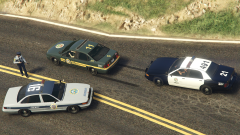
From the album: Aquamenti Police Workshop & Museum
With the new uniform came a new livery for Blaine County Sheriff. Also pictured are one of my LSSD units and an unaltered LSPD squad. -
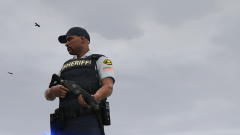
From the album: Aquamenti Police Workshop & Museum
This is my first attempt at uniforms. Blaine County. -
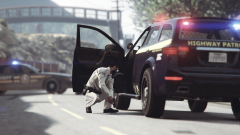
From the album: Aquamenti Police Workshop & Museum
LSSD and SAHP taking matters to a conclusion. -
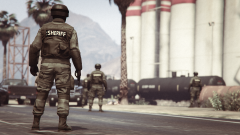
From the album: Aquamenti Police Workshop & Museum
-
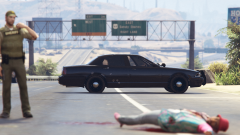
From the album: Aquamenti Police Workshop & Museum
-
From the album: Aquamenti Police Workshop & Museum
This is my LSSD Brute Pony police transport and patrol van.



