


cp702
Friends of LSPDFR
-
Joined
Everything posted by cp702
-
-
I was about to say the same thing. It's right on the skin, and that's what really matters.
- 3 comments
- 2 reviews
-
-
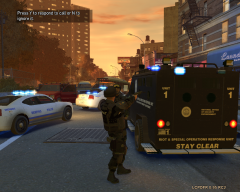 Holy crap, the mechanics changed the light color on the Bearcat while it was driving! *That's* dedication!
 -
-
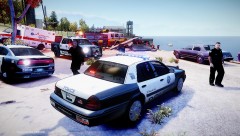 You send a fire engine and an ambulance if you think there might be a bomb?
 -
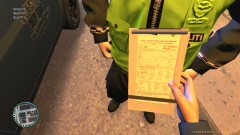 If you want the badge to not be raised, edit uppr_normal_002 and make it a solid rectangle where it looks like a badge.
 -
http://gtapolicemods.com/downloads.php?do=file&id=799 It helps you coordinate MP law enforcement activity.
-
What problems could hacking into a bank cause for others? To start, if you make money off it, you're either directly stealing from people or just adding money without taking it from elsewhere. If the former, it's bad. If the latter, it leads to more inflation, and reduces the value of everyone's money. Basically, hacking into a bank is the classic "should be extremely illegal" scenario.
-
I've done that a couple times. Let me guess: it didn't update right away when you hit "post", so you tried again?
-
I don't mean official support, I mean helping people who have problems. You already seem to have started.
-
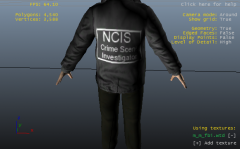 The Naval Criminal Investigative Service has a TV show about them called NCIS. The show is pretty well known, at least in the US, so I assume that's what it's referring to. Also, the show is about as accurate in its depiction of law enforcement as CSI is, which is to say not at all.
 -
Naval Criminal Investigative Service. They are a federal law enforcement agency attached to and focused on the Department of the Navy (which includes the US Navy and the US Marine Corps). They do investigative work, so kind of like FBI-type stuff. They are a mix of military and civilian personnel.
-
Advice: Look at older books; anything pre-1926 is public domain.
-
Freshman in high school or college? Also, there are tens of thousands of titles on the iBookstore, as well as hundreds of thousands on others (like Kindle store), as well as literally millions that are old enough to be public domain. You need to give a better idea of what you're looking for so we can narrow it down. Fiction, nonfiction? What genre?
-
I'm not sure a real jacket would have that box there. I'd try it without the box. For that matter, I'd look towards thick, in-your-face, all caps fonts (like Impact). It seems like it'd be better in block text on a jacket.
-
Your videos are great, but I'm even more excited that you're returning to support.
-
http://gtapolicemods.com/downloads.php?do=file&id=351
-
If you want to add a skin alongside preexisting skins, you can do it, subject to some restrictions. For CAR skins, you can add a livery if the car supports multiple liveries. If it does, the paintjob names will be (something)_sign_*, where * is a number from 1 to 4. If 1, 2, 3, and 4 are all there, you can't add a livery. If one or more of them is missing, you can add a new livery with the missing number. If the paintjob names aren't in that format, there aren't multiple liveries. For PED skins, look at my post "Ped texture discoveries" (stickied in content mods) to see the format they use for the name. You can *always* add a ped skin and have it work, but there are sometimes bugs if there are more than 3 skins for one mesh. To actually add the skins, you need OpenIV. Just open the WTD in "Edit Mode", drag in what you want to add, click "OK" to the mipmaps dialog, select the new image, and hit "rename". Type in the appropriate name, and hit "enter". Hit "save", and you're done.
-
There aren't that many kinds of callouts. If you want to do more, you can role-play. A fair number of members don't really do callouts anymore; they prefer just patrolling.
-
I think they're basically the same, but Radiance is brighter.
-
You don't know anyone with an extra monitor you can borrow? BTW, is this a laptop or desktop?
-
You can follow a similar procedure to add peds.
-
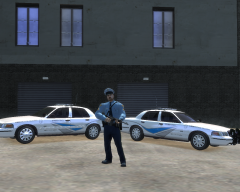 VSP meaning Vermont or Virginia ? JK.
 -
Who are the VBSP and LVSP? There are no US state law enforcement agencies named that.


