


cp702
Friends of LSPDFR
-
Joined
Everything posted by cp702
-
So the stations_sahp file needs to be installed into two other files. It's not a standalone thing. The <Station> section should replace the La Mesa station in stations.xml, and the two sections below "Needs backup.xml to include the following under corresponding sections:" need to have their content incorporated into backup.xml.
-
It looks like your LSPDFR stations_sahp.xml is invalid. Could you post that file?
-
 Non-ELS vehicles do emergency lighting with an entry in carcols.ymt and a reference in carvariations.ymt. These entries are referred to using an ID number, so you might have a SAHP Buffalo say “I’m using siren setting number 87” and have a corresponding entry number 87 in carcols. If two mods use the same ID number, they’ll have the same emergency light setup. When they’re supposed to have different light setups, this will mess up one of the vehicles’ lights. By default, these numbers are effectively limited to a maximum of 255, which means it was reasonably likely for 2 different mods to end up with the same ID. This increases that limit to 65535, so it’s much easier to avoid those conflicts. I don’t know enough about FiveM to know if this will work with it. It should work with FiveM-ready vehicles in normal GTA single-player, but I don’t know if it would work in FiveM itself.
- 342 comments
- 19 reviews
-
-

- 1
-
-
I don't speak Chinese; could you translate that message for me? What happens if you delete SirenSettings.log?
- 342 comments
- 19 reviews
-
If you use RPH, you need to install both files. If you don't use RPH, you only need the ASI. (If you sometimes use RPH and sometimes don't, then install both.)
- 342 comments
- 19 reviews
-
Yes. Vehicles don't need any special configuration to take advantage of this.
- 342 comments
- 19 reviews
-
This mod raises various siren limits in GTA V. The per-vehicle siren limit is raised from 20 to 32. Vehicles can now have siren1 through siren32, which are all fully functioning and independent. The siren_glass limit is also raised to 32. Note that the limit of 128 total bones on a vehicle still exists. The maximum value of a siren setting ID in carcols is raised to 65535. In the base game, siren settings can conflict if one of them has a value over 255. Now, siren setting IDs can go up to 65535 without conflicting with each other. This mod also expands the maximum number of unique siren settings you can have. If you have 400 cars, and they all have unique light patterns, that'll work. Installation Copy the included ASI to your game folder. Usage For additional lights, just use siren21 through siren32 and add extra entries to the siren settings in carcols.meta. Again, note that there is still a limit of 128 total bones on a single vehicle. For the increased ID limit, just use a number bigger than "255" as the ID. The values 0, 255, and 65535 are reserved, so don't use those specific values. No additional configuration is required. RPH Users SSLA does not require RAGEPluginHook, but it is compatible with it. However, it is ONLY compatible with the latest version! RPH version 1.98 has a compatibility patch that will play nicely with SSLA v2. The latest RPH version can be found bundled with LSPDFR, or on the RAGEPluginHook Discord server. If you had RAGEPluginHook and SSLA v1, you may have had a compatibility DLL in your Plugins folder. This DLL is no longer required and should be removed. RPH now talks directly to SSLA. RPH plugins that deal with emergency lighting will continue to function, but may need to be updated to support lights 21 through 32. FiveM Users SSLA v2 is compatible with FiveM. The server owner must enable ASIs in server.cfg with sv_scripthookallowed true, and Each user must copy the ASI into the plugins folder in their FiveM Application Data. No changes are required to the server config. RPH Developers In RPH version 1.98 and up, the Lights member of an EmergencyLighting will be length EmergencyLighting.MaxLights (a static class property) instead of necessarily being length 20. They will still all have the same length, it's just that that length will be longer than 20 if SSLA is installed. Logging This ASI produces a SirenSettings.log file in your game directory. It records: Every loaded SirenSetting, its name, its ID, and its internal index; Every loaded vehicle, its name, its siren ID, and the index it was matched to; Any conflicts, where two SirenSetting entries have the same ID. License Please link to an official upload instead of redistributing this yourself.
- 342 comments
- 19 reviews
-
-
-

-

- 84
-
-
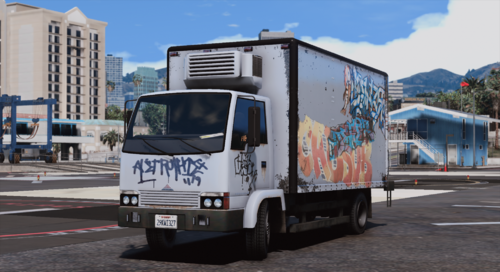 The debate aside (and since the title and description have been updated I think we can all move on), this is a clever idea for a vehicle.
- 21 comments
- 7 reviews
-
-
- 2
-
-
-
 Can you type "ListPlugins" into the RPH console (hit F4) and see what it shows?
 -
Good idea. Maybe a "saved glove" where you can toggle between that glove type and no gloves with a keystroke? I can try extending to hats and sunglasses, but that might take a bit more time to work out how best to do it (there are a lot more hats than gloves). I'll think about it.
-
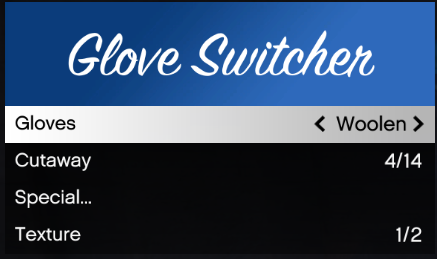
This plugin lets you switch gloves on an MP freemode ped without fiddling with the various uppr_### entries. For instance, if you want to put on surgical gloves from whatever uniform you're wearing, you can just select "surgical gloves" in the menu and not worry about the 100+ possibilities for "Upper Skin." How to install: Copy contents of the Glove Switcher folder into your GTA V directory. This script requires RAGE Plugin Hook. How to use: Press the menu key (default is F10). "Glove" is the glove you're wearing. "Cutaway" is how that torso model is cut away to prevent clipping through the ped's clothes. The right cutaway to use depends on your specific outfit. You normally only need to change the cutaway if you've changed your character's clothing. There are also "special" configurations, which only work with particular outfits (e.g. the arms for the Space Creature suit). The Special menu lets you choose any uppr_### entry by index, and the INI file allows you to create presets for particular entries. All special configurations in the base game are included in the INI file, except for some duplicates. If you have other mods that change stuff, you can add more special entries following the same pattern. Please ask for permission if you want to reuse this in your own mod.
-
The biggest catch is that LSPDFR uses zero-indexing while EUP uses one-indexing. In other words, EUP "Upper Body 5" is LSPDFR "uppr 4".
-
Stuff is going on. We have a testing team already (there's no application process), and we don't generally share development progress unless we want to build hype.
-
Check that your plugins are all fully updated.
-
LSPDFR is a script mod. It doesn't change any of the game's files.
-
This is going to seem weird, but I promise there's a reason. You're in Saudi Arabia, your language is set to Arabic, and you're using the Hijri calendar, right?
-
There are a couple more things I can think of on the theme of "rolling up on a scene with other cops already there." Basically, you'd specify a position, a backup type and flags, a number of vehicles (default is 1), and a number of peds (again, default is 1). LSPDFR would then choose a loadout based on the position, backup type, and flags, would spawn the given number of vehicles and peds based on that loadout, and would pass handles to all spawned vehicles and peds. That way, if you wanted to set up a scene that the player arrives at, you could use appropriate units for that area based on the config files.
-
Despite the custom system, I did backup regions, stations, backup, and duty selection by modifying the default files. Especially for backup regions and backup, it makes more sense to me to have the one file integrating *every* change so I don’t have to worry about conflicts. I mostly use the custom folder for outfits, inventory, and agencies.
-
They were removed by the author, who to my knowledge has not stated a reason (authors don’t need to give a reason to remove their mods).
-
0.4 doesn't include new assets; it's a script mod only. What it does do is let you specify your own agencies with custom peds and vehicles, such as by using RDE (which already has config files written). They're complementary mods.
-
PeterU Callouts sort of works. Some calls work, but some glitch (and I think Speeding Vehicle has an undocumented hard dependency on Traffic Policer).
-
If you feel that this topic has been pinned in error, please report this post.
-
I believe it is a requirement, and that LSPDFR literally looks for files matching “custom/outfits_*.xml” or equivalent.
-
Most API functions still exist, although some had minor or subtle changes to their functionality. Plugins relying on undocumented functions are more likely to break. Plugins that explicitly check your LSPDFR version (like Albo's stuff IIRC) will of course throw an error. If you have a plugin you want to try, just try it and see if it works.

