


A Stranger
Members
-
Joined
-
Last visited
Everything posted by A Stranger
-
Remove Albo's mods, they're outdated.
-
I don't see ELS installed.
-
Yes, all trainers work. The Epic version has no different files, just a different version number, which is supported.
-
Rename your mods folder to _mods and remove any visual mod you have installed.
-
Verify your game files.
-
Rename your mods folder to _mods (If you have one). And remove any visual mods you have.
-
Do this: Change the plugin timeout threshold from 10000 to 60000 in the RagePluginHook.ini file and change Main.PreloadAllModel in GTAV/LSPDFR -> LSPDFR.ini to false. Then, remove in /Plugins/LSPDFR: Arrestmanager; AssortedCallouts; CimputerPlus; LSPDFR+; PolicePartner, TrafficPolicer; PoliceSmartRadio. And use Bejo's plugins instead.
-
All trainers are.
-
Send asiloader.log. It's located in your GTA V folder.
-
Did you even go on duty after loading LSPDFR?
-
-
Rename your mods folder to _mods, then try again.
-
If you have trouble running RagePluginHook with the Epic Games launcher, do the following: 1. Launch Grand Theft Auto V via the Epic Games Launcher. 2. Load into SinglePlayer. 3. Tab out of your game (ALT+TAB) and run RagePluginHook. 4. Once it successfully hooks you can tab back into Grand Theft Auto V.
-
Check regedit. If you read E:\ in your log, that's a virtual drive, not your actual hard drive.
-
First of, .bak files do not belong in the vehicles.rpf. Take them out. Did you install the .xmls into GTAV/ELS/Pack_default?
-
You need to install ScripthookV, not ScripthookVdotnet.
-
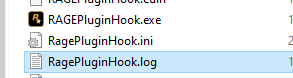
You need to send this file:
-
Also, you can not (ever) replace the vehicles.meta. Only edit the slots. And if it's an add-on, you need a custom carvariations.meta.
-
Remove any of Albo's mods and Computer+. Then; change the plugin timeout threshold from 10000 to 60000 in the RagePluginHook.ini file and change Main.PreloadAllModel in GTAV/LSPDFR -> LSPDFR.ini to false. And add Main.DisableGameBlipHiding = true to your LSPDFR.ini
-
More info on your GPU would be nice. 🙂
-
Still not the correct log. It should be two below the RagePluginHook.exe; it's a text file. You may wanna do this: Change the plugin timeout threshold from 10000 to 60000 in the RagePluginHook.ini file and change Main.PreloadAllModel in GTAV/LSPDFR -> LSPDFR.ini to false.
-
Albo's plugins are outdated. I recommend you use Bejo's plugins instead.
-
Looks like you didn't install RPH into your GTA folder. Can you send a screenshot of where you put it?
-
Change the plugin timeout threshold from 10000 to 60000 in the RagePluginHook.ini file and change Main.PreloadAllModel in GTAV/LSPDFR -> LSPDFR.ini to false.
-
Epic Games version is 1868.4. Therefor ScripthookV will need an update.

