


A Stranger
Members
-
Joined
-
Last visited
Everything posted by A Stranger
-
Please send your RagePluginHook.log.
-
Means that something in your mods folder is broken. What did you last install?
-
Sadly not in your mods folder. You'd have to go back step by step.
-
Then it is something in your mods folder. What did you last put in?
-
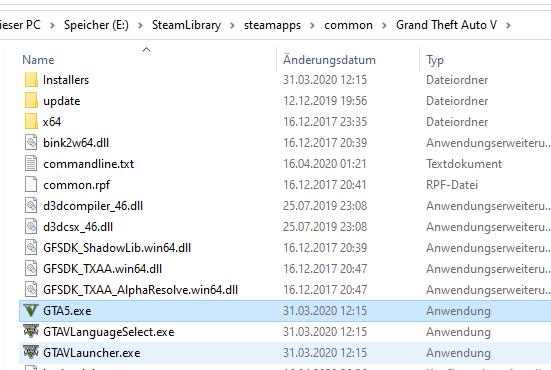
GTA5.exe is located in your GTA V folder. Right here: Remove it. Once you've done so, do what I said above. For the Retail version of GTA V: Open the Rockstar Games launcher -> Locate "Settings" in the top right corner -> Select under "My Installed Games" Grand Theft Auto 5 -> Select Verify Integrity. For the Steam version of GTA V: Right click Grand Theft Auto V in Steam -> Properties -> Local Files -> Verify Integrity Of Game Cache.
-
It was just a Rockstar Games Launcher update, not a game update. So this update didn't add/remove any content. You're good to go. For the future though: You will lose your update.rpf settings if the game really updates.
-
Please send your RagePluginHook.log.
-
L&O works fine. Can you send your RagePluginHook.log?
-
Don't load LSPD:FR on startup in the RagePluginHook settings. Also; if it crashes, please send your RagePluginHook.log.
-
And rename your mods folder to _mods. (If you have one.)
-
Remove RichsPoliceEnhancements and rename your mods folder to _mods. If you have one.
-
Please send your RagePluginHook.log. It's located in your GTAV main folder.
-
You are missing Albo.Common. ( Also; remove LSPDFR+ and Computer+.
-
You have an error in your lspdfr.ini. (WorldEvents.IntervalMultiplier) . Reset it to default.
-
Add your GTA V folder to Antivirus exceptions. Once you have done so, restart your PC.
-
Also; make sure to rename your mods folder to _mods.
-
Clean folder isn't _Plugins. Just verify your game files. (Steam or R* Launcher.)
-
It works fine for us on the RPH discord. Why do you think there are over 1k people playing currently? Clean your folder and verify, that's worked so far.
-
Works perfectly fine for me on the new update. Clean folder?
-
Delete GTA5.exe and then verify your game files in Steam.
-
Update your game. Delete GTA5.exe, then verify your game data. For the Retail version of GTA V: Open the Rockstar Games launcher -> Locate "Settings" in the top right corner -> Select under "My Installed Games" Grand Theft Auto 5 -> Select Verify Integrity. For the Steam version of GTA V: Right click Grand Theft Auto V in Steam -> Properties -> Local Files -> Verify Integrity Of Game Cache.
-
LSPD:Fr works just fine. Same goes for RagePluginHook. Make sure you your only have LSPD:FR installed and rename the LSPDFR folder in /Plugins to _LSPDFR.
-
Please send your RagePluginHook.log.
-
Did you disable preload in the LSPDFR.ini?
-
There's the Plugin ClearTheWayV: and Which I highly recommend.

