


A Stranger
Members
-
Joined
-
Last visited
Everything posted by A Stranger
-
Please send your asiloader.log It's located in your main GTAV-folder.
-
Can you show me what I asked for earlier for AdvancedHook.dll and GTA5.exe?
-
Log reader isn't much help in situations like these, sadly. @rovedx Are you using ScripthookVdotnet? If so, you need to update: https://github.com/scripthookvdotnet/scripthookvdotnet-nightly/releases/tag/v3.6.0-nightly.115
-
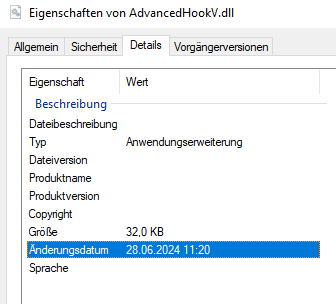
Download the file I showed you earlier and replace it in your main GTAV folder. You may also remove AdvancedHook in your main GTAV folder and then simply drag & drop the new one. (If you permissions won't let you properly replace it) You can right click on AdvancedHook -> Properties -> Details and it should give you roughly this date: 28th of June 2024. If it says something else, you need to update it.
-
It was either removed by the author or the staff team. Not much you can do about it except maybe ask the author.
-
Please send your RagePluginHook.log located in your main directory.
-
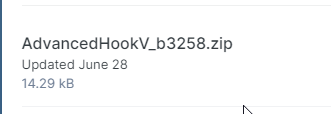
You need to update AdvancedHook from ELS. It's a separate download.
-
1. Rename mods to _mods to make sure your update.rpf / gameconfig isn't outdated. 2. Verify your game files to clean up your vanilla files. 3. Make sure you didn't save while on duty. If so, remove your SGTA and PGTA files from Documents/Rockstar Games/GTAV/Profiles/Random Number/
-
You edited something in your .ini's incorrectly. Reinstall LSPDFR manually.
-
You need to send your RagePluginHook.log in your GTAV main folder.
-
The vehicles.meta only really influences what VehicleClass and FLAGS the vehicles have that impacts lights. Are your cars ELS or non-ELS? Or even DLS?
-
Please send your RagePluginHook.log from your main directory.
-
You need to send the actual log in your main GTAV folder.
-
Install the latest version of ScripthookVdotnet: https://github.com/scripthookvdotnet/scripthookvdotnet-nightly/releases/tag/v3.6.0-nightly.114
-
Hello community, I noticed more and more requests on how to fix the liveries on the newly introduced police vehicles. I wrote the FAQ on it and thought maybe it would be nice in the forums as well. If it's not appreciated, I fully understand. 🙂 Now, let's get to it. ╼╼╼╼╼╼╼╼╼╼╼╼╼╼╼╼╼╼╼╼╼╼╼╼╼╼╼╼╼╼╼╼╼╼╼╼╼╼╼╼╼╼╼ You may have noticed that replace vehicles for the latest police DLC vehicles look inverted, incorrect, total blackout or simply off. With Patchday mp2023_02 and Patch2023_01 new police vehicles have been introduced to the game. Those vehicles have not only new sirenID and LightID’s, but also a different carvariations.meta. Due to this difference, exchanging them with replacement vehicles can cause them to appear black or have messed up liveries. The fix for this is rather simple. You can change the sirenID to their default values later on. 1. Locate the carvariations.meta for the new police vehicle. For the police vehicles in Patch2023_01 you can find it in mp2023_02. (Do not replace vehicles in mp2023_02, only edit the carvariations.meta!) For the police vehicles in Patch2024_01 you can find them in mp2024_01. (Do not replace vehicles in mp2024_01, only edit the carvariations.meta!) 2. Make sure Edit Mode is enabled in OpenIV. Right click the carvariations.meta in the given path and press Edit: mods/update/x64/dlcpacks/DLC PACK OF THE VEHICLE/dlc.rpf/common/data 3. Highlight the police vehicle you want to edit. The entire section for a vehicle is referred to as a “slot”. This is what a slot looks like: The end of the slot is usually identified by the "“SirenSetting value=”1” ” 4. Once you have highlighted the slot, simply replace it with a vanilla template of a police vehicle by pasting it. You can get those templates from other cars, or like in this case, from Albo1125’s MODDING DLC. Once you have replaced the text, press “SAVE” and you’re done. I hope this helps those who replace the new DLC police vehicles. Otherwise, enjoy the show. Thank you and good luck!
-
It would certainly boost sales once again for PC. if it works & staff wants to do it, we're all onboard!
-
1. Disable Ambient.Cop Spawns in your LSPDFR.ini: AmbientSpawn.MaxCopsInArea = 0 AmbientSpawn.MaxSpawnedCopsInArea = 0 2. Change the plugin timeout threshold from 10000 to 60000 in the RagePluginHook.ini file; found in your Grand Theft Auto V folder. Then locate to the GTAV/LSPDFR folder and open the LSPDFR.ini. There change Main.PreloadAllModels to "false".
-
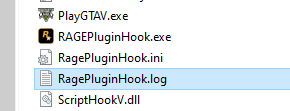
Please send your RagePluginHook.log. It is located in your GTAV main folder.
-
You are missing files for XScanner. Reinstall it properly.
-
Send your ELS.log.
-
Are you using ELS or ScripthookVdotnet?
-
Are you using ELS or ScripthookVdotnet?
-
Are you on duty and holding E?
-
His ELS.log is empty. Looks like he did not install the .xml's into: ELS/Pack_default
-
1. Install "'Common.Client" for SimpleCTRL. 2. Install "IPT.Common" for CallouInterface. 3. Remove in /Plugins/LSPDFR - CalloutInterfaceAPI (Belongs to your GTAV folder) - HWYCallouts; - KucheraCallouts; - Plain Sight; - RadioRealismFR; - UnitedCallouts; 4. There's an issue in TAGSCallouts' Config. 5. Same for XScanner. 6. Update RAGENativeUI: https://github.com/alexguirre/RAGENativeUI/releases/tag/1.9.2


