


A Stranger
Members
-
Joined
-
Last visited
Everything posted by A Stranger
-
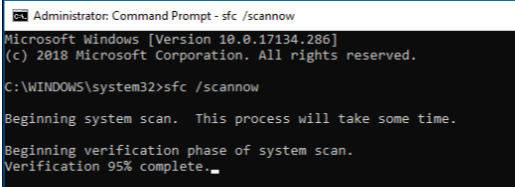
It basically scans your OS for any faults. Open CMD as admin, then type it in. Should look like this:
-
Welcome, you have the infamous "SlimDX" error. There are many posts about this on LCPDFR.com but the solution is never the same. I'll try and list a few things I've seen to have worked in the past: 1. Restart of the PC. 2. A complete sfc scannow 3. Antivirus exceptions 4. Reinstallation of the .NET packages for Windows. 5. Cleaning the GTA V folder to make it vanilla and starting over.
-
It's still a vehicle error. I do not recommend installing two packs that replace each other. Disable one and see if that changes anything.
-
Ripples cars have a tendency. Anyways, you don't need to reinstall GTA V for that. Either start over with your mods folder or verify.
-
Those are FiveM cars you are describing. You can still use them with GTA V singleplayer but it will be a lot harder, especially if they come with carcols files.
-
-
Yes. You should also change the vehicles.meta or else you may run into model / handling issues.
-
Open a new topic instead of posting in a closed one. 🙂
-
Rename your mods folder to _mods. If you installed a visual mod, like enbseries, remove it.
-
Try putting the vanilla one back in.
-
Rename your mods folder to _mods.
-
Do you have StopThePed? If so, disable the Realistic Weapon Menu thing.
-
Both of these logs are a few days old. Start the game, let it crash again & then send that log.
-
Open the vehicles.meta, located in mods/update/update.rpf/common/data/levels/gta5. Locate the slot you have issues with. Look for LODDistance. And make sure it's above 100.
-
Did you replace any .meta files, like the vehicles.meta?
-
Rename your mods folder and scripts folder to _mods and _scripts. Then try again.
-
Should be G.
-
Change the plugin timeout threshold from 10000 to 60000 in the RagePluginHook.ini file and change Main.PreloadAllModel in GTAV/LSPDFR -> LSPDFR.ini to false.
-
Same path, just not mods. Should be: GTAV/update/update.rpf/common/data/levels/gta5.
-
1. Open commandline.txt in your GTA V folder and remove everything in it. Save & close. 2. Reinstall LSPD:FR 0.47 manual. 3. Update RagePluginHook to version 1.78. 4. If you have a scripts / mods folder, rename them to _mods and _scripts.
-
Please send your RagePluginHook.log.
-
Sounds like a mod replaced a ped file. You sure you didn't install anything else?
-
That file is empty. Please send your RagePluginHook.log.
-
Send a new log.
-
You should replace the vehicles.meta with the vanilla one. And a sidenote; you don't ever replace the carvariations, handling or vehicles.meta. You edit them.

