


vazlpower7
Members
-
Joined
-
Last visited
Everything posted by vazlpower7
-
-
-
 Does anyone know if it is possible for me to install a siren say from modern siren pack but also have the default ELS siren in as well so that some vehicles use the default ELS one and the different. one on different vehicles? My city and sheriff vehicles i would like to use the default ELS siren and I would like my highway vehicles to use the different one. Is this possible through changing a siren setting in ELS somehow?
- 2,706 comments
- 241 reviews
-
-

- 1
-
-
 Does anyone know if it is possible for me to install the CHP siren but also have the default ELS siren in as well so that some vehicles use the default ELS one and the CHP one on different vehicles? My city and sheriff vehicles i would like to use the default ELS siren and I would like my highway vehicles to use the CHP one. Is this possible through ELS settings somehow?
- 221 comments
- 40 reviews
-
 How come whenever I want to warp both the ambulance and fire, I hit the divide button and they just insta-spawn right next to me. I have not touched anything at all in the ini related to the distance of spawning I left it all how it is, yet they just spawn right next to me, most of the time the firetruck and ambulance spawn inside of eachother too so it is just a cluster fuck of flying trucks all around me.
- 783 comments
- 86 reviews
-
 I have noticed that since I have updated to 1.0.0.27-PRERELEASE, that when I initiate a pullover on a vehicle all occupants of surrounding vehicles jump out of their cars. I am not sure if anyone else is having the problem but the second that I turn my lights on to pull them over, everyone around me jumps out of their cars, then walks back to their cars, gets in, and drives away.
- 540 comments
- 42 reviews
-
-
- 1
-
-
 He re-updated the files again about 45 minutes ago after I posted that, he had put on his twitter that RPH thought his files were a virus and blocked them. Before he re-updated it the version available for download was 1.4.1.0, but he fixed it.
- 1,178 comments
- 137 reviews
-
How come your most recent version is 1.4.10? when your last version was 1.6.4.0
- 1,178 comments
- 137 reviews
-
 Is there controller support? Meaning that I can use something like up on the dpad to open the radio?
- 1,196 comments
- 127 reviews
-
Haha forgot it was april fools for a second and when a pink duke o death and a blue hearse responded to a lady being shot scene I thought I did something wrong. Then I saw the zombies get out and I was like aaahhh its April 1st.
- 783 comments
- 86 reviews
-
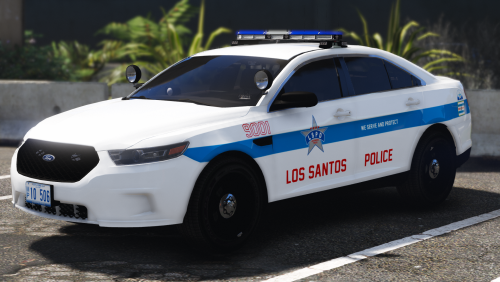 Yeah it looks exactly the same its just he made the pushbar an extra and when I try to put your skin on to the new version, the skin itself fits on the sides, but there are a couple things out of line in the front and back, like the ford symbols are covered and are not showing.
- 32 comments
- 14 reviews
-
Love the new update with the Impala and the Chevy Express! Could you possibly update the skin for the 2016 FPIU in thegreathahs pack so that it fits the updated model he put out? Also if you guys didn't know, the ELS Chevy Express is still out, just not on LSPDFR. Here is the link, it also works with the template that is in this pack. https://www.gta5-mods.com/vehicles/els-2016-chevy-express-3500-prisonor-transport-unit
- 32 comments
- 14 reviews
-
aaahhh just spent like an hour trying to match some vehicles from two different packs together to make it all with blue lights and the Chicago skins. lol back to work now
- 32 comments
- 14 reviews
-
How did you get the blue lights with the FPIS and the other vehicles from thegreathahs pack if they are not included in the blue lights pack?
- 32 comments
- 14 reviews
-
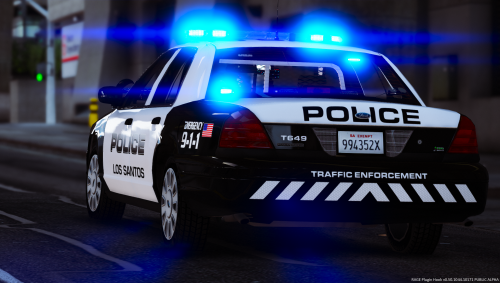 Since the ELS Correctional van is no longer on LSPDFR, what van were you thinking of using?
- 40 comments
- 10 reviews
-
-
Im having an issue where no lights except for the wig wags in the front and back will work. No lightbars will work, no dash lights, no nothing except for the head and tail light flashers. I know there is some other people having the issue because I put a support forum up about it and I am unsure of a fix.
- 2,706 comments
- 241 reviews
-
-
- 1
-
-
I am not sure if someone will disagree with me but me personally will always put every vehicle I install in my latest patchday that has a vehicles folder (patchday13 for me, may be different for you). I also dont usually pay attention to what patchday they say in their readmes because it is just a lot of unnecessary work in my opinion to have all these different vehicles in different folders when i can have them all in one folder.
-
 You should make an addon version of the pack so that we could use all of the cars as city vehicles.
- 210 comments
- 59 reviews
-
Does anyone know how to fix a vehicle from driving in a straight line when i sound my horn? Its really annoying when im in pursuits and traffic stops
- 2,706 comments
- 241 reviews
-
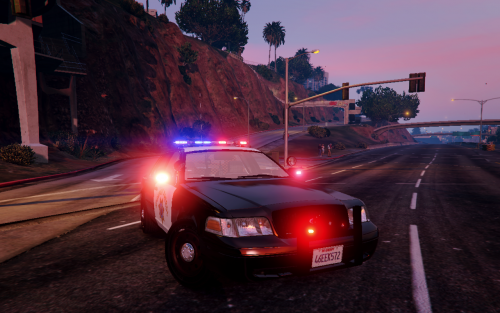 The lights on mine are all matte color. none of them actually light up like in your screenshots. Not sure if it is because of the mod that I use for lights (realistic radiance) or weather I installed it wrong. Could someone help me out?
- 45 comments
- 16 reviews
-
Does anyone know if it is possible for me to change the keybindings on the controller? I have conflicting mods that use the same controller keybindings for some actions
- 2,706 comments
- 241 reviews
-
Really really nice pack, really like it. Could you possibly add the Chevy Express 3500 Correctional Van? Would be cool to see without any prisoner transport markings on it though, so that when it responds as Local SWAT in game its not a prisoner transport coming to assist for a pursuit.
- 40 comments
- 10 reviews
-
 You should make another pack with all these cars too but skip the police4 slot so that we can still put a highway patrol or state in and also make a caprice, and the police slots would go up to police8 and police9 but skipping 4
- 779 comments
- 187 reviews
-

