


vazlpower7
Members
-
Joined
-
Last visited
Everything posted by vazlpower7
-
Ok. Also I know this does not have anything to do with this thread, but do you know, if when i install an OIV pack, when it automatically installs the vehicles meta, does it replace the entire meta, or just the one vehicles meta lines inside it. Or does it depend on the author.
-
Yeah i tried that with a different vehicle, that i actually only need one extra in on it, and that didnt work either, it doesnt seem to be just for the police slot, it is like it does not want to work on any of my vehicles.
-
Yeah im editing the right ones. Im not sure what to do now abt the extras, i think im just going to install some new vehicles.
-
Yeah just tried doing it in the meta and that doesn't work either.

-
Alright ill try that now ill let you know if it works
-
calling in backup since those are the vehicles i want the extras to spawn in on
-
still not sure if im doing it wrong. Its doing the same thing, not putting the extras in. I did it the way it looks like you have. Is this correct?
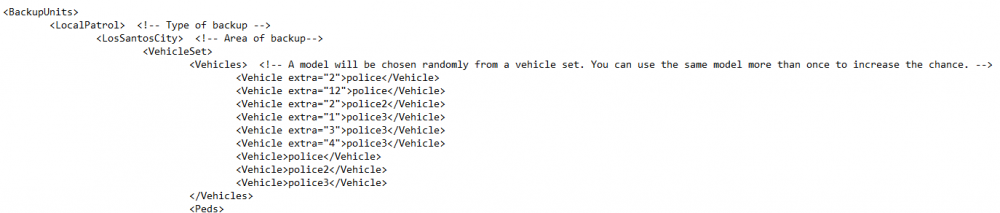
-
The extras that i put in to force dont spawn in. Ill put a screenshot, I may be putting it in wrong.
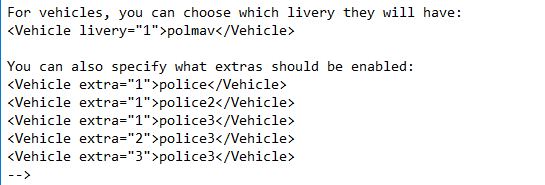
-
yes i do know about forcing extras in the vehicle meta and I have tried both the backup.xml now and the meta and neither of them work, so not sure what to do now.
-
Thanks this will help, is there any way in this backup.xml file that you can put randomized extras so that it always has to spawn with say extra 3 or 4 or with both but never without?
-
I am using bxbugs123's lapd cvpi. Sometimes it spawns with a lightbar, sometimes with slicktop interior lights.Since they are both extras sometimes neither spawn at all and it just has no lights except for the corner strobes that are not extras and are always there. Is there any way to make it so it randomly spawns certain extras without using the custom backup mod. I find the mod way to confusing bc there are so many customization options, and tbh i dont need that many options.
-
.thumb.jpg.30de2cdd6bdce371d029c527c67ad196.jpg) Half the time the vehicle spawns with no lights at all it will spawn with random so sometimes just with rambar and no lightbar or interior slicktop lights. Anyone know a fix? I did see the earlier comments about the custom backup mod, but i do not need that level of customization, i just would like it so that it always spawns with a lightbar or slicktop with interior lights.
Half the time the vehicle spawns with no lights at all it will spawn with random so sometimes just with rambar and no lightbar or interior slicktop lights. Anyone know a fix? I did see the earlier comments about the custom backup mod, but i do not need that level of customization, i just would like it so that it always spawns with a lightbar or slicktop with interior lights.- 101 comments
- 33 reviews
-
-

- 1
-
-
 So glad you updated!! Cant play without it, probably one of the most useful mods on the entire website!
- 1,915 comments
- 242 reviews
-
-
 What light mod are you using to make the lights so great in the pictures? In my game the lights on it are really dull and bad
- 148 comments
- 34 reviews
-
sorry i have been away for a couple days and did not see your post. The issue is that I am able to properly install the vehicle I am not able to get the lights to work properly.
-
Im really confused on how to install a vehicle with an oiv package installer. I do everything exactly how it says in the readme and it doesnt work. Im trying to install bxbugs crown vic. I have no idea what im doing wrong if someone could please help me
-
Im not new to LSPDFR ive been here for a while there is just one problems i have never been able to fix, the rambar always falls off. Not for every car just for some of them. FLAG_EXTRAS_STRONG does absolutely nothing for me weather it is in the flags line or not. I know there is another topc that said just add the flag to the meta except that doesnt work for me, and im not sure if anyone else is having the same problem. Does anyone know anything else to put in the flags line maybe that would help actually make the extras stong?
-
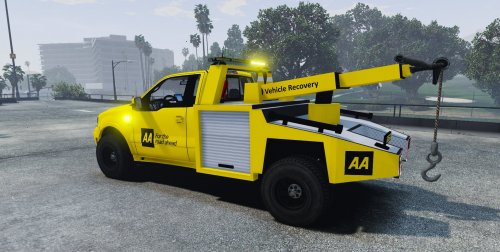 Looks like an amazing skin in the pictures and I really like it, I downloaded the file and in the readme it says install the ytd files i have included except there is no ytd file. Just arm, front and rear DDS Image files.
 -
Not really sure where the location of visualsettings.dat is. Could someone help me out?
- 101 comments
- 33 reviews
-
 Hey Zach I may have found out your problems with seeing names and blips with MultiFive. If you go into the PLD (Player Location Display) ini file there are two multiplayer options that are defaulted to true. One is ShowPlayerObituaries and the other is DisplayPlayerBlips. There are both under something that says [ MULTIPLAYER ] and I saw that you guys have Player Location Display in your multifive server. I assume if all four of you turn these settings to false it will work. I do not use multifive myself and have not tried it but it is worth a shot to be able to use multifive again. Hope I helped!
- 42 comments
- 22 reviews
-
I need some help here. I know what I am doing with LSPDFR and I am relatively good with it even though i am pretty new. There is just one thing i am not sure of. If i have two different vehicles, and they both need carvariations mets installed or the lights do not work properly, but both metas need to be installed to the same place, how would I install it? Usually when I install one, one car works, then I install the other, that other car works and the first one does not anymore because the first one was overwritten. Been wondering this for a while but it hasnt really become something I need to fix until now.
-
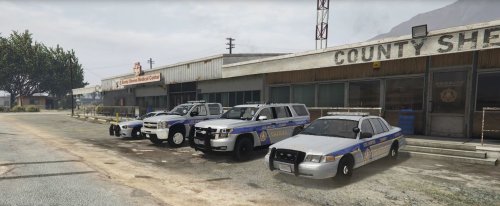 Its really awesome to see these cars bc in live in Bergen County and i see them every day passing the sheriffs station on my way to school. Also the blue lines are just a few shades darker in real life, but other than that, spot on
- 14 comments
- 4 reviews
-
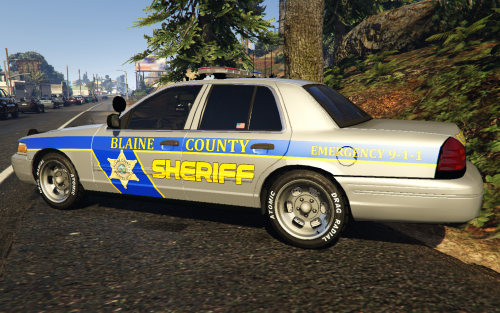 Wow didnt realize at first glance but then I read your description about it being Bergen County Sheriff and bc I live in Bergen County irl its cool to see these textures
 -

.thumb.jpg.30de2cdd6bdce371d029c527c67ad196.jpg)
