Quakex64
Members
-
Joined
-
Last visited
Everything posted by Quakex64
-
-
-
 try again without the callout files in and see if you get the same issue...
- 546 comments
- 103 reviews
-
 most likely because this mod is outdated for the current architecture programmers currently use... has not been updated since February 10th, which means its unlikely to work correctly with current lspdfr/RAGEhook software
- 542 comments
- 98 reviews
-
-

- 2
-
-
-
thats my biggest thing when using this
-
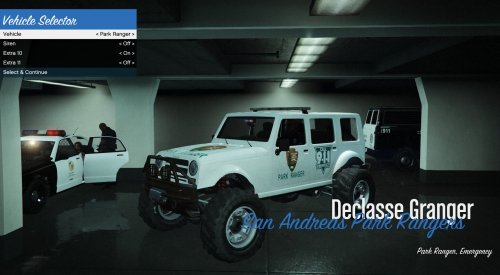 I have had this on gta5-mods.com for some time now and I figured its time to put it on here, where people may enjoy it more. you need this car: then download my livery and follow this: how to install: using OPEN IV, navigate to GTA V/update/x64/dlcpacks/patchday3ng/dlc.rpf/x64/levels/gta5/vehicles.rpf or if you use mods folder (which I highly reccomend) Grand Theft Auto V\mods\update\x64/dlcpacks/patchday3ng/dlc.rpf/x64/levels/gta5/vehicles.rpf Replace the file pranger.ytd and pranger+hi.ytd with the files I have provided readme, files and pic are all in the zip I did rename the current car as pranger.ytf, pranger+hi.ytf, pranger.ytd and pranger+hi.ytd and successfully worked in game. gta5-mods.com link: https://www.gta5-mods.com/paintjobs/park-ranger-livery-conversion-for-the-marked-mesa3-by-deputy_p
 -
 LOL, I literally thought you were going to say something besides your hat... :P and some people on here, are literally, magicians.. take Albo here for example
- 1,915 comments
- 242 reviews
-
-
- 1
-
-
off topic here - is it that hard of a concept here in the forums in which people have issues and haven't yet grasped the concept of posting any kind of log or document that would tell the author about what went wrong as why you're posting here in the first place??? seems like it... I see Kal posting that all the time
- 1,915 comments
- 242 reviews
-
-
- 2
-
-
I'll wait till you can upload a new everything and maybe, just maybe the fire department can actually respond in this new version...
-
google translates that into, "I hope there is awesome progress on this project"
-
I will finish my videos, and have them to you, in a PM, sometime today.. be on the lookout :) [still] hope to get a newer version soon EDIT 1 everytime and try to either save or export my videos, no mater what I save the project or the movie, it says "the name you used is in violation of ****star TOS, please rename" I try it as just D and it still says that... so I wont be making any kind of movies for this.. you'll just have to take my feedback via written.... like I have done in the PM conversation..
-
-
well, if an improvement is coming, should I still finish my videos on the mishaps I have gotten and the "bugs" i see and then send them to you???? one suggestion might be that before the fire truck/ambulance leaves it gives an option for the officer (you the player) to say whether the scene is clear, as in bodies are gone or you need to call coroner and maybe something else, as in, the can be dismissed and I can finish up or something
-
ok, TY.... ive been trying to get a add on type dlc going myself and I cant figure out how to do it yet without my game crashing..... and I always use a mods folder if I want to edit anything
-
its off topic, but I would like to get the ones I have working so, @Flava0ne I only a few questions for you about the add ons you are able to get working. 1) do you put them (the addons) in a mods folder? 2) do you only use the DLC list meta file to add them? if not, what other files do you use, and where do you put them? 3) can you pm me the add ons that you use? 4) are most of them from gta5mods.com?
-
-
-
-
-
 works for 0.3.1? says 0.3b in your description
 -
@PNWParksFan I hope you received my PM about the beta.... since I tried it I have been unsuccessful to play gta v again and had to redownload some files but have not yet tried to see if it works yet.
-
 well you could find the the specific component in open IV, extract it, and put it on the default and see if it works... the defaults do have a ytd to change, mind you.. so it could work, thoerectically
- 127 comments
- 33 reviews
-
on some of them, yes you can... think of the ones from one of the DLCs that came with them.... you can paint the bat, molotov, the broken bottle, grenade, sticky bomb, but I do not know to much about the default weapons like the handguns or rifles.
- 127 comments
- 33 reviews
-