


Creators: Due to background reprocessing of files, approvals and file security checks may be delayed. Thanks for your patience.

Quakex64
Members
-
Joined
-
Last visited
Everything posted by Quakex64
-
dont know what station you're speaking of but its probably not made yet
-
 how are you loading it? do you have it set to be auto loaded in the console? auto loaded via startup.rphs?
- 338 comments
- 46 reviews
-
 Support - what to do if you encounter a bug or have problems: Watch the installation video for my modifications here. Use this tool: http://www.lcpdfr.com/files/file/9755-lspdfr-troubleshooter-by-albo1125/ Read the documentation PDF file if you're having trouble getting a specific feature to work. Suggestions can be made here. If all else fails: Please leave a comment (not a review). Include your RAGEPluginHook.log file, located in your Grand Theft Auto V folder. Also, please provide an accurate description of what happened. This allows me to help you as fast as possible.I suggest you re-read part 5 again...
- 1,178 comments
- 137 reviews
-
To help the developer out after a crash you need to provide a log file for them to diagnose an issue you have. You're going to find the log in your GTA 5 directory root folder (mine is in logs folder because I moved it there, disregard it) going to be named as seen: RagePluginHook_[something]. ( I date mine so they do look different) It will be a text file that you can simply open in notepad. when you open it, it will look like this: NOTE: your installation path will be different) The log has a whole bunch of mumbo jumbo important information, but all you need to do is hit CTRL+A, open up pastebin.com click new paste, then Ctrl+V, save that, it will give you a page link, you need to post that page link to your reply here in the support topic for whatever mod you used when crashed. then you would go into explanation about what you were doing or what happened before the crash so developers can help rectify the problem.. Ive posted this because alot of people to whom LSPDFR is new to them install a mod correctly, are able to use it for their personal enjoyment but end up crashing and just reply to the mod topic, I crashed when I was doing "x" can you help me... If you do not provide the developer(s) some kind of log, they are not able to help you if/when you ask for it by just "it crashed, can you help?" Fro the specific mod, there is also usally a Readme provided that tells you what the mod is, whats the mod is used for, how to use it (controls) and how to (properly) install it. If you cannot open that readme up and read the instructions, PLEASE do not go to the developers page and ask for help. if this is in the wrong section, I apologize but I dont really think it is..... If you know how to do this, and you do it on a normal basis after crashes occur from either LSPDFR or GTA V itself, I applaud you.
-
youd have to rename the model name. so if you put in a model thats used for police2 slot, rename it in your dlc files to what the model is, like use Charger, if it was that which you used for the model in the add on..then you have to spawn vehicle by name using a trainer. im just now trying to figure out how to make them work as well.
-
 you're going to find the log in your GTA 5 directory root folder (mine is in logs folder because I moved it there, disregard it) going to be named as seen: RagePluginHook_[something]. It will be a text file that you can simply open in notepad. when you open it, it will look like this: has a whole bunch of mumbo jumbo important information, but all you need to do is hit CTRL+A, open up pastebin.com click new paste, then Ctrl+V, save that, it will give you a page link, you need to post that page link to your reply here in the support topic for whatever mod you used when crashed. then you would go into explanation about what you were doing or what happened before the crash so developers can help rectify the problem.. Hope this helps you and others.
- 542 comments
- 98 reviews
-
-

- 1
-
-
-
is there anyway to adjust it like with police radio or Rage show my location?
- 542 comments
- 98 reviews
-
 if its too long, thats what pastebin.com is for. copy paste the whole thing, get a link from that, post that link here
- 329 comments
- 53 reviews
-
 go to: Grand Theft Auto V\Plugins\LSPDFR\Arrest Manager and open the "Transport Regions" xml. in there you can change which car comes in each region defined in the xml, you can also change which ped comes as well..Can probably do same thing in world districts xml.
- 1,915 comments
- 242 reviews
-
-
-
-
-
-
.thumb.jpg.4066677156985e22489bfecddc2f6c45.jpg) is there a version of this car without open IV installer package in the download?
is there a version of this car without open IV installer package in the download?- 376 comments
- 81 reviews
-
-
-
 @xistyyy you didnt look hard enough as breathalyzer settings are 3/4 of the way down the page.+ I also dont believe drugalyzer is in anymore.... (From what I remember anyways... I could be wrong)
- 3,646 comments
- 306 reviews
-
@DrewsNetwork @Slapyurmomma you would need to find a different way to extract the files.. if using 7zip, you may need to try winrar or some other unzipping tool like it
- 3,646 comments
- 306 reviews
-
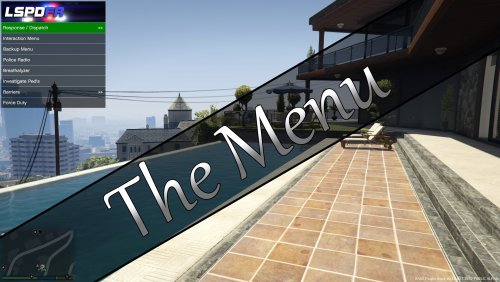 @CrashEight so what youve done is add every control used by most, if not all, plugins into this menu and its worked??? list some of the plugins and mods youve used please, as some people dont use everything youve added and maybe some things people do use, aren't in there.... I appreciate your work doing this. @CrashEight @joe25 FYI in the future please use the spoiler code so we arent scrolling down for 5 minutes
 -
-
 via changelog: What's New in Version 0.7 Released Tuesday at 07:45 PM Updated to RPH 0.42 its not updated for 44 yet
- 211 comments
- 28 reviews
-


.thumb.jpg.4066677156985e22489bfecddc2f6c45.jpg)
