


Quakex64
Members
-
Joined
-
Last visited
Everything posted by Quakex64
-
Real Paramedics by jedijosh920 https://www.gta5-mods.com/scripts/real-paramedics
-
so I wonder how did JediJosh get the real paramedics thing he made to work correctly?
-
uhh you'll know
-
ok TY... we would give you the feedback via this page or somewhere else? or you will give instructions along with the mod as to where we go for that?
-
when I saw that you are accepting beta testers, I jumped at the chance to try and help you... I have already filled out the information you needed.. I hope that I am able to play with this and give you actual useful information and feedback.
-
 same here as Kal said... its trying to help you figure out whats wrong.... I always open up the updated version in a different folder than the gta v folder (the plugins or lspdfr folder, depending) and then copy whats there in terms of controls, then once I am done, I cut the existing, put it in the previous versions folder and paste updated versions with the new dll program into the respective folder... this way I have the backup ini and program so if anything goes wrong, I have the backup... (and nothing SHOULD go wrong), but sometimes stuff is out of your control, so..
- 3,646 comments
- 306 reviews
-
-

- 1
-
-
make sure if it tells you in the changelog to update INI that you keep the same settings.... like I open both and make sure most stuff that stays is ALWAYS the same, so if I get the drunk driver every 3 minutes in the old and in the new its every 15 seconds (its an example)
- 3,646 comments
- 306 reviews
-
i sometime get that after I do not click the captcha thing to get it to download.. it will do this simply because youve waited to long to do the captcha for the download to be authorized... at least thats what I am thinking.... dont quote me on that as I have no knowledge of how that works, just my $0.02 edit: yeah, look at the bottom.. link expired. you waited to long after the security check thing to download it...
- 3,646 comments
- 306 reviews
-
any updates at all?? [suggestion] perhaps make each area its own map so that when you go to load the map itself youre not waiting 5-7 minutes wait to load one map thats all over the map.
-
is this still being worked on at all?
-
try JediJoshs real paramedic.. his mod actually revives the people...
-
how are you even able to play with modded files in the main directory in the first place??? (it sounds like you have Steam version right??) if I put one file in the main folder it will throw an error saying corrupt game please reinstall simply because of that one file.... im perplexed at how you have that woprking
-
you need to go to the RAGEhook forums to get help from them...
-
I hope this is still active in progress by @PNWParksFan.... I sure hope so
-
 you could do what @piggie1 did and provide a ragehoog log so the author can find the reason behind the crash... you should do this all the time, not just for law callouts, if you ever have trouble with something else AKA a different callout or plugin
- 130 comments
- 28 reviews
-
-
 this method probably does no work anymore and perhaps should be studied and made into an add-on police "dlc" type pack.. everyone seems to be doing that now a days anyway.... I still cant figure out how to do that myself.. @dbock1989 "dbock's Complete Edition DLC [add-on] pack" has a nice ring to it anyways :) :)
- 371 comments
- 38 reviews
-
-
I have tried changing the size in the gameconfig but doing that dropped my fps from 60 to hovering around 18.. that could have been all the vehicles ive added as well, but now I am doing an entirely new mods folder, only going to be using lspdfr related items... the are but not limited to: vehicles, clothing, visual (Real Police Stations mod) amongst other various items...
-
-
@DoubleHelix I only used the original metas from dbocks complete update file along with the ones I found on the internet (trying to add them in) I guess there is some conflict with doing it that way.....then again it could be due to the fact that I have so many other car mods installed in various locations.... I will just use police edits from now on I guess I want to use @dbock1989 complete pack (I renamed pobison2 to sheriffbison since that is the livery on it), the coroner boxville, and the two vehicles from police toolbox.. but then I have so many others that I have found and want to use for some reason...
-
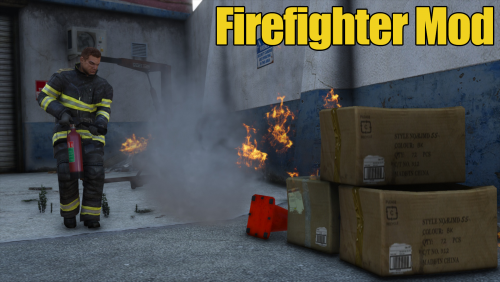 it shouldnt as LSPDFR uses ragehook to play, and the firefighter mod uses simple scripthook. But I would not be on duty in lspdfr and run as a firefighter, just in case there is conflicts with how it works, but then again, you might be able to use some of lspdfr mods to your advantage.. like coroner or road management comes to mind
 -
@DoubleHelix I was using both his vehicles and carvariations and installed them like he said.. vehicles in patchday3 and metas in mpchristmas2.. it crashes... I then found the policetoolbox vehicles, tried combining both metas together, tried in mpchristmas and mpluxe2 (where policetoolbox files go) and nothing seems to work right....
-
played it when it first cam out on gta5mods.com and hopefully its been updated enough to where I can enjoy it more with more options than before.... keep updating it, it has much potential to be an epic mod
-
[might be wrong section, I dont know but it pertains to the topic] well I have yet to find a working directory for dBocks add on vehicles, the complete pack.... put the files in mpchristmas2 and vehicles in patchday 3, result=full crash put both files and vehicles in mpluxe2 , result=full crash put both files and vehicles in mpchristmas2, result=full crash put both files and vehicles, in mpchristmas2, and modified gameconfig with vehicle limit raised, result=full crash I guess its inevitable that I am not meant to use added on vehicles... there goes my DLC idea... if I cant get this to work, why bother with the other. :( :( :( @JordanMikel did you add the <flags>FLAG_LAW_ENFORCEMENT FLAG_EMERGENCY_SERVICE</flags> to the vehicles meta?

