Quakex64
Members
-
Joined
-
Last visited
Everything posted by Quakex64
-
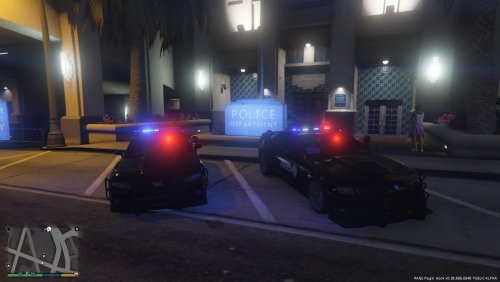 this would be a SICK addition to my every growing library of police cars.... also would be crazy awesome if you made a slicktop version.... and yeah, a couple of things need attention.
- 19 comments
- 3 reviews
-
 I tried this yesterday but it crashed my game via ragehook crash once it was loaded... I seriously hope this mod can be resurrected... I like the idea of a K9 partner.
- 542 comments
- 98 reviews
-
-

- 1
-
-
-
 Three cheers for @Dippa.. Hip Hip Hooray, Hip Hip Hooray, Hip Hip Hooray
- 3,646 comments
- 306 reviews
-
-
- 1
-
-
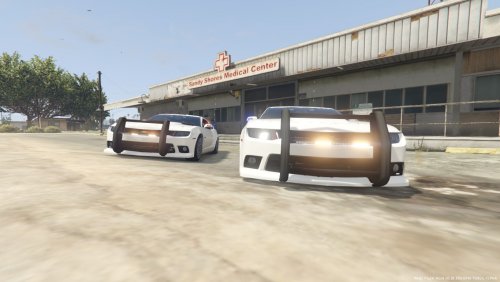 my only comment here is that rambar thing is WAAAYY to big for that car, use one from a crown victoria.
- 15 comments
- 5 reviews
-
-
 oh, sorry.. missed that part
 -
How do we go about making our own module and what exactly is it?
-
-
I just went thru and double checked your files (and for myself) NOTE: anything with "hasn't been updated for awhile" just means I have been checking often on these in the past and I havent seen any updates from them (recently)...I ,personally, dont know if they work in 0.3.1 of LSPDFR or not, but if they do, let me know so I can use them
- 3,646 comments
- 306 reviews
-
-
your pc may be beefy, but do you have all the requirements, updates and such installed? for updates I mean Windows, video, any hardware type stuff
- 3,646 comments
- 306 reviews
-
 you could just take the dilettante2 from x64e (I think) and replace the merryweather logo like Ive done, but if you want an authentic police hybrid, guess youll have to wait
- 371 comments
- 38 reviews
-
is support for this still going because I am using these vehicles, plus others I have found both here on this site plus gta5-mods.com and after combining all respective metas, carvariations and vehicles, with "complete update," and when I tried running the game, it crashes.... I am just wondering what else I have to modify? EDIT: such an idiot... CAR files go in patchday3 where meta files go in mpchristmas2
- 371 comments
- 38 reviews
-
 you can always click to select it, right click, hit properties, and then details to make sure its the updated version... not saying you didnt replace it or what not but always a reminder..
- 1,081 comments
- 166 reviews
-
-
- 1
-
-
 well you didnt really specify where you were asking it about, sorry for confusion...
- 127 comments
- 33 reviews
-
maybe he was using those two as examples of whats available.. listing every weapon would be a rather long list
- 127 comments
- 33 reviews
-
Nicely done @alexguirre ... I look forward to trying this once GTA V decides to work again..
-
did you even? " Required files: Albo1125.Common 5.4.0.1, RAGENativeUI 1.3.1.0, RPH 0.37+, New Assorted Callouts audio files, LSPDFR 0.3.1.0 "
- 1,081 comments
- 166 reviews
-
-
- 1
-
-
from the readme, if you bothered to read it "INSTALLATION -------------------------------------------------------------------- 1. Install RagePluginHook 0.37+ and LSPDFR 0.3.1. For details, http://www.ragepluginhook.net and http://www.lspdfr.com 2. Drag the 'Plugins' folder into your GTA V Folder and Replace/Merge all files. ///Know what you're doing? Copy Assorted Callouts.dll/.ini to: GTA V/Plugins/LSPDFR. 3. Drag Albo1125.Common and RAGENativeUI into your GTA V MAIN folder. This is the same folder as where RagePluginHook.EXE is located! 4. Drag the LSPDFR folder into your GTA V Folder and replace/merge all files. ///Know what you're doing? Copy Assorted Callouts Audio to GTA V/LSPDFR/Police Scanner. 5. You can edit the settings this plugin uses by changing the .ini file. 6. Launch GTA V via the Ragehook plugin. Assorted Callouts is automatically started when you go on duty; you must not load it separately. 7. Assorted Callouts will periodically check for updates automatically unless disabled." where does RageNative file go??? and I just replied.
- 1,081 comments
- 166 reviews
-
-
- 1
-
-
-
-
-
no, thats not the entrance, however most likely, you have the abilityy to enter there is because its right below, and when you do teleport, you got your second picture, I call bugged world cause theres nothing there..
- 127 comments
- 33 reviews
-
if you watched his video, the attachments (flashlight) is on the gun (@1:18 of the video), I dont know about suppressors
- 127 comments
- 33 reviews