



Cosmo
Members
-
Joined
-
Last visited
Everything posted by Cosmo
-
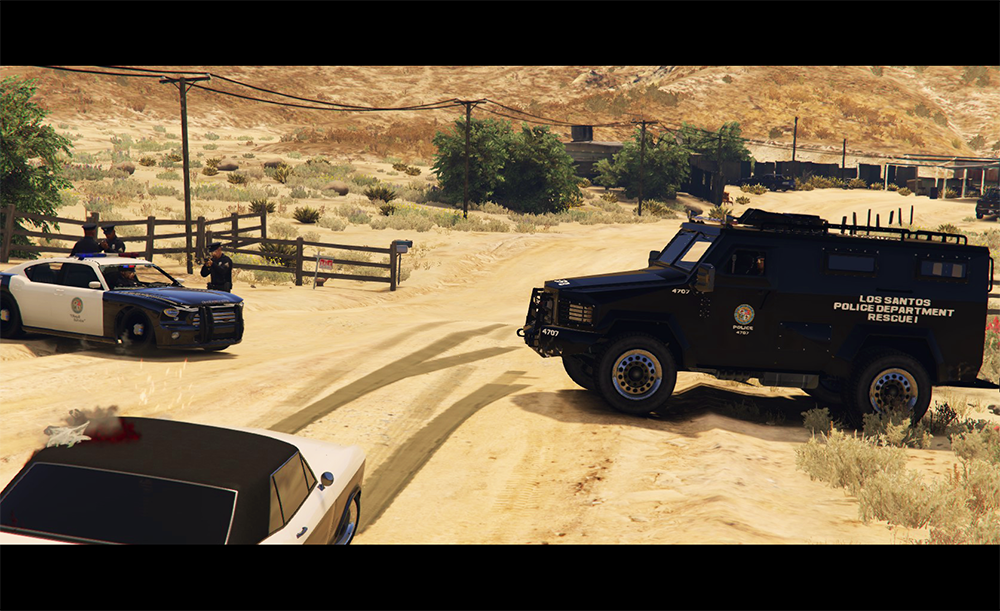
 Hello everyone, This is the Lenco Variation by Cosmo. INTRO: I hope you enjoy it very much, if you come across any bugs then please feel free to let me know. Donations are always accepted and any amount is greatly appreciated. All donations go towards the costs of vehicle development (Purchasing models, zMod Subscription, etc). FEATURES: Ten fully functioning seats (Thanks to Yard1 who helped make that possible). All regular/expected car features such as dirt, window cracks, damage, etc.. Fully UV-Mapped and Templated. Custom Handling (Thanks to Sgt. Kanyo for the GTA IV handling line). Can attach boat and small trailers. Two Lightbar variations (Arjent and Liberty) 2k and 4k textures/templates INSTALLATION: A very in-depth installation is included inside the README in the download, please refer to that for the full instructions. *** Don't forget to make backups or use a mods folder *** Using OpenIV, you put everything from the folder Vehicle Files which includes riot.ytd, riot.yft, etc into: update>x64>dlcpacks>patchday8ng>dlc.rpf>x64>levels>gta5>vehicles.rpf You then place the vehicles.meta into: update>update.rpf>common>data>levels>gta5 You then place the handling.meta into: update>update.rpf>common>data You then place the vehiclelayouts.meta into: update>update.rpf>common>data>ai You need to put all of these files in the correct places or else that vehicle will not work properly. Additional Liveries If you'd like to follow the progress of future updates, make suggestions, or report bugs, head over to this thread: If you are a vehicle developer, feel free to make you're own version with the Dev Version, just remember proper credits: Do not upload this file on to any other website or claim this as your own work. However, you may include this model in a car pack as long as proper credits are given. Feel free to edit the livery included (Bearcat_sign_1) however you'd like.
- 80 comments
- 19 reviews
-
-

-

- 34
-
-
It's an unmarked Audi S8 with an optional beacon light on top. I'll definitely try to make another version with a better lightbar but I'd have to get permission to convert one because I'm not really into creating whole lightbars. However, once people use the car they might be more inclined to let me use/convert their lightbar.
-
Doing some final touches before release Such as adding a nice license plate with light. Also, All the windows now crack correctly. I added some orange lights at the top that glow slightly at night. And it should now be capable of holding 8 people in the back, and 2 in the front. (Thanks to Yard1 for the seating layout.) The file should be up in a few hours at most. I will continue to add small details and bug fix even after I release it so after you use it, please tell me any suggestions you have, anything you want added, such as extras, and definitely let me know of any bugs so I can fix them.
-
I might be able to add 2 more, and then if you count the front seats that would make 10. I will try adding 4 more to the back but the seat might be too far from the door.
-
Six people can now get in the back, the max amount of bodyguards that it would let me spawn. They get in perfectly, thanks to Yard1. Tomorrow (2/11/16), I will be 100% definitely uploading the bearcat. Everything works as it should, but it's getting pretty late for me. I'll post a link to the file when it's uploaded, so if you follow the thread then you'll see it right when it's posted.
-
They aren't too cheap, but if you only plan on playing GTA IV and not GTA V then you could get a fairly inexpensive one. Here is the minimum requirements for GTA IV: Processor: Intel Core 2 Duo 1.8Ghz, AMD Athlon X2 64 2.4Ghz. Memory: 1.5GB. Free Hard Drive Space: 16GB. Video Card: 256MB NVidia 7900 / 256MB ATI X1900.
-
That would be the problem then. I believe you need at least some sort of graphics card in order to play GTA IV.
-
So even with the vanilla seat settings they (SWAT) kept just jumping off, however when I used a non-law enforcement bodyguard, like the Surfer, they stayed on. So I think it might be related to a setting I changed which makes the police get out of the car. EDIT: Yes, it was all because I added FLAG_LAW_ENFORCEMENT to the Riot van. Bodyguards are now getting in normally.
-
Well in that case, I'll make some final adjustments and get the files all ready
-
I'll actually look into that because I am using a trainer. Also depending on what everyone wants, I could release it with the vanilla seating for now if the trainer isn't the problem. I just hate not being able to release it since I was trying to release it a few days ago, but if everyone would rather wait a little longer and have better seating then that's what I'd do.
-
What graphics card do you have?
-
Unfortunately progress is kind of at a stand still. The issue I'm having is that when anyone gets into the back, or even the passenger seat, they stay there for a few seconds and then get out, back in, and repeat over and over. It makes the car pretty much useless as a swat vehicle so I'm still trying to fix the issue. However, once I get that fixed, it should be all set to be released, so it could be any day now that a break through is made.I haven't looked into those wheels so I'm not sure how they are set up but do they have all the correct LODs? Something I can see happening is if it only has L0, it's the highest quality. That means if it a common wheel, it loads that high quality wheel on every single car that's loaded, even the ones that are too far away to directly see. And that could cause a crash easily.Hello everyone, This is my first video using GTA V and the Rockstar Editor so bare with me! I'm still trying to find out the full capabilities of it and I messed a few things up which I now know how to fix. I was thinking about doing some kind of short police/detective show (inspired by True Detective) with episodes and an actual story but this video took about 4 days just to record, edit, render, and upload it. Please tell me what you think about it. I realize it would be much better with voice acting but I have no microphone at the moment. (There are a few mess ups, please try to look past those since I was a little rushed) Please feel free to leave questions, comments, suggestions, or anything else you would like to leave with me. I'm very open to constructive criticism since I've never taken any sort of filmography/film classes.As soon as possible, there's really not much left to do before the release version besides correcting the seating issue. Hopefully I can resolve that tonight. On a side note, I made a GTA V short video that features the Bearcat and it would be great if anyone would check it out and give me some feedback (Just note that it is my first short using GTA V, and by the time I realized a few errors I made, I would have had to redo the whole thing).Yes please! With my layout I was able to have more in the back but they didn't know how to get into all of the seats. They would just walk into the side unless spawned into that car.Very sorry about the delay but I've run into a bug that is quite major and makes the car fairly useless. I'll work on it tomorrow and I'm sure I can get it fixed and uploaded by tomorrow on (2/8/16).Nearing the end.. I hope to release the bearcat tomorrow, 2/6/2016. If I can't however, then I will definitely release it the next day on 2/7. I finished making all of the LODs (L0-L3) using zModeler3's handy optimization tool. The windscreen also now cracks and shows bullet holes (just have to do that to the rest of the windows) The lights are also all in place now (On the first try too!), and I'll have a video before, or on, release. The last few things I have to do is tweak the collision model a little and fix any minor bugs I come across. A few more screenshots in the spoiler below:That car does look pretty awesome. I might have a go at it. What would be better, a 2008 or 2012?Yeah, I just ordered a new one and installed it so now I'm back to working on the bearcat. I had the power supply for at least a few years so it probably died of natural causes.So the power supply in my desktop blew on Friday and i just fixed it today so it put me slightly behind schedule, but I am planning on getting it finished up and released this weekend.If you haven't already, try selecting the button and recalculating normals. Its under Surface>Normals>CalculateIt is because who ever made the model did not properly make all of the LODs. That is a problem in itself but it could be fixed if you know zModeler3 and have an unlocked version of the car. If you don't have one of those however, you could go into the vehicles.meta and find the car slot which this is happening to and change a few numbers. <lodDistances content="float_array"> 20.000000 35.000000 90.000000 180.000000 500.000000 500.000000 </lodDistances> I haven't messed around with these but it seems pretty self explanatory. I assume the 20 is how far for LOD0, 35 for LOD1, and so on. Although it might work, I would not suggest doing this because if you make it so that you see LOD0 from very far then your game might lag from loading all those details, especially if there are multiple of the same car in the area.zModeler3 will import .3ds and .obj files so I suggest exporting your model from Blender as one of those if you are able too, I do not have much experience with Blender though.

