


Creators: Due to background reprocessing of files, approvals and file security checks may be delayed. Thanks for your patience.

Cosmo
Members
-
Joined
-
Last visited
Everything posted by Cosmo
-
Aw I got messed up with this one Not sure why they are different. Did you want me to get rid of the darker blue behind the "Trooper"?
-
Okay so here's a rough rough draft lol. Don't worry about the colors because I'll fix those at the end and I also know the lines aren't the right angle but the model is done. Is that sort of the correct lightbar? It was hard to tell from the picture. Also does it say POLICE on the back of the Impala like it does on this tahoe?
-
I'm not an expert with ELS and definitely not with DROT, however that lightbar should already be mapped with ELS and should work just fine. As for the lighting pod colors, that would not be in zModeler but in a texture editing program. You would edit the EMERGLIGHTS to change the glass color. This is the result of changing the red rectangle I circle to blue: Now as you can see, the lights INSIDE the glass are still blue and red. If you wanted, for example, to change the inside lights to blue to match the glass, you would have to edit the EMERGLIGHTS_EMIS and change the reds to blues. I hope I could help. If I didn't fully answer your question or you have more, feel free to PM me or 'quote' me so that I get a notification.
-
Please make your own topic about this. This topic is for a request about Altamonte Springs and not NYPD. Also, NYPD is quite common and I bet there's already an NYPD skin for the charger. Many probably.
-
I'll totally take the request (being a fellow police explorer) Also, would you want the 'POLICE' to be yellow like in the tahoe picture? or grey like in the caprice picture?
-
Sorry it took so long but here it is. The colors might be a bit off, but I'm still working on that and the lightbar glass colors which are a bit weird. But I'll just update it later on, for now, enjoy.
-
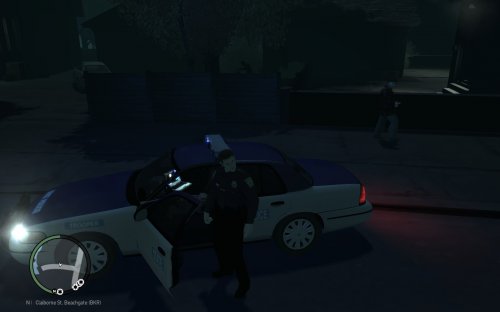 Today I bring you the Liberty State Police which was requested and it is based on Virginia State Police Notes: - Replaces any police car - ELS V8 enabled - Supports 4 liveries - Contains 4 license plate variations - Whelen Edge 9000 lightbar - Two vehicle variations, one has antennas and no camera, while the other is the opposite. (For some odd reason it would crash my game instantly if I had the antennas AND camera on the car at the same time. Anyone know why this happens?) Installation: - Same installation as any other car - Just replace police.wft and police.wtd (Or another police car) inside your vehicles.img with the files provided. - Always make a backup! I am not responsible if you mess up your game and you have no backup. Pictures: Change Log: (1.0.0) Release (1.1.0) Added: ELS config because I forgot it (1.1.5) Fixed: Got rid of the blue background behind the word "Trooper" Credits: - Model is original Ford Crown Victoria by Schaefft, modified for and converted to GTAIV by Chasez. - This version of the CVPI model has been modified by Bxbugs123 & Lt.Caine with permission by Schaefft and Chasez. - Whelen Edge Modeled & converted for GTA IV by Bxbugs123 - Whelen Edge textures by Bxbugs123 - CVPI Wheel made & converted to GTA IV by Bxbugs123 - Decatur Genesis I Radar made & Converted by Bxbugs123 - Decatur Genesis I Radar textures By Bxbugs123 & DoTTGaMMa - Panasonic Arbitrator model is scratch built by johnclark1102 - Panasonic Arbitrator texture is made by diablozer0d617 - Police Console made by PFCBarefoot - Spotlight UV-Mapped and converted to GTA IV by JewishBanana - Setina Body Guard Partition by Bxbugs123 (Shotgun by Grim) - Antennas by PriMan - Toughbook C19 by PFCBarefoot - CVPI GrilleGuard by TraumaPak - Livery textures by Cosmo - Car assembled by Cosmo This is my first released car. Comment or PM me if you have any questions or comments
 -
So this is just a topic to put all of my cars in one place. I do take requests at the moment so feel free to comment or send me a PM. Liberty State, requested by Sportboz. Request topic (http://www.lcpdfr.com/forums/topic/50976-liberty-state-highway-patrol-pack/) Altamonte Springs, requested by JerkyRoope. Request topic (http://www.lcpdfr.com/forums/topic/51454-altamonte-springs-police/#comment-343358) Currently working on New Hampshire State Police & Nashua Police Pack NH State Police Charger Nashua CVPI
-
Sooo it's pretty much done. Here's what I've got so far. Just some minor tweaking remains, and the colors are a bit off but I should be able to fix that. It should be fully done soon.
-
Almost done.. Took so long because I put together a custom CVPI instead of just making a texture for someone else's. The model is done and the texture should be soon too.
-
Do you have a preference for rims? I currently just have black steel rims on it
-
Well just all blue lights is easy. Do you want the actual light bar to be blue? or just the lights?
-
Do you have a link to the caprice that you want textured?
-
I'd be willing to texture some cars if you found some links for the cars you wanted textured Thing is, there's so many CVPI's out there with all different lightbars so I wouldn't know which one you prefer.
-
I would probably be willing to make some skins if I knew what Liberty State Police looked like lol. Default NYPD/LCPD theme? (White w/ blue lettering?)
-
So I'm probably doing something incredibly stupid like forgetting to check a box or something of that nature. Anyways, I have this cool hat, however it is too far forwards for the cop model I'm using. So I go through all the steps of importing the files into 3ds with 'GIMS' (Something like that), and then moving the hat back seems incredibly easy. However, every time I export the hat, I look at it in OpenIV and it's never moved no matter what I do. I've tried moving every single part back (dev_model, m_y_cop. *children, head_000, etc..) and nothing seems to work. It's such an easy task and yet I can't figure out how to do it. (If you're wondering, I don't think I'm importing/exporting wrong since the model is fine when I look at it, just not moved back).
-
Oh yeah I think the pack I was using used an older ELS version which may have caused a problem. Thanks so much for all the help though. So helpful and even finding replacement vehicle links lol. Probably the most helpful person I've ever found xD
-
Yeah, unfortunately you are right and the light positions do only effect the environment. I have a feeling that something I am doing is causing the SECL to not work properly. I'm using Cj24's LCPD Pack which is made for ELS which is why I would think that it would have all of the lights. PS: I'm glad GTA IV isn't totally dead now that GTA V came out ;p
-
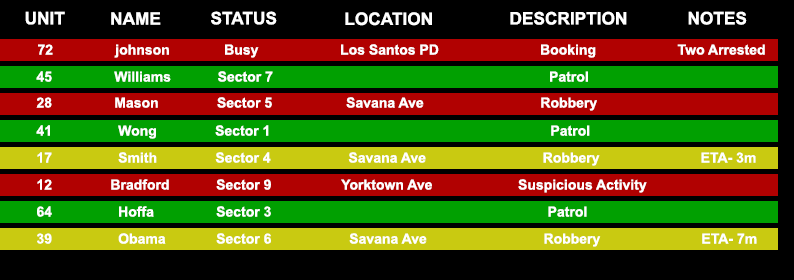
What do you mean by that? In-game waypoints or GPS on the map in the program? Anyways, this thing looks great and I look forward to what's in future updates. Also it would be great if you could somehow have LCPD:FR/LSPD:FR re-route the callouts to that program as 911 calls, but I don't even know if that's possible or feasible. Although some more realistic suggestions would be- able to zoom in and out on the map (if you can't already) and maybe in the future make it a little more pretty (color coded). I don't know about everywhere but where I live the dispatch looks like this: Green means free, Red is on call, and yellow is on the way to a call. Of course this is just a suggestion, just because this is what mine looks like doesn't mean every one everywhere has to be the same, and you don't need anything like this in yours if you didn't want. Posts merged - Staff
-
Ahh yes, thanks a ton. So, this car which was made for ELS does in-fact not have a Light Stage One. In the ELS menu it shows the SECL as flashing but they must not correspond to any actual lights on the car. Is there any way to fix this and set some of the lights as the SECL? Or would I have to make my own car for that? I thought maybe the ENV Light Positions might do it if I got them in the right spots? (I know about re-texturing and SLOTCONTROL but I have no clue in the slightest how ELS knows where the lights are and such. I'm no modeller, so sorry for all the questions and if I'm being dumb.)
-
Hello, so I'm pretty new to creating vehicles and I don't know much about ELS. I'm having a slight problem with some of my vehicles. So I have a charger (Don't know whos but I could find out if needed) and I made my own texture and that worked out fine. Now I'm trying to change the color of the lights. What I did was I changed the emergencylights_emis texture in the .wtd to be all blue lights instead of blue and red. I don't know if that's the right way but it worked. I also changed the enviroment lights to be blue and that worked fine. Except now, Light stage one shows orange environmental lights and no lights anywhere on the car are even lit up. Any help would be appreciated or even a point towards some kind of ELS tutorial explaining how to change light colors etc.



