


Gerhart67
Members
-
Joined
-
Last visited
Everything posted by Gerhart67
-
There is a pinned topic in this section just for that issue so I advise you to look there.
-
Then view the details tab and look at Product Version.
-
You must have it on disk so just go here http://support.rockstargames.com/entries/484496-Grand-Theft-Auto-IV-Patch-7-Title-Update-v-1-0-7-0-English-1-0-6-1-Russian-1-0-5-2-Japanese- I forgot to mention that you needed the latest patch, sorry. Hopefully you obtained it legally otherwise I don't believe it will patch for you. I've got the Steam version.
-
Are you sure your scripts have loaded? If not, can you bring up the console by pressing the tilde key ( this key ~ it's usually next to the number one key ) If that doesn't bring up the console then reload the save by going into your menu/Game/Load and choose your save to load back up. If it does bring up the console then type in reloadscripts and press enter. The game will freeze for a few seconds and the console screen will come back up, just hit the tilde again to close the console. It may help to go into the config file and locate KeybindingsDisabled=0 and change that to a 1. That will help with any conflicts with other mods as it will, well, disable all the keybinds but leave the F3 and F4 functional. Also make sure you don't have a different mod using those keys.
-
I'm assuming that running it in Compatibility mode for Windows XP ( Service Pack 3 ) and as Administrator doesn't work? I'm only assuming because you didn't mention if you tried it.
-
Shoot I just re-read your post and noticed you said your spotlight only works during the day. That is really odd, are you using some modified timecycle or something similar? I'm using PUSH's glock 20, I was using the same gun as you until I put that flashlight mod in. I'm sorry I really don't know what the problem may be.
-
You could use this flashlight mod '?do=embed' frameborder='0' data-embedContent>> Works with any gun except snipers, I've switched to it and never looked back.
-
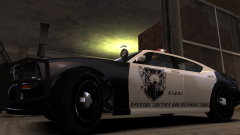
From the album: Gerhart67's custom textures
S.T.A.R.T quick response vehicle -
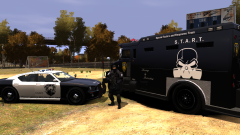
From the album: Gerhart67's custom textures
My S.T.A.R.T vehicles ( Special Tactics and Response Team ) -
Hey if anyone is interested I have a couple of different videos up on my YT channel. http://www.youtube.com/user/GerhartRTFO/videos One is basically a ride along as I make a texture and throw it in game. The other is showing how to enable and play lcpdfr along with features of policehelper. If you have time check them out and let me know what you think. I have another coming and it's behind the scenes of Jake and JJ. Just a simple showing of getting set up to record the ride alongs.
-
Not too sure what you're trying to install. Is it Episodes from Liberty City or LCPD First Response? Is your GTA disk or steam version?
-
^That plus maybe the models you have installed, vehicle density, rendering distance, list of mods installed, blood type, pets name, average income...... wait, some of those aren't needed. What was the question?
-
Well I can offer some advice but I imagine some may disagree with me. First off check the textures for the vehicles and if they are 2048x2048, for the body and without any transparency, you can reduce the size to 1024x1024 with minor detail loss. If the texture is not taking advantage of the carcols.dat file then it's using more resources. Also check the other textures the vehicle is using, such as the interiors, many of them can also be reduced. Nearly all of the higher poly cars overdue the texture size and this game/engine is not made to work with such high textures and/or or poly cars hence the issues using such models. You may be correct in saying that it isn't a hardware issue but there is no mention of specs so I don't know for sure. I don't use high poly cars or els and if I do use a car with high textures I either reduce them or make my own. I can run everything completely maxed out and still have playable frame rates even while recording. Of course without recording it's even better. I suggest using OpenIV to check out the textures you can watch my video and it will tell you how, if you like. http://www.lcpdfr.com/page/tutorials/index.action/_/vehicle-modification-tutorial/how-to-install-a-vehicle-using-open-iv-extremely-simple-r53 I'm in the process of rendering a video of me making a texture right now but it will take some time to load up afterwards. I may make a video of my settings and how the game runs when not forced to use high poly cars and the advantage of using the carcols file. I do understand that some cars can't use the carcols file because of how it's made so reduction of texture sizes is the only option on those.
-
-
If you bought your version off Steam then it is located in something like this example if you run a 64 bit system EXAMPLE: C:Program Files (x86)SteamSteamAppscommonGrand Theft Auto IV. A 32 bit system won't have Program Files (x86) just Program Files. Odd because OpenIV usually finds the executable on it's own I only have to point it to the EFLC executable. Hope this helps
-
My desktop always consists of pictures I've taken either in a game or with my camera. This was taken while I was out walking in the countryside looking for subjects to shoot. This lil' guy became interested in my camera so I held out my finger and he plopped right down. I actually asked him if he would let me take some pictures, he didn't leave so I took that as yes. This is with my 100mm macro lens, my favorite. Click the image for a better look.
-
-
Here's a quick tutorial on how to install a vehicle into GTA IV using Open IV. This is also the same way to install weapons and peds. Go full screen to see everything clearly.
-
Take a look at this and see if it helps you '?do=embed' frameborder='0' data-embedContent>>
-
Thanks guys I'm happy to hear you're enjoying them.
-
-
Got a new video up if anyone is interested. http://www.youtube.com/user/GerhartRTFO/videos
-
-
-
I use this '?do=embed' frameborder='0' data-embedContent>> by Mr John Dowe ( this comes as an exe for steam version or CD ) Darthwound made this '?do=embed' frameborder='0' data-embedContent>> Both are very good

