


Hystery
Members
-
Joined
-
Last visited
Everything posted by Hystery
-
No, you look for the existing lines for the car you want to modify and replace them. And don't copy/paste exactly what I typed, the line name is slightly different, I think it's something like <handlingID> or something. It's not complicated. Example: you want the police3 slot to drive like a Ferrari? Open the vehicles.meta, look for 'police3' lines, once found scroll down until you find the handling line, you change the name of it to TURISMO, you save, you replace the original vehicles.meta file with this one, done.
-
I think you meant "Assault" and "Assaulted".
-
I said both acted stupid.
-
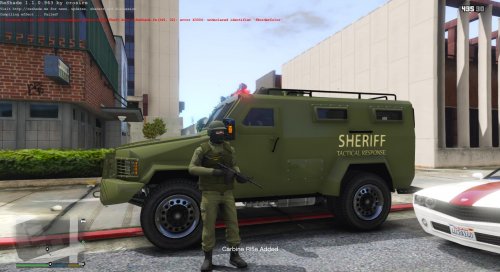 1/ Strange font for the Tactical Response and the Stand Back 2/ You ripped this 'Sheriff' from another texture, we can see the black inside the 'R'. Try using your own fonts/designs.
 -
SAHP ped has to be replaced in update/x64/dlcpacks/patchday3ng/dlc.rpf/x64/models/cdimages/patchday3ng.rpf LSPD ped has to be replaced in update/x64/dlcpacks/patchday9ng/dlc.rpf/x64/models/cdimages/patchday9ng.rpf Possible pedprops have to be replaced in x64e/x64/models/cdimages/pedprops.rpfCheck this page to know which key it corresponds too, and which number corresponds to the key you want to replace it with.Couldn't tell which it is, I modified it. If you lauched the game with skin control installed, you should have a skin control.ini file in which you can change the shortcut to open it. Make sure you installed skin control at the root of your GTA V also, and not in the plugin folder or anywhere else.If you can't find an easy fix, reinstall your game. And use a mods folder, next time.No idea, I never did a repair on a modded version of the game, I always deleted everything that was related to mods before attempting one last time I had to do that. But yeah, from now on, make sure to use a mods folder to keep your vanilla data safe from harmYou installed the files in your original GTA V data because you didn't use a mods folder. If you had one, you would have been asked if you wanted to install the mod in it during the installation of said mod. You're good for either a repair (verify game cache on Steam, repair option on the retail version), or for a complete reinstallation.The website seems to be struggling since a few hours, with corrupted downloads and unable to process uploading. I suggest patience until this is fixed.You're playing online on that screenshot.It's in the visualsettings file that is located in update/update.rpf/common/data Extract it, modify it, import it back to its original location. Don't forget to use a mods folder. This question has already been answered many times, so you should consider searching Google/the forums to get your answer beforehand.Yeah, not disagreeing he had to make a decision, what we're arguing is that he made the WRONG one. General motto of any police department? Serve and Protect. PROTECT. As in PROTECT the population, as ingrate as they might be, part of the job. Please tell me where's the protection part when you shoot blindly through a door and you know nothing about the situation inside. Yes, he decided to do that, and yes, it was a bad decision that should be punished, he is a shame to the police officers profession. In this kind of situation you're supposed to keep your self control and react to the situation accordingly, which did not happen there. The guy was not responding to someone knocking his door. He was responding to someone he had NO IDEA who they were, after he got harrassed, almost home-invaded, and with people rioting in front of his house. Police knocked without calling themselves out from the outside, which should be a standard IMO, the man thought he was threatened again by the same people and responded accordingly. I agree it was a stupid reaction, not denying that, but you say later that it was a good shot from the officer to shoot through the door. So, one man uses a gas gun through his door to protect himself from previous threats, you say it's bad. A police officer empties half a magazine through a door to protect himself from an unknown threat, you say it's good. Double standards much? You can't say that in one case it's good, and in one case it's bad, it doesn't make any sense, either you say both are good, or you say both are bad, it's as if you said "This guy was speeding on the highway, it's bad" because it's a guy who's late to his job interview, and then "This cop was speeding on the highway even though he was not in intervention, it's cool" because the officer is late for a interview with his captain. Yeah, how unfortunate she got almost killed by people supposed to protect her. Then they are asked to trust the police. By the way: Just to keep that clear.Please check the pinned topic on top of the page and/or make researches on the forums before posting a new thread.
.thumb.png.5fbbb989547defaeeb5c22864df62b54.png) The download seems to be corrupted, it weights only 953Ko and can't be opened.
The download seems to be corrupted, it weights only 953Ko and can't be opened.- 174 comments
- 47 reviews
Install RDE and remove the scripts, I guess it should work. EDIT: Nevermind that, there's probably some .xml file for the patrolling cars or something like that. I don't know. You should ask on the RDE page.No. There's no mod that makes the cars patrolling like RDE. However, there are add-ons like this one that give the slots available, and it was literally the first result in Google, so you should think about making some researches beforehand.Did you install the latest Ragehook Plugin version? Didn't know that.


.thumb.png.5fbbb989547defaeeb5c22864df62b54.png)
Account
Navigation
Search
Configure browser push notifications
Chrome (Android)
- Tap the lock icon next to the address bar.
- Tap Permissions → Notifications.
- Adjust your preference.
Chrome (Desktop)
- Click the padlock icon in the address bar.
- Select Site settings.
- Find Notifications and adjust your preference.
Safari (iOS 16.4+)
- Ensure the site is installed via Add to Home Screen.
- Open Settings App → Notifications.
- Find your app name and adjust your preference.
Safari (macOS)
- Go to Safari → Preferences.
- Click the Websites tab.
- Select Notifications in the sidebar.
- Find this website and adjust your preference.
Edge (Android)
- Tap the lock icon next to the address bar.
- Tap Permissions.
- Find Notifications and adjust your preference.
Edge (Desktop)
- Click the padlock icon in the address bar.
- Click Permissions for this site.
- Find Notifications and adjust your preference.
Firefox (Android)
- Go to Settings → Site permissions.
- Tap Notifications.
- Find this site in the list and adjust your preference.
Firefox (Desktop)
- Open Firefox Settings.
- Search for Notifications.
- Find this site in the list and adjust your preference.