


Hystery
Members
-
Joined
-
Last visited
Everything posted by Hystery
-
 What da heck does LASPD mean
 -
 On top of what was suggested, I'd also suggest to reduce the size of the NOoSE logo, because holy damn this is big...
 -
Aren't you afraid that random AI cops will spawn with that helmet? Oo
-
y u no fun
-
Ask @Lundy, I'm sure he'll do that in no time :^)
-
You can put everything in the carvariation in mpchristmas2, no worries about that. And yeah, the handling is quite a complicated one. I personally try to stay away from those as it can quickly mess up everything. The easiest way to change one is to go in the vehicle.meta file and to change the <hangling> </handling> line. For example, if you have placed, let's say, a lamborghini in the police slot and you want it to accelerate and brake like a Lamborghini, you just have to find the police lines in the vehicle.meta file, locate the handling data and change it for <handling>ZENTORNO</handling> or something similar. The actual handling.meta with all the numbers are located at update/udapte.rpf/common/data, but it's a hell to change.
-
It depends. Most of the vanilla cars don't have accessible carvariation.meta files, the lines have to be added manually in existing ones. Most people place the carvariation.meta lines in the one located in the mpchristmas2 DLC folder, located at the same location as the others. The vehicle.meta file however is accessible in update/update.rpf/common/data/level/gta5.
-
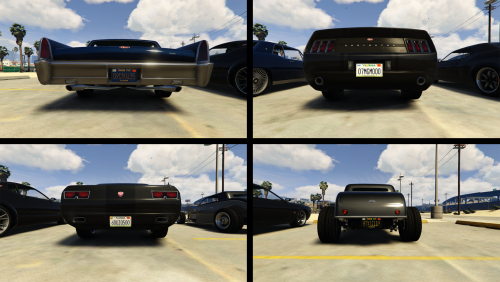 As a side released of my VCPD Skin pack, I'll release the Florida license plates I worked on for people to use if they wish to do so. I renamed the plates according to their look, and not according to their name in the vehshare.ytd file. However the negatives have the right names. But if you plan to use those I think you know how to install them. If you don't know how to install them, check my VCPD Skin pack, you'll find a vehshare.ytd file ready to use. The download includes: 4 license plates with a modern design 3 license plates with an old design 1 license plate for police and emergency vehicles 5 negatives Not all of the license plates are in the screenshots. If you wish to use them for skin making or anything of the like, feel free to do so, just leave my name in the credits.
- 1 comment
- 2 reviews
-
-

- 3
-
-
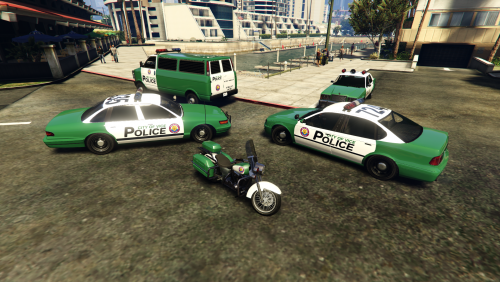 I was a bit tired of the whole LSPD theme at some point. And many people will agree when I say that GTA: Vice City was one of the best GTA games ever released. The atmosphere, the 80s, the story, the characters, everything was awesome. So I wanted to get a bit of that feeling back in my game, and worked on making a VCPD Skin pack, but also with Florida license plates for both civilian and police cars, to get more immersed while I was playing. This download contains: 4 skins for the Vapid Stanier 1st Gen 4 skins for the Willard Marbelle 4 skins for the Declasse Merit 1 skin for the Police Transport 1 skin for the Police Bike 1 skin for the Police Maverick All license plates replaced with Florida license plates Links to the models used are provided in the download in a .txt file. The license plates are provided under the format of a vehshare.ytd file. If you already have a modified vehshare.ytd file, fear not, I'll release the license plates as dev parts so you can just get them there and install them manually. Have fun with those!
- 3 comments
- 1 review
-
-
- 5
-
-
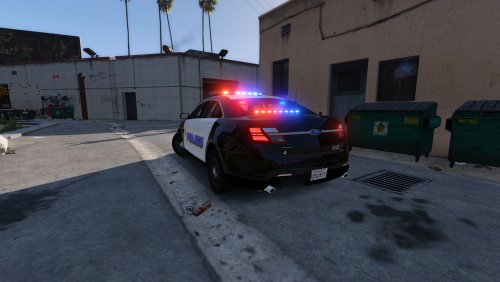
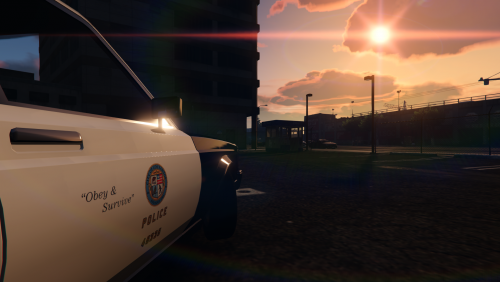 Nothing incredible to say about this. I wanted to play with an old school fleet of vanilla cars, but the original model had a LAPD livery on it by default, and I dislike having real life agencies in my game, so I made these. There are 4 liveries with unique unit numbers. However, because the car is not multi-livery enabled, you will have to choose one of them, it's impossible to have all of them installed at once.
 -
Please try to search the forums before creating a support thread.
-
Please try to make a research on the forums before posting a support thread.
-
You necessarily do something wrong at some point, since models work for other people. Work on a clean GTA V install. Like, completely clean. This kind of things can happen when files conflict with something that was installed previously on the same slot.
-
You should post in the support section of the GTA V subforum. To install cars properly, read this thread, and work on a clean GTA V install: PS: Dunno if the fursuit on your avatar is yours, but I like it.
-
1/ Wrong forum section, please be careful with that 2/ Work on a clean install, and follow this, and it'll work. 100% guaranteed.
-
Fixed, hopefully it is a bit clearer now, thanks for the feedback!
-
Please make researches before posting a new support thread, your problem has already been fixed after it has been asked by several other people.
-
Doesn't matter. Every car comes with it's own setting, you've to change all of them if they use blue lights, as I said.
-
You have to do that for all the cars using blue lights, not only one. If it doesn't work, you're doing something wrong, because it's exactly that.
-
In the ELS folder, where you put the ELS config files. Open them and scroll down to [ENV_LIGHT_COLORS], change red to blue. Done. This question has already been answered several times, make sure to search the forums before creating a new support thread.
-
GTA IV, with ELS?
-
.thumb.png.317840e646daa237dd2ebf110ecf9884.png) Oh you know, just the general stuff, CVPI, Tahoe, like, just enough to have 2 patrol cars and one SUV. Don't take that as a request though, it was just more like a suggestion or anything, you don't have to make them
Oh you know, just the general stuff, CVPI, Tahoe, like, just enough to have 2 patrol cars and one SUV. Don't take that as a request though, it was just more like a suggestion or anything, you don't have to make them- 10 comments
- 2 reviews
-
-
- 1
-
-
Not possible on those lightbars. They would turn either all blue, or all red, but not blue and red at the same time. So you'd end with a lightbar that would almost be all blue or all red on the back.
-
Too bad there's only skins for one car, I wouldn't mind having a full fleet out of these.
- 10 comments
- 2 reviews
-
Then it's normal, it's updating your game.

.thumb.png.317840e646daa237dd2ebf110ecf9884.png)