


Hystery
Members
-
Joined
-
Last visited
Everything posted by Hystery
-
If he has problem with resources being wrongly allowed by his system, increasing the priority level can help. However, the real time priority level is indeed not advisable, but high priority level is perfectly acceptable.
-
Do they actually send their products in EU or further? And how do I pay something in pound if I have euros? Might sound like stupid questions, but I never bought anything that wasn't in euro.
-
The middle doesn't seem to fit.
-
Pretty sure there are some already around here. Look for them.
-
Textures for cars all go in the .ytd files of the model. Make sure to name them identically to the textures you're trying to replace.
-
You're using ELS, which has a folder in your GTA IV root. You've ELS files. Hmm, I wonder where those ELS files could go...
-
Well, if it's the first time you launch GTA V, then yes, you'll have to make an authentication as well as downloading the last updates. I mean, it clearly says "ACTIVATION OF GTA V REQUIRES AN INTERNET CONNECTION". I think it's a generous giveaway about your problem.
-
There's a search bar for a reason though...
-
One is online, and the other is offline? I mean, their names are pretty self-explanatory.
-
Are you using any ENB that could be eating all your VRAM? If yes, find another ENB less greedy in resources or don't use any ENB at all.
-
Search through the .ytd files if there's not a texture for the bumper and the roof. If there isn't, then the model is simply made that way and you can't do anything about it. Maybe changing the color the car spawns with in a .meta file, but can't help you with that one.
-
I'd even say he's going to win with 101% of the votes.
-
Casimir.
-
Vehicles.meta is at the same place for all vehicles: update/udpdate.rpf/common/data/level/gta5 Carvariation doesn't exist for those slots, lines have to be manually added in an existing carvariation file like in mpchristmas.
-
visualsettings.dat
-
You're necessarily doing something wrong on your end for it not to work as it is intended to.
-
I don't really see the gray in your screenshot...
-
Put shader quality to high or above, and make sure you installed everything properly.
-
Then you're doing something wrong, there's no other solution. If you follow his tutorials step by step, it works. 100% of the time. Redo it until it works.
-
There's a lane somewhere that says <audiohash> something. Change what's after to the name of a policeslot, it'll change the engine sound and the siren it uses.
-
I suggest you look up for Jeff Favignano tutorial videos on how to install stuff correctly. 100% chance of success.
-
Pretty sure I've seen a similar topic some time ago. You should look for it, it might have the fix you're looking after.
-
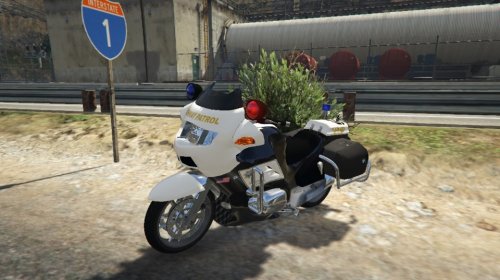 @Sirky Dude, you translated nothing, you literally copy/pasted what was on the gta5-mods download page. Don't come and take credits for something you didn't do, it's a bit ridiculous. Also, it's in spanish only because it has been set in spanish on gta5-mods, but you can change the language by clicking on the top of the website. On topic, I'd say the skin needs a bit more work. It's a bit pixelated, and there are spots were it clips with other parts of the bike, like the SAHP decal that is too big or placed too high and has the top of the letters missing.
- 5 comments
- 4 reviews
-
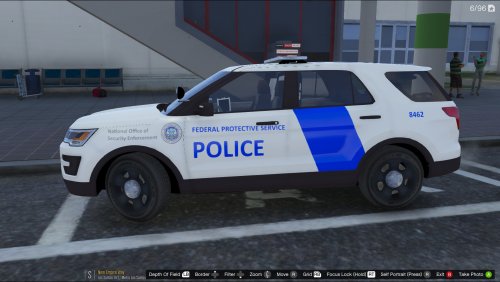 The blue is way too saturated.
 -
I actually like the side lights, they look different from the usual vehicles that quickly end ressembling each other


